A gaming PC setup can quickly consume every outlet nearby, especially when you add monitors, speakers, a router, lighting, and charging accessories. The right surge protector helps organize that equipment while adding a layer of protection against voltage spikes.
These 10 power strips for gaming PC setup prioritize useful outlet layouts, surge-protection ratings, cord length, USB connectivity, and space-saving designs. Use the guide below to choose the right balance of capacity, convenience, and safety for your desk.
Best 10 Power Strips for Gaming PC Setup Picks for 2026
Best High-Protection Pick
ECHOGEAR ShockBlocker 8-Outlet Surge Protector

- 3,420 joules of surge protection
- Slim, mountable design
- Spaced outlets for bulky plugs
Best For: Gaming desks needing strong protection without USB ports
Best for Maximum Connections
SUPERDANNY 22-Outlet USB Power Strip

- 22 AC outlets and six USB ports
- Wide-spaced outlet layout
- 6.5-foot cord with flat plug
Best For: Large gaming rooms with many devices and chargers
Best Balanced Desk Option
Belkin 12-Outlet Surge Protector

- 12 widely spaced AC outlets
- 3,940 joules of surge protection
- 8-foot cord with angled plug
Best For: PC workstations needing dependable, simple AC power
Best RGB Gaming Pick
4000J Gaming Surge Protector with USB-C

- 4,000 joules of surge protection
- RGB lighting with three modes
- USB-A and dual USB-C ports
Best For: Gaming PC desks that want lighting and device charging
Best Overall
Anker 351 12-Outlet Power Strip

- 12 AC outlets with wide spacing for bulky plugs
- 20W USB-C plus two USB-A charging ports
- 2100J surge protection and mountable design
Best For: Gaming desks needing broad outlet coverage in a compact setup
Best for Large Rigs
NANOLAKE 18-Outlet Heavy-Duty Strip

- 18 wide-spaced AC outlets and four USB ports
- 4800J surge protection with status indicators
- 10-foot cord and three-way mounting options
Best For: Large gaming setups with many monitors and peripherals
Best Heavy-Duty Desk Option
TROND 10-Outlet Surge Protector

- 10 spaced outlets with two USB-C and two USB-A ports
- 4000J protection with integrated circuit breaker
- 14 AWG cord, flat plug, and wall-mounting holes
Best For: Gaming desks needing sturdy construction and clean mounting
Best All-Rounder

- 12 AC outlets with two widely spaced sockets
- Four USB ports, including USB-C
- 2700J surge rating and 6-foot cord
Best For: Balanced gaming desks with PCs, monitors, and peripherals
Maximum Capacity Pick

- 24 AC outlets for large gaming setups
- Four USB ports with two USB-C ports
- 4100J surge protection and flat plug
Best For: Extensive gaming and entertainment stations
Organized Desk Pick
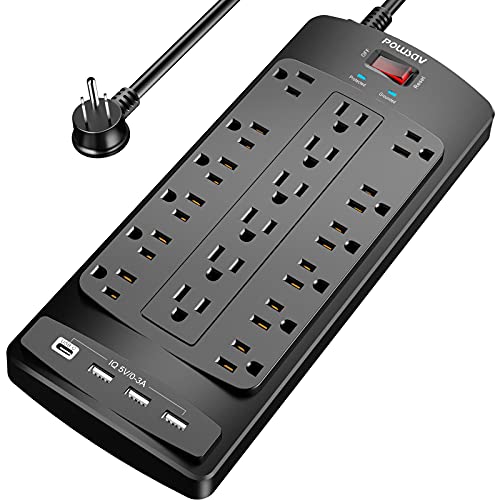
- 18 widely spaced AC outlets
- Four USB ports and a 6-foot flat-plug cord
- Cable ties plus 2100J surge protection
Best For: Busy gaming desks needing capacity and cable organization
Best High-Protection Pick – ECHOGEAR ShockBlocker 8-Outlet Surge Protector
For gaming PC setups that need straightforward protection without a bulky footprint, this ECHOGEAR strip combines eight outlets with 3,420 joules of surge protection. Its slim, mountable design works well behind a desk or entertainment center.
Best For: Gamers who want strong surge protection, a low-profile design, and room for larger power plugs.
Pros:
- 3,420 joules of surge protection for up to eight connected devices
- Slim, wall-mountable design is easy to conceal
- Extra spacing on three outlets accommodates bulky plugs
- Includes signal filtering, safety covers, UL certification, and a connected-equipment warranty
Cons:
- Provides only eight outlets and no USB charging ports
- Its 11.75-inch length may require some desk or wall space
This is a practical choice when protection and discreet installation matter more than integrated USB charging or a very high outlet count.
Best for Maximum Connections – SUPERDANNY 22-Outlet USB Power Strip
Among power strips for gaming PC setup needs, this SUPERDANNY model stands out for its unusually high capacity: 22 AC outlets plus six USB ports. The wide-spaced layout and 6.5-foot cord make it suitable for desks with multiple gaming and media devices.
Best For: Large gaming or media setups that need many AC outlets and built-in USB charging.
Pros:
- Provides 22 grounded AC outlets and six USB ports, including one USB-C port
- Wide spacing helps prevent bulky adapters from blocking neighboring outlets
- Flat, angled plug and 6.5-foot cord support flexible placement
- Offers 2,100 joules of surge protection and multiple safety protections
Cons:
- The large 11.65-by-6.37-inch body may be oversized for compact desks
- Side outlets cannot be rotated
- USB-C charging is limited to up to 5V/3A
This is the capacity-focused option for setups with numerous monitors, consoles, chargers, lamps, and peripherals, though its footprint is larger than a conventional strip.
Best Balanced Desk Option – Belkin 12-Outlet Surge Protector
This Belkin surge protector is a balanced choice for power strips for gaming PC setup use, offering 12 AC outlets, widely spaced receptacles, and an 8-foot heavy-duty cord. Its slim housing and angled plug are convenient for workstations and tight spaces.
Best For: Gaming desks that need dependable surge protection and more outlets without USB charging features.
Pros:
- 12 AC outlets provide room for a computer, monitors, and accessories
- 3,940 joules of surge protection and 15A capacity
- Widely spaced outlets fit larger chargers and adapters
- Includes a protection indicator, UL certification, and connected-equipment warranty
Cons:
- Does not include USB-A or USB-C charging ports
- The 13-inch body may take up more desk or wall space than a slim eight-outlet strip
Belkin’s combination of outlet capacity, long cord length, safety certification, and protection indicator makes this a sensible all-purpose choice for a conventional PC workstation.
Best RGB Gaming Pick – 4000J Gaming Surge Protector with USB-C
Designed specifically for gaming spaces, this six-outlet strip adds RGB lighting, USB charging, and a 10-degree angled outlet layout. It delivers 4,000 joules of surge protection while keeping larger plugs separated on a desk.
Best For: Gaming PC desks where RGB ambiance, USB-C charging, and a compact gaming-focused design are priorities.
Pros:
- 4,000 joules of surge protection with 15A overload protection
- Six AC outlets plus one USB-A and two USB-C ports
- RGB lighting offers three modes and four brightness levels
- Wide spacing, a 60-degree angled cord, and a 6-foot cable aid placement
Cons:
- Six AC outlets provide less capacity than larger multi-outlet strips
- USB-C power is rated at 20W maximum
- RGB lighting may be unnecessary for minimalist setups
This is the most gaming-oriented option in the group, pairing strong surge protection with desk-friendly lighting and convenient charging for smaller peripherals.
Best Overall – Anker 351 12-Outlet Power Strip
The Anker 351 is a practical choice for power strips for gaming pc setup when you need plenty of AC outlets without an oversized unit. Its 12 outlets, three USB ports, 2100-joule surge protection, and 5-foot cord suit a desk-based PC and accessory layout.
Best For: Gaming desks that need many outlets, spaced plugs, and convenient device charging.
Pros:
- Provides 12 AC outlets with extra spacing for bulky adapters.
- Includes one 20W USB-C port and two USB-A ports.
- Offers 2100-joule surge protection, overload protection, and temperature control.
- Supports mounting and includes a 5-foot cord for desks and side tables.
Cons:
- Total USB output is shared and limited to 15W across the USB ports.
- The 5-foot cord may be limiting for setups farther from the wall outlet.
Choose this model if your priority is a balanced, desk-friendly strip with abundant AC capacity and useful USB charging. Its shorter cord and shared USB output are worth considering for larger or more demanding setups.
Best for Large Rigs – NANOLAKE 18-Outlet Heavy-Duty Strip
For power strips for gaming pc setup with numerous peripherals, the NANOLAKE provides exceptional outlet capacity. It combines 18 wide-spaced AC outlets, four USB ports, 4800-joule surge protection, and a 10-foot cord for expansive desks or rooms.
Best For: Large gaming rigs with multiple monitors, consoles, chargers, and other peripherals.
Pros:
- Offers 18 AC outlets plus two USB-A and two USB-C ports.
- Uses 4800-joule surge protection with grounded and protected status indicators.
- Its 10-foot cord and flat plug help reach distant or tight outlets.
- Supports side, top, and back mounting with a commercial-grade ABS housing.
Cons:
- The large outlet count may be more than a compact desk setup needs.
- Its 10.9-inch length and heavy-duty design may take more desk or wall space.
This is the strongest fit when your gaming station includes a PC, several displays, consoles, and many accessories. The long cord and mounting options also make it flexible for cable-management projects beyond the desktop.
Best Heavy-Duty Desk Option – TROND 10-Outlet Surge Protector
The TROND Prime VIII is a solid middle-ground option for power strips for gaming pc setup, offering 10 widely spaced outlets, four USB charging ports, and 4000-joule surge protection. Its flat plug and mountable housing are especially useful for tidy desk or entertainment-center installations.
Best For: Gaming desks needing heavy-duty wiring, wall mounting, and flexible outlet placement.
Pros:
- Provides 10 widely spaced AC outlets in horizontal and vertical arrangements.
- Includes two USB-C and two USB-A ports for charging accessories.
- Uses 4000-joule surge protection and an integrated circuit breaker.
- Features a 45-degree flat plug, 14 AWG 5-foot cord, and wall-mounting holes.
Cons:
- It has fewer AC outlets than the 12- and 18-outlet alternatives.
- Total USB output is limited to 3.4A/17W.
Pick the TROND if you want a sturdy, ETL-listed strip with useful mounting flexibility and a heavy-duty cord. It fits most gaming stations well, though especially expansive rigs may benefit from a higher outlet count.
Best All-Rounder – 12-Outlet USB Power Strip
For a gaming PC setup with several peripherals, the ALESTOR 12-outlet surge protector provides a practical mix of capacity, charging, and cord reach. Its 6-foot heavy-duty cable, 2700-joule surge rating, and two widely spaced outlets make it easier to power larger adapters without crowding.
Best For: Gamers who need a balanced power strip for a PC, monitors, peripherals, and USB devices.
Pros:
- 12 AC outlets, including two outlets spaced 2 inches apart for larger adapters.
- Four USB ports, including one USB-C port, with smart charging support.
- 2700 joules of surge protection, overload protection, and an ETL-certified design.
- 6-foot cord, protected indicator light, and 24-month warranty.
Cons:
- Offers fewer AC outlets than the larger 18- and 24-outlet options.
- USB-C charging is rated for up to 3A but is intended for compatible USB devices.
The ALESTOR is a sensible middle-ground choice when you want enough outlets for a typical gaming station without moving to an oversized power strip. Its widely spaced sockets and USB-C port add useful flexibility for desk setups.
Maximum Capacity Pick – 24-Outlet Gaming Power Strip
If your gaming PC setup includes multiple monitors, consoles, speakers, chargers, and networking gear, the QINLIANF power strip stands out for its exceptionally high outlet count. It combines 24 AC outlets with four USB ports, a 6-foot flat-plug cord, and a 4100-joule surge rating.
Best For: Large gaming and entertainment setups with many devices that need to stay connected.
Pros:
- 24 AC outlets provide substantial capacity for a crowded computer desk.
- Four USB charging ports include two USB-C ports and smart charging support.
- 4100 joules of surge protection with overload protection and a protected indicator.
- Flat plug, mountable design, ETL certification, and a 6-foot heavy-duty cord.
Cons:
- Its large outlet count may be more than a compact or simple gaming desk requires.
- The USB-C ports do not support devices requiring 9–22V charging voltage.
- The listed warranty is 12 months, shorter than the ALESTOR option’s warranty.
Choose the QINLIANF when outlet capacity is the priority. The 24-outlet layout and high surge rating are well suited to expansive gaming stations, though its USB-C limitations should be checked against your devices.
Organized Desk Pick – 18-Outlet Surge Protector
The POWSAV 18-outlet surge protector is a strong option for power strips for gaming PC setup planning when you need extra outlets but not the maximum 24-outlet capacity. Its flat plug, 6-foot cord, cable ties, and widely spaced outlets help keep a busy computer desk more manageable.
Best For: Gaming desks that need generous outlet capacity and easier cable organization.
Pros:
- 18 widely spaced AC outlets accommodate numerous gaming and desk devices.
- Four USB ports provide convenient charging for compatible devices.
- 2100 joules of surge protection, overload protection, grounding indicator, and ETL certification.
- Flat plug and reusable cable ties help with placement and cord management.
Cons:
- Lower surge protection rating than the 2700-joule and 4100-joule alternatives.
- USB ports are not described as including USB-C.
- The listed warranty is 12 months.
The POWSAV offers a useful compromise between capacity and organization. It is especially appealing for gamers who want widely spaced outlets and included cable ties while keeping the setup below the size of a 24-outlet strip.
How We Picked the Best Power Strips for Gaming PC Setup
We focused on features that matter in a real gaming area: adequate AC outlet capacity, meaningful surge-energy ratings, practical cord lengths, accessible outlet spacing, USB charging, and a design that works under or beside a desk. We also considered safety signals such as UL or ETL listing when provided in the product details.
Remember that a surge protector is not the same as a voltage regulator or an uninterruptible power supply (UPS). It can help absorb transient spikes, but it cannot keep a gaming PC running during an outage. For competitive gaming, important work, or frequent power interruptions, pair a quality surge protector with a properly sized UPS.
Quick Comparison
| What to Compare | Why It Matters |
|---|---|
| AC outlets | Determines how many devices you can connect without daisy-chaining strips. |
| Joule rating | Indicates the approximate energy the surge-protection components can absorb over time. |
| USB ports | Convenient for controllers, phones, headsets, and other low-power accessories. |
| Cord length and plug | Controls placement and helps reach outlets behind desks or entertainment centers. |
| Outlet spacing | Widely spaced sockets accommodate large PC bricks and oversized adapters. |
Key Buying Factors for Power Strips for Gaming PC Setup
Outlet Count and Layout
Count your PC, monitors, speakers, network equipment, console, lighting, and chargers before buying. More outlets are useful only when they are spaced well enough for bulky adapters. A long, low-profile strip may fit beneath a desk better than a tall outlet tower.
Surge Protection and Safety
Higher joule ratings generally provide more absorption capacity, but the number alone should not determine your choice. Look for a reputable manufacturer, overload protection, a protected-status indicator, and recognized safety testing such as UL or ETL listing. Never connect one surge strip to another.
USB Charging and Power Limits
USB ports are handy for accessories, but they are not a substitute for AC outlets when powering a monitor or desktop PC. Check total USB output and understand that shared USB power may be divided among connected devices.
Cord Length and Placement
A six- to 10-foot cord can make a major difference when the wall outlet is behind furniture. Flat plugs are useful in tight spaces, while mounting holes can keep the strip off the floor and improve cable management.
Who Should Buy Which Power Strips for Gaming PC Setup?
Choose a compact, slim model for a small desk or minimalist setup. Pick a high-outlet model when you run several monitors, speakers, lighting, and network devices from one location. A strip with USB-A and USB-C is best for frequent controller and mobile-device charging, while a long-cord, mountable option suits larger desks or entertainment centers. If your area experiences brownouts or outages, skip a basic strip and buy a UPS for the PC instead.