A dual-chamber case can make a gaming build look cleaner and run cooler by separating cables, drives, and the power supply from the main components. That extra layout space also makes it easier to showcase your hardware with tempered glass and RGB.
Below, we focus on the best gaming PC case dual chamber options for 2026, with picks that balance airflow, radiator support, build flexibility, and value for different types of builders.
Best 10 Gaming PC Case Dual Chamber Picks for 2026
Flagship Airflow Pick
NZXT H9 Flow Dual-Chamber ATX Case

- Dual-chamber design for cleaner cable routing
- Four included fans with high airflow focus
- Supports up to 420mm radiators
Best For: Premium builders who want airflow, glass panels, and easy cable management
Showcase Screen Pick
HYTE Y70 Touch Infinite Snow White

- Built-in 14.9-inch 2.5K touchscreen
- Dual-chamber layout with panoramic glass
- Includes PCIe 4.0 riser for vertical GPU
Best For: Showcase builds that want a touchscreen and vertical GPU display
Compact Airflow Pick
Lian Li O11D MINI V2 Flow Black
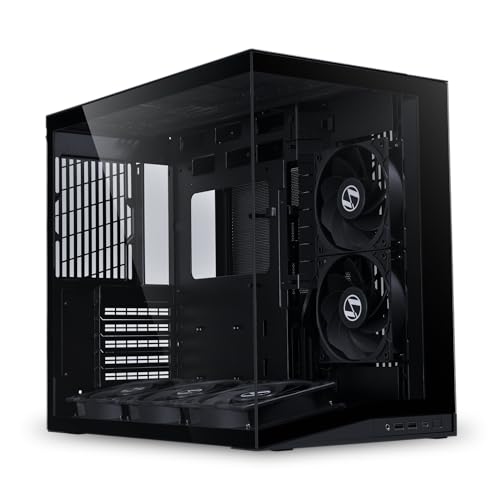
- Five pre-installed reverse blade fans
- 10-degree bottom intake improves GPU cooling
- Supports ATX back-connect motherboards
Best For: Compact builders who want strong airflow and a tidy panoramic layout
Dark Showcase Pick
HYTE Y70 Touch Infinite Pitch Black

- 14.9-inch touchscreen with 2.5K resolution
- Dual-chamber design with vertical GPU support
- Up to 10 fans and 360mm radiator support
Best For: Dark-themed showcase builds that still want a premium display feature
Panoramic Value Pick

- 7 pre-installed ARGB PWM fans
- Supports up to three 360mm radiators
- Fits GPUs up to 400mm in a dual-glass layout
Best For: Builders who want an RGB-forward case with roomy cooling support
Premium Showcase Choice
HYTE Y70 Panoramic Dual Chamber
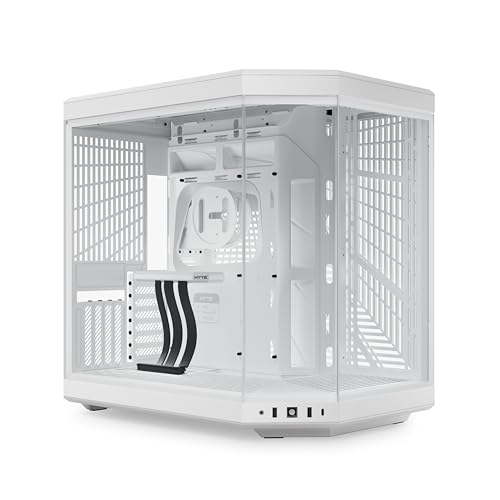
- 3-piece panoramic glass with dual-chamber layout
- Includes PCIe 4.0 riser cable for vertical GPUs
- Supports 360mm side radiator and adjustable top cooling
Best For: Enthusiasts wanting a premium vertical-GPU showcase case
Compact Builder-Friendly Pick
STRUXVEX S8 Panoramic Dual-Chamber

- Dual tempered-glass panoramic design
- Dedicated PSU chamber for cleaner cable routing
- Supports up to 407mm GPUs and 360mm AIOs
Best For: Builders who want an accessible dual-chamber case with wide component support
Panoramic Cooling Pick
KEDIERS K4 Snow White Dual-Chamber ATX Case

- Dual-channel airflow for CPU and GPU cooling
- 8 pre-installed PWM ARGB fans included
- Back-connect ready with panoramic glass panels
Best For: Showcase builders who want strong airflow and a clean white look
High-Airflow Value Pick
HYXN H2 2026 Dual-Chamber ATX Case

- 8 included fans, including 6x140mm units
- Supports 420mm radiators and back-mounted boards
- Dual-chamber layout aids airflow and cable routing
Best For: Airflow-focused builders who want lots of space and no RGB
Full-Tower Showcase Pick
darkFlash DY470 Dual-Chamber ATX Case

- Full-tower dual-chamber case with panoramic glass
- Vertical GPU mounting and ATX back-mount support
- Fits up to 2 x 360mm radiators with 4 PWM ARGB fans
Best For: Showcase gaming builds that need vertical GPU support and roomy cooling
Flagship Airflow Pick – NZXT H9 Flow Dual-Chamber ATX Case
The NZXT H9 Flow is a strong gaming pc case dual chamber option if you want a clean layout with serious cooling headroom. Its separated interior helps isolate the PSU and drives, while the perforated steel panels and included fans are aimed at high-airflow builds.
Best For: Builders who want a premium dual-chamber ATX case with wide radiator support and straightforward cable management.
Pros:
- Dual-chamber layout improves cooling and keeps cables easier to manage.
- Comes with four fans pre-installed, including three front-right and one rear fan.
- Supports up to 420mm radiators on the top and front-right.
- Wraparound tempered glass gives the build a panoramic showcase look.
Cons:
- Large chassis size may be more case than compact builds need.
- 3-pin DC case-version fans may not suit every preference.
- Premium feature set is geared toward higher-end builds.
Overall, the H9 Flow focuses on airflow, visual presentation, and tidy routing in one flagship-style package. If you want a gaming pc case dual chamber design with strong cooling and room for big hardware, this is an easy one to consider.
Showcase Screen Pick – HYTE Y70 Touch Infinite Snow White
The HYTE Y70 Touch Infinite turns a gaming pc case dual chamber layout into a display piece, thanks to its integrated 14.9-inch 2.5K touchscreen and panoramic glass. It still offers practical cooling flexibility and a vertical GPU setup, so the visual focus does not come at the expense of core build features.
Best For: Builders who want a showcase case with a built-in touchscreen and vertical graphics card presentation.
Pros:
- Integrated 14.9-inch LCD touchscreen with 2.5K resolution and 10-point multi-touch.
- Dual-chamber design with three-piece panoramic glass for a clean display-oriented build.
- Includes a PCIe 4.0 x16 riser cable for vertical GPU mounting.
- Supports up to 10 fans and 360mm radiator configurations.
Cons:
- Touchscreen and riser features add complexity beyond a standard case.
- Large chassis footprint may be excessive for smaller spaces.
- Best suited to builders who plan to use the display features.
This case is aimed at users who want their PC to be part hardware, part centerpiece. If your priority is a gaming pc case dual chamber that also doubles as a display platform, the Y70 Touch Infinite stands out immediately.
Compact Airflow Pick – Lian Li O11D MINI V2 Flow Black
The Lian Li O11D MINI V2 Flow is a smaller take on the gaming pc case dual chamber idea, but it still emphasizes airflow and a polished internal layout. With five pre-installed reverse blade fans, slanted bottom intake, and back-connect motherboard support, it is built for compact but capable ATX systems.
Best For: Builders who want a compact mid-tower with strong airflow and a clean, organized interior.
Pros:
- Includes five pre-installed 120mm reverse blade fans.
- 10-degree slanted bottom design helps direct cold air to the GPU.
- Supports ATX, M-ATX, and Mini-ITX motherboards, plus ATX back-connect boards.
- Tempered glass front and side panels provide an open view of the build.
Cons:
- Compact footprint means less room than larger dual-chamber cases.
- Side-mount PSU design may not suit every builder’s preference.
- Designed more for efficient layouts than maximum expansion.
As a compact alternative, this model balances presentation, cooling, and smart component placement very well. If you want a gaming pc case dual chamber style without going full-size, the O11D MINI V2 Flow is a practical pick.
Dark Showcase Pick – HYTE Y70 Touch Infinite Pitch Black
The HYTE Y70 Touch Infinite in Pitch Black brings the same showcase-first gaming pc case dual chamber design as the white model, but with a darker aesthetic. It combines a 14.9-inch touchscreen, panoramic glass, and vertical GPU support with broad cooling capacity for high-end builds.
Best For: PC builders who want a black showcase case with a touchscreen and vertical graphics card mounting.
Pros:
- Integrated 14.9-inch 2.5K touchscreen with 10-point multi-touch support.
- Dual-chamber interior and three-piece panoramic glass create a clean display look.
- Includes a PCIe 4.0 x16 riser cable for vertical GPU mounting.
- Supports up to 10 fans and 360mm radiator options.
Cons:
- Large footprint may not fit every desk or room setup.
- Touchscreen feature is a premium addition that may not appeal to every buyer.
- Better suited to showcase builds than minimalist budget systems.
This version keeps the same standout feature set while shifting the look toward a darker, more restrained build theme. For shoppers comparing a gaming pc case dual chamber option with display flair, the Pitch Black Y70 is a strong match.
Panoramic Value Pick – HYXN H1 Dual-Cavity ARGB Case
If you want a gaming pc case dual chamber look with strong cooling value, the HYXN H1 is built around a panoramic 270° glass design and an unusually roomy internal layout. It pairs a dual-cavity structure with 7 pre-installed ARGB PWM fans, so it leans hard into both aesthetics and airflow without needing an immediate fan upgrade.
Best For: Builders who want a spacious, RGB-heavy dual-chamber case with broad radiator support.
Pros:
- Pre-installed 7 ARGB PWM fans for ready-to-go airflow and lighting
- Supports up to three 360mm radiators simultaneously, including top and side positions
- Fits ATX, mATX, and ITX boards, plus GPUs up to 400mm
- Dual tempered-glass panels and vertical airflow design for a clean showcase build
Cons:
- Large footprint may be more case than a compact setup needs
- Glass-heavy design prioritizes visuals over a minimalist look
Overall, the H1 is a strong pick if you want a feature-rich dual-chamber case that arrives with cooling already handled. It offers a lot of hardware room and a polished showcase style for the money.
Premium Showcase Choice – HYTE Y70 Panoramic Dual Chamber
The HYTE Y70 is a premium gaming pc case dual chamber option for builders who care about presentation as much as airflow. Its 3-piece panoramic glass design, included PCIe 4.0 riser cable, and extensive rear-chamber cable management make it easy to build a clean vertical GPU showcase.
Best For: Enthusiasts who want a high-end showcase chassis with vertical GPU support and strong cooling headroom.
Pros:
- Panoramic 3-piece glass and dual-chamber layout create a polished display build
- Included PCIe 4.0 x16 riser cable supports massive 4-slot vertical graphics
- Supports a 360mm side radiator and adjustable top radiator up to 68mm thick
- Rear-chamber space, Velcro straps, and tool-less panels help simplify cable management
Cons:
- Premium positioning makes it more expensive than basic dual-chamber cases
- Large size and glass panels may be more than minimal builders need
For builders chasing a luxury aesthetic, the Y70 stands out as a refined dual-chamber case with practical cooling and cable-routing features. It is especially compelling if you want an eye-catching vertical GPU layout without sacrificing build quality.
Compact Builder-Friendly Pick – STRUXVEX S8 Panoramic Dual-Chamber
The STRUXVEX S8 is a practical gaming pc case dual chamber choice if you want a panoramic build without going overboard on size or complexity. It uses dual tempered glass panels, a separated PSU chamber, and pre-installed reverse ARGB fans to keep the main compartment tidy and visually focused.
Best For: Builders who want a clean-looking mid-size dual-chamber case with straightforward cooling support.
Pros:
- Dual-panel tempered glass gives the build a panoramic showcase look
- Dedicated PSU chamber improves cable management and airflow separation
- Pre-installed 3 reverse-blade ARGB fans help with immediate cooling
- Supports up to a 407mm GPU, 360mm AIO, and 162mm CPU cooler
Cons:
- Only three fans are included, so some builds may want more added later
- Rear-mount PSU layout may not suit every preference
The S8 focuses on the essentials: good hardware clearance, a clean dual-chamber layout, and easy-to-use features like tool-free glass access. It is a sensible option for builders who want a polished look and strong compatibility without stepping into a larger premium chassis.
Panoramic Cooling Pick – KEDIERS K4 Snow White Dual-Chamber ATX Case
If you want a gaming pc case dual chamber build with a focus on airflow and visibility, the KEDIERS K4 is built around a very specific cooling layout. It uses horizontal airflow for the CPU and vertical airflow for the GPU, plus 8 pre-installed PWM ARGB fans and support for large 420mm radiators.
Best For: Builders who want strong cooling, a glass-heavy panoramic look, and easy cable management in a white showcase case.
Pros:
- Dual-channel airflow design separates CPU and GPU cooling paths.
- 8 included PWM ARGB fans help move air through the case.
- Back-connect support and large cable space keep the front area clean.
- Supports ATX, Micro-ATX, Mini-ITX, and up to 420mm radiators.
Cons:
- Large panoramic glass design may not suit understated builds.
- White finish and glass panels may need more frequent cleaning.
- Big case size may be more than needed for simple systems.
Overall, the K4 is a strong fit if you want a dual-chamber style case that prioritizes airflow, fan count, and a clean showcase layout. Its mix of radiator support, roomy component clearance, and tempered glass makes it an easy pick for a visible gaming build.
High-Airflow Value Pick – HYXN H2 2026 Dual-Chamber ATX Case
The HYXN H2 is a gaming pc case dual chamber option made for builders who want a spacious layout and a lot of included airflow. It comes with 8 non-ARGB fans, supports large 420mm radiators, and leaves plenty of room for long GPUs and a back-mounted motherboard setup.
Best For: Users who want a roomy airflow-focused case with broad radiator support and no built-in RGB lighting.
Pros:
- Dual-chamber layout separates components to improve thermal performance and cable management.
- 8 included fans, including 6x140mm units, provide substantial airflow.
- Supports E-ATX, ATX, M-ATX, and ITX motherboards.
- Large interior fits GPUs up to 455mm and PSUs up to 220mm.
Cons:
- Fans are non-ARGB, so it is not for buyers who want lighting effects.
- Big chassis may take up more desk or floor space.
- Its plain black styling is more practical than flashy.
If your priority is cooling capacity and room to build, the H2 delivers a very practical dual-chamber format. The combination of large fan coverage, radiator flexibility, and tidy rear-compartment management makes it a sensible choice for high-airflow systems.
Full-Tower Showcase Pick – darkFlash DY470 Dual-Chamber ATX Case
The darkFlash DY470 is a full-tower gaming pc case dual chamber design aimed at builders who want a spacious, premium-looking layout. It supports vertical GPU mounting, ATX back-mounted motherboards, and up to two 360mm radiators while using panoramic glass to show off the interior.
Best For: Gamers and creators who want a full-tower showcase case with vertical GPU support and tidy cable management.
Pros:
- Dual-chamber layout helps separate components and improve airflow.
- Vertical GPU mounting adds flexibility for display-focused builds.
- Supports up to 2 x 360mm radiators and long GPUs up to 410mm.
- Includes 4 PWM ARGB fans, plus velcro straps and a snap-on design for easier building.
Cons:
- Full-tower size is larger and heavier than many mid-tower options.
- Only supports ATX motherboards, so it is less flexible than some rivals.
- Glass-heavy styling is best for showcase builds, not minimal setups.
The DY470 stands out for builders who want a dramatic display case without giving up practical cooling support. Its dual-chamber structure, vertical GPU option, and generous radiator space make it a strong fit for high-end gaming builds.
How We Picked the Best Gaming PC Case Dual Chamber
For this roundup, we prioritized real-world building convenience first: airflow potential, cable-routing space, radiator and fan support, and how easy each chassis should be to assemble in. We also looked for features that matter in a Gaming PC Case Dual Chamber, such as clean side-chamber access, strong GPU clearance, and front or side glass that still leaves room for practical cooling.
Since these cases are aimed at different budgets and build styles, we also considered included fans, back-connect motherboard support, vertical GPU mounting options, and whether the layout suits compact, mid-tower, or full-tower builds.
Quick Comparison: What Stands Out
If you want the cleanest showcase build, choose a panoramic case with glass on multiple sides and strong cable management. If performance is the priority, look for higher fan counts, large radiator support, and a layout that feeds fresh air directly to the GPU and CPU. Builders who want easier assembly should pay close attention to space behind the tray and whether the case supports back-connect motherboards.
Key Buying Factors for a Gaming PC Case Dual Chamber
Airflow and Cooling Support
More chamber separation usually means less cable clutter in the main airflow path, but fan placement still matters. Check how many fans are included, where intake and exhaust positions are located, and whether the case supports 360mm or 420mm radiators if you plan to use liquid cooling.
Motherboard Compatibility
Some dual-chamber designs work best with standard ATX boards, while others are built around back-connect layouts for even cleaner cable routing. Make sure your board size and connector placement match the chassis design before buying.
GPU Clearance and Display Style
Large modern graphics cards need generous room, especially in panoramic cases that also support vertical mounting. If you want a visual centerpiece, confirm the GPU orientation options and side-glass clearance so the card does not crowd the chamber.
Included Fans and Build Value
Cases with more preinstalled fans can save money and simplify the first build. That said, fan quality, controller support, and noise levels matter just as much as raw quantity.
Who Should Buy Which Gaming PC Case Dual Chamber?
Choose a premium showcase case if your priority is aesthetics, touchscreen features, or a high-end display build. Go with an airflow-focused model if you are running a hot CPU and GPU combo or want lower temperatures with less tuning. If you are building on a budget, a well-equipped dual-chamber tower with included fans offers the best value. For most gamers, the best Gaming PC Case Dual Chamber is the one that matches your cooling plan, motherboard layout, and space needs without making the build harder than it has to be.