If you want sharper control in classic spinner games, the right controller can make a huge difference. A good arcade controller with spinner should feel smooth, stay accurate, and match your setup without extra hassle.
We focused on options that suit different cabinets, emulation rigs, and budgets so you can choose with confidence.
Best 10 Arcade Controller with Spinner Picks for 2026
Arcade1Up Upgrade Pick
Compact Spinner for Supported 12-in-1 Builds

- Works with Windows, Linux, and OS via 12-in-1 interface
- Compatible with Arcade version 12-in-1 and 6-in-1 only
- Not for Counter Cade, Party Cade, or Legacy Tempest
Best For: Arcade1Up owners with supported 12-in-1 or 6-in-1 hardware
Smallest-Footprint Choice
USB Button Hole Spinner for Tight Panels

- Fits any 28mm button hole
- Includes 2 buttons and USB cable
- Swaps X/Y axis by holding both buttons 10 seconds
Best For: Compact builds using a 28mm button hole on PC, Mac, Linux, or Raspberry Pi
Two-Player DIY Kit
LED Joystick and Buttons Set with No Spinner

- Includes 2 joysticks, 2 USB encoders, and 20 LED buttons
- Built for 2-player arcade, MAME, and Jamma projects
- Does not include a spinner
Best For: DIY builders who want a two-player LED arcade control kit without a spinner
High-Precision Pick
Push & Pull USB Spinner with Calibration
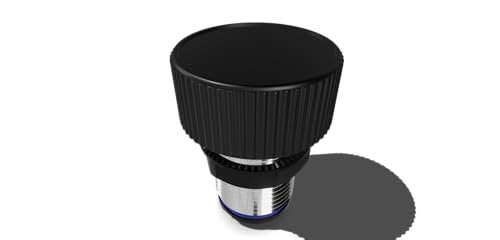
- Configurable CPR from 128 to 4096
- Includes push, pull, and scroll buttons
- Software calibration with switchable X/Y direction
Best For: PC or Raspberry Pi builders who want a calibrated spinner with extra controls
Industrial-Grade Spinner Pick
RAC-Spinner USB Arcade Game Spinner for Raspberry Pi MAME PC

- Industrial-grade E6B2-CWZ6C encoder
- Full aluminum alloy knob
- Metal bracket fits joystick mounting holes
Best For: Durable USB spinner builds for PC, MAME, and Raspberry Pi
Combo Control Upgrade
tsticks GRS LED Trackball with Spinner for Arcade

- Spinner and trackball in one unit
- Customizable LED effects
- Universal mounting for 28mm holes
Best For: Space-saving arcade panels that need both spinner and trackball
Simple MAME Spinner Kit
SpinTrack Arcade USB Spinner kit by RetroArcade.us

- USB spinner kit for arcade use
- Made for MAME systems
- Compact dimensions listed
Best For: No-frills MAME builds needing a dedicated spinner
Premium Plug-and-Play Pick
FightBox R5 USB Arcade Game Spinner Controller

- USB HID plug-and-play design
- Sanwa buttons and aluminum alloy knob
- Works with PC, Raspberry Pi, MAME, and RetroArch
Best For: Players wanting a feature-rich spinner controller for retro gaming setups
Compact MAME and Jamma Option
SpinTrack Arcade USB Spinner kit, Perfect for MAME and Jamma Systems (Silver)

- Built for MAME and Jamma systems
- Compact metal USB kit
- Includes 90-day manufacturer warranty
Best For: Adult users upgrading a cabinet with a compact spinner kit
Simple USB Spinner Choice
SpinTrack Arcade USB Spinner, Perfect for MAME Systems

- Built for MAME systems
- Compact and lightweight USB spinner
- Simple spinner-focused design
Best For: MAME players wanting a basic, compact spinner input
Arcade1Up Upgrade Pick – Compact Spinner for Supported 12-in-1 Builds
If you want an arcade controller with spinner for a supported Arcade1Up-style setup, this model is built for specific cabinet configurations rather than universal plug-and-play use. Its notes make the compatibility limits very clear, so it is best for buyers who already know their board and cabinet match the supported 12-in-1 or 6-in-1 setup.
Best For: Arcade1Up owners with supported 12-in-1 or 6-in-1 hardware who want a dedicated spinner.
Pros:
- Compatible with Windows, Linux, and OS via a 12-in-1 interface board.
- Also listed as compatible with Arcade version 12-in-1 and 6-in-1 only.
- Compact unit with a small footprint for control panels.
Cons:
- Not for Counter Cade, Party Cade, or Legacy Tempest setups.
- Compatibility is limited to specific board versions only.
This is a fit-first option: if your hardware matches the supported setup, it keeps the spinner upgrade simple and targeted. If not, the compatibility warning is important enough to rule it out quickly.
Smallest-Footprint Choice – USB Button Hole Spinner for Tight Panels
This arcade controller with spinner is aimed at cramped control panels, since it fits any 28mm button hole and is described as the smallest form factor. It is a practical pick if you want a spinner that installs through an existing button opening and works across common DIY platforms.
Best For: Compact builds using a 28mm button hole on PC, Mac, Linux, or Raspberry Pi.
Pros:
- Fits any 28mm button hole.
- Includes 2 buttons and a USB cable.
- Compatible with Windows, Linux, Mac, and Raspberry Pi.
- Direction can be swapped between X and Y axis by holding both buttons for 10 seconds.
Cons:
- Single-unit design may be more limited than larger control-panel spinners.
- Users must use the button combo to change axis direction.
For space-constrained setups, this spinner stands out because it uses a standard button hole and keeps the installation footprint very small. The axis-swap feature also adds flexibility for different games or mappings.
Two-Player DIY Kit – LED Joystick and Buttons Set with No Spinner
This listing is not an arcade controller with spinner, but it is a full DIY controller kit for players building a two-person arcade panel on Windows PC, MAME, or Raspberry Pi. If your priority is illuminated controls and a complete joystick/button package rather than a spinner module, this kit is worth considering.
Best For: DIY builders who want a two-player LED arcade control kit without a spinner.
Pros:
- Includes 2 joysticks, 2 USB encoders, and 20 LED arcade buttons.
- Designed for 2-player arcade, MAME, Jamma, and other fighting game projects.
- Uses 5V LED illuminated push buttons with built-in blue switches.
- Notes claim the buttons are tested to 3,000,000 cycles.
Cons:
- Does not include a spinner.
- Primary focus is joystick-and-button control rather than spinner gameplay.
This is a strong control-panel starter kit, but it should not be mistaken for a spinner upgrade. If you need spinner gameplay specifically, you will need a different product; if you want a lit two-player build, this bundle covers a lot of ground.
High-Precision Pick – Push & Pull USB Spinner with Calibration
If you are shopping for an arcade controller with spinner and want more tuning control, this model stands out for its configurable CPR range and calibration options. It is aimed at PC and Raspberry Pi setups, with a full aluminum structure and extra push, pull, and scroll buttons for flexible gameplay input.
Best For: PC or Raspberry Pi builders who want a calibrated spinner with push, pull, and scroll controls.
Pros:
- Configurable CPR from 128 to 4096.
- Complete aluminum structure for a sturdy build.
- Includes push, pull, and scroll buttons.
- Software calibration and switchable X/Y mouse direction are included.
Cons:
- Designed for PC and Raspberry Pi, not listed for broader platforms.
- Extra features may be more than needed for basic spinner use.
This is the most feature-rich spinner in the group, especially if you care about calibration and directional control. For users who want a more adjustable input device, it offers a very complete package.
Industrial-Grade Spinner Pick – RAC-Spinner USB Arcade Game Spinner for Raspberry Pi MAME PC
If you want an arcade controller with spinner for a Raspberry Pi, MAME, or PC build, this RAC-Spinner model keeps the focus on a solid mechanical feel. It uses an industrial-grade E6B2-CWZ6C encoder, an all-aluminum knob, and a metal bracket designed to line up with traditional joystick mounting holes, which should make installation easier for many cabinet mods.
Best For: Builders who want a durable, USB-connected spinner with an easy-to-mod bracket layout for PC or Raspberry Pi arcade projects.
Pros:
- Industrial-grade E6B2-CWZ6C encoder for spinner input
- Full aluminum alloy knob for a more solid touch feel
- Metal bracket fits traditional joystick mounting holes
- Adjustable knob height adds setup flexibility
Cons:
- Single-controller product, so it does not include a trackball
- USB cable length is listed at 1.5m, which may be limiting in some cabinets
This is a practical choice if your priority is a straightforward, hard-wearing spinner rather than extra controls or lighting effects. The design is aimed at easy integration into common arcade layouts.
Combo Control Upgrade – tsticks GRS LED Trackball with Spinner for Arcade
If you’re shopping for an arcade controller with spinner and want to save space, this tsticks unit combines a spinner and trackball in one device. It uses optical trackball technology, supports USB connectivity, and includes customizable LED effects, making it a flexible option for DIY arcade panels and multi-control builds.
Best For: Arcade projects that need both spinner and trackball control in a single mounted unit.
Pros:
- Spinner and trackball combined in one unit
- Advanced optical technology for the trackball
- Customizable LED effects for visual customization
- Universal mounting for 28mm hole setups
Cons:
- More complex than a single-purpose spinner
- Includes only 2 buttons, so it may not suit every layout
This is a strong pick when panel space is tight and you want both control types without separate hardware. The USB, multi-platform compatibility, and universal mounting make it a versatile DIY-friendly option.
Simple MAME Spinner Kit – SpinTrack Arcade USB Spinner kit by RetroArcade.us
SpinTrack Arcade USB Spinner kit by RetroArcade.us, Perfect for MAME Systems (Red)
Check Price On AmazonFor a basic arcade controller with spinner focused on MAME systems, this SpinTrack kit keeps things simple. The supplied details point to a compact USB spinner kit from RetroArcade.us, so it fits best in builds where you want a dedicated spinner without extra features getting in the way.
Best For: MAME builders who want a compact, no-frills USB spinner kit.
Pros:
- USB spinner kit designed for arcade use
- Suited to MAME systems
- Compact physical size based on listed dimensions
Cons:
- Very limited product details are provided
- No listed extras such as LED effects or trackball support
This option appears aimed at straightforward spinner-only installations rather than feature-heavy control panels. If you already know you want a dedicated USB spinner for a MAME setup, the simplicity may be the appeal.
Premium Plug-and-Play Pick – FightBox R5 USB Arcade Game Spinner Controller
If you want an arcade controller with spinner that feels ready for serious play right out of the box, the FightBox R5 is built around a USB HID Arduino Pro Micro setup with plug-and-play compatibility. It combines an aluminum alloy knob, adjustable height, non-slip base, and Sanwa buttons, making it a practical choice for desktop use with emulators and retro setups.
Best For: Players who want a full-featured spinner controller for PC, Raspberry Pi, and MAME/RetroArch setups.
Pros:
- Plug-and-play USB HID design with Arduino Pro Micro-based controller
- High-quality arcade components, including Sanwa buttons
- Aluminum alloy knob with adjustable height and non-slip base
- Compatible with PC, Raspberry Pi, media players, TV boxes, and popular emulators
Cons:
- Primarily focused on spinner-based gameplay rather than a full multi-control panel
- Desktop-oriented size may be less convenient for very compact setups
This is the most feature-rich option in the group, especially if you want a spinner controller that integrates cleanly with common retro gaming platforms. The inclusion of premium buttons and an adjustable spinner makes it stand out for users who value feel and versatility.
Compact MAME and Jamma Option – SpinTrack Arcade USB Spinner kit, Perfect for MAME and Jamma Systems (Silver)
RetroArcade.us SpinTrack Arcade USB Spinner kit, Perfect for MAME and Jamma Systems (Silver)
Check Price On AmazonThe SpinTrack Arcade USB Spinner kit is a straightforward arcade controller with spinner designed for MAME and Jamma systems. Its small metal build and manual operation make it a simple add-on for cabinet-style setups where you want spinner control without extra complexity.
Best For: Adult users building or upgrading a MAME or Jamma setup that needs a compact spinner kit.
Pros:
- Designed for MAME and Jamma systems
- Compact metal construction
- USB kit format keeps installation straightforward
- Backed by a 90-day manufacturer warranty
Cons:
- Limited feature set compared with larger controller panels
- Small size may not suit users wanting a more substantial control surface
If your goal is simply to add spinner control to an arcade build, this kit keeps the focus on compatibility and basic function. It is a practical choice for users who want a compact, purpose-built spinner rather than a more elaborate all-in-one controller.
Simple USB Spinner Choice – SpinTrack Arcade USB Spinner, Perfect for MAME Systems
This SpinTrack model is a no-frills arcade controller with spinner aimed at MAME systems. With a compact 6 x 6 x 2 inch design and lightweight build, it makes sense when you want a basic spinner input for a dedicated retro gaming setup.
Best For: MAME users who want a compact, lightweight USB spinner.
Pros:
- Designed specifically for MAME systems
- Compact 6 x 6 x 2 inch footprint
- Lightweight at 4.8 ounces
- USB spinner format keeps the setup simple
Cons:
- Fewer listed details and features than the higher-end model
- Best suited to spinner-specific use rather than broader control needs
For a basic spinner-focused setup, this model keeps the emphasis on size and simplicity. It is a sensible pick if you want an affordable-style USB spinner solution for MAME without extra hardware extras.
How We Picked the Best Arcade Controller with Spinner Options
We looked for models that balance smooth rotation, reliable USB connectivity, easy installation, and broad compatibility with common retro gaming setups. We also favored products that make sense for real-world use, whether you are building a full cabinet or upgrading a compact desktop controller.
Quick Comparison
Most buyers will be choosing between simple USB spinners, spinner-and-trackball combos, and cabinet-focused kits. Pure spinner units are best for clean, responsive control in games that rely heavily on rotational input. Combo units can save space and offer more versatility, while button-and-control kits are better if you are outfitting an entire two-player panel.
Key Buying Factors for an Arcade Controller with Spinner
Compatibility
Check whether the spinner is designed for MAME, PC, Raspberry Pi, Jamma, or Arcade1Up systems. Some units are plug-and-play over USB, while others may need specific mounting or wiring.
Feel and Sensitivity
The best spinner should spin freely without feeling loose or scratchy. A good response curve matters for driving, shooting, and other precision-based arcade games.
Installation and Panel Fit
Measure your control panel before buying. Hole size, shaft length, and mounting style can determine whether a model is an easy drop-in or a more involved retrofit.
Extra Controls
Some players only need the spinner itself, while others benefit from push-and-pull input, integrated buttons, or a trackball companion. Choose the simplest setup that matches the games you actually play.
Who Should Buy Which Arcade Controller with Spinner?
If you want a straightforward upgrade for classic arcade titles, a standard USB spinner is usually the safest choice. If you are building a dedicated cabinet or restoring an Arcade1Up machine, look for models made for that exact use case.
Players who switch between many game types may prefer a combo controller with a trackball or additional buttons. If you care most about tuning and feel, prioritize responsiveness and build quality over bundled features. In the end, the best Arcade Controller with Spinner is the one that fits your cabinet, your games, and how you like to play.