If you want a gaming docking station with 4K 120Hz, the goal is simple: get smooth big-screen play, stable charging, and the right ports without bottlenecks.
Below, we focus on docks that make sense for handheld gaming PCs, laptops, and hybrid setups, so you can match the dock to your display, power needs, and accessories.
Best 10 Gaming Docking Station with 4K 120hz Picks for 2026
Portable Handheld Dock
JSAUX 6-in-1 Dock for Steam Deck & Ally X

- 4K@120Hz HDMI 2.1 output
- 100W PD charging and Gigabit Ethernet
- 3 USB 3.0 ports for accessories
Best For: Handheld gamers who want a simple single-screen 4K@120Hz dock
Premium Desk Dock
Baseus Spacemate RD1 Pro 15-in-1 Dock

- 4K@120Hz on HDMI 2
- 160W total output with 180W GaN adapter
- Smart display plus Qi2.2 wireless charging
Best For: Desk users who want strong charging and a high-refresh single display
Foldable Handheld Dock
UGREEN 6-in-1 4K@120Hz Steam Deck Dock

- 4K@120Hz HDMI 2.1 with VRR support
- 100W PD charging and Gigabit Ethernet
- Foldable stand for portable handheld setups
Best For: Portable handheld gamers who want a compact 4K@120Hz dock
Triple-Monitor Desk Dock
Acer 13-in-1 Triple Display USB-C Dock

- 2 HDMI + 1 DisplayPort for triple screens
- 100W charging with included 110W adapter
- USB-C, USB-A, Ethernet, audio, and SD/TF
Best For: Windows desk users who need a triple-monitor productivity dock
BenQ Pick
GR10 Steam Deck Dock with 4K 120Hz HDMI 2.1
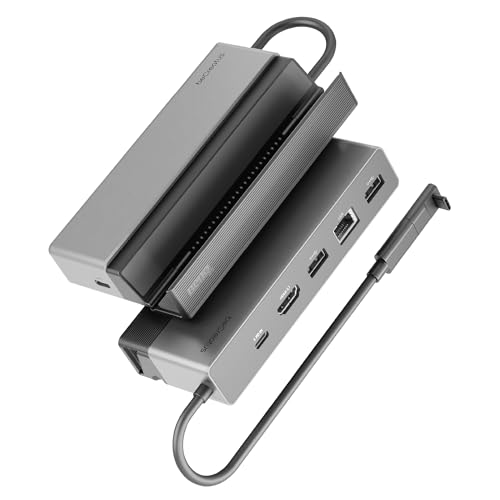
- HDMI 2.1 supports 4K@120Hz and HDR10
- 2.5GbE helps with stable streaming and cloud gaming
- Flip stand and 100W PD suit TV play
Best For: Steam Deck owners wanting a compact 4K120 TV dock
Razer Pick
USB 4 Dock with Dual 4K 120Hz Monitor Support

- USB4 dock with 14 ports for broad connectivity
- Dual-monitor support with a 4K 120Hz primary display
- 100W charging and included 180W adapter
Best For: Desk setups that need 4K120 plus lots of ports
iVANKY Pick
14-in-1 RGB Dock with 4K 120Hz HDMI 2.1

- HDMI 2.1 outputs 4K@120Hz for external gaming
- 10Gbps USB-A, SD/TF slots, and 1Gbps Ethernet
- Foldable stand and RGB lighting add flexibility
Best For: RGB-minded handheld gamers who want 4K120 and extra storage slots
WAVLINK Multi-Display Work Dock
Triple Monitors Dock with 4K@144Hz

- Single DisplayPort up to 4K@144Hz
- Supports up to 3 external monitors
- Includes 130W charger and USB-C cable
Best For: Windows users building a multi-monitor workstation
Chizha Handheld Gaming Dock

- 4K HDR output up to 120Hz
- Built-in optical audio and Gigabit Ethernet
- Up to 4TB NVMe SSD expansion
Best For: Steam Deck and other handheld owners wanting a TV-ready dock
Baseus Compact Dual Monitor Dock
9-in-1 USB-C Dock with 4K@120Hz

- Single display up to 4K@120Hz
- Dual HDMI with mirror/extend modes
- 1000Mbps Ethernet and SD/TF reader
Best For: Portable laptop users who want a compact high-refresh dock
Portable Handheld Dock – JSAUX 6-in-1 Dock for Steam Deck & Ally X
If you want a gaming docking station with 4k 120hz for a handheld setup, this JSAUX 6-in-1 focuses on the essentials: HDMI 2.1 output, fast charging, wired networking, and extra USB ports. It’s a straightforward pick for players who want a smooth big-screen experience without adding a lot of desk clutter.
Best For: Steam Deck and other handheld gamers who want simple 4K@120Hz TV or monitor output with strong charging and Ethernet.
Pros:
- HDMI 2.1 supports up to 4K@120Hz for smoother external display gaming.
- 100W PD charging helps keep handhelds powered during long sessions.
- Gigabit Ethernet and 3 USB 3.0 ports add useful gaming connectivity.
- Broad support for Steam Deck, ROG Ally/Ally X, Legion Go/Go S, MSI Claw, and more.
Cons:
- Not compatible with ROG XBOX Ally / XBOX Ally X.
- Only one HDMI port, so it is not built for multi-monitor use.
- Best suited to handheld-focused setups rather than full desktop expansion.
This is a clean, practical dock if your priority is high-refresh external gaming on a single screen. It keeps the feature set focused on what matters most for handheld play: video, power, and stable internet.
Premium Desk Dock – Baseus Spacemate RD1 Pro 15-in-1 Dock
The Baseus Spacemate RD1 Pro is a gaming docking station with 4k 120hz support on its second HDMI port, but it is much more than a display adapter. With 15-in-1 connectivity, 180W GaN charging, and a smart display, it suits users who want one dock to handle work, gaming, charging, and cable management.
Best For: Power users who want a feature-rich dock for a cleaner desk, fast charging, and a high-refresh single display.
Pros:
- HDMI 2 supports up to 4K@120Hz for ultra-clear single-display output.
- 160W total output and 180W GaN adapter support multiple devices.
- Includes 25W Qi2.2 wireless charging and a smart status display.
- Large port selection adds USB-C, USB-A, Ethernet, and SD/TF slots.
Cons:
- 4K@120Hz is available only on HDMI 2.
- Dual displays are limited to 4K@60Hz rather than 4K@120Hz.
- Best for desk setups, not compact handheld-only use.
If you want a premium all-in-one dock, this model stands out for its mix of display support, charging power, and convenience features. It is especially appealing if you value a tidy workstation and need one hub to do a lot.
Foldable Handheld Dock – UGREEN 6-in-1 4K@120Hz Steam Deck Dock
If you are shopping for a gaming docking station with 4k 120hz output, this UGREEN 6-in-1 is built around smooth HDMI 2.1 video, charging, and basic expansion. It fits well as a compact dock for handheld gaming, with enough flexibility to also cover laptops, PCs, Macs, and phones.
Best For: Players who want a portable foldable dock for handheld gaming and a single 4K@120Hz display.
Pros:
- HDMI 2.1 supports up to 4K@120Hz with VRR, FreeSync, and G-Sync.
- 100W PD charging helps power the host while using the dock.
- Includes 2 USB-A 3.0, 1 USB-C 3.0 data port, and Gigabit Ethernet.
- Foldable aluminum alloy stand makes it easy to carry and store.
Cons:
- Only one HDMI output, so it is not a multi-monitor dock.
- Not compatible with Nintendo Switch 2.
- Less expansive than larger desktop docking stations.
This dock makes sense if you want a travel-friendly way to connect a handheld to a high-refresh monitor or TV. Its strength is simplicity: strong video, stable power, and the connections most gamers actually use.
Triple-Monitor Desk Dock – Acer 13-in-1 Triple Display USB-C Dock
The Acer 13-in-1 is more of a productivity docking station than a gaming docking station with 4k 120hz, and its display focus is clearly on multi-monitor expansion. It supports triple-screen output for Windows laptops, with triple 4K at 30Hz possible on compatible systems that support DSC, making it a better fit for workstations than high-refresh gaming.
Best For: Windows users who need a triple-monitor desk dock with broad I/O and reliable laptop charging.
Pros:
- 2 HDMI ports plus 1 DisplayPort support triple-screen setups on Windows.
- Includes 100W laptop charging from the bundled 110W adapter.
- Offers USB-C, USB-A, Gigabit Ethernet, audio, and SD/TF expansion.
- Designed for stable desktop use with a metal body and security slot.
Cons:
- Triple 4K is only up to 30Hz, so it is not a high-refresh gaming dock.
- macOS only supports mirroring across multiple displays.
- Requires a full-featured USB-C port and compatible Windows hardware for best results.
If your priority is multitasking rather than gaming, this Acer dock is a strong desk companion. It delivers the ports and monitor flexibility many office and creator setups need, but it is not the right choice for 4K 120Hz play.
BenQ Pick – GR10 Steam Deck Dock with 4K 120Hz HDMI 2.1
If you want a gaming docking station with 4k 120hz support for a Steam Deck or handheld PC, the BenQ GR10 focuses on the essentials: HDMI 2.1 output, broad device compatibility, and stable wired networking. It is built for TV play with a compact flip-stand design, plus 100W power delivery and multiple USB ports for peripherals.
Best For: Steam Deck and handheld gamers who want a TV-ready dock with HDMI 2.1, Ethernet, and a neat flip-up stand.
Pros:
- HDMI 2.1 supports up to 4K@120Hz, 1080p@360Hz, and 8K@60Hz with HDR10.
- Includes 2.5GbE for stable streaming and cloud gaming connections.
- 100W power delivery helps keep the device charged during play.
- USB-A x2 and USB-C x1 offer 10Gbps data transfer for peripherals.
Cons:
- No HDMI CEC support.
- Optimal performance may require an adapter, according to the notes.
- Geared more toward Steam Deck-style setups than a full desktop dock.
This is a strong pick if you value a simple, gaming-first dock with fast wired networking and a clean stand design. It is less about maxed-out port count and more about reliable 4K120 TV play.
Razer Pick – USB 4 Dock with Dual 4K 120Hz Monitor Support
The Razer USB 4 Dock is aimed at users who want a gaming docking station with 4k 120hz capability plus a more complete desktop-style port layout. With 14 ports, USB4 connectivity, and dual-monitor support, it works well if you want one dock for displays, charging, and everyday peripherals.
Best For: Gamers and power users who want a premium USB4 dock that can handle a 4K 120Hz main display and extra accessories.
Pros:
- USB4 connection delivers fast data transfer and broad device support.
- Dual monitor support includes a primary display up to 4K 120Hz.
- 14-port layout reduces cable clutter for desks with many devices.
- Includes 100W charging plus a 180W adapter and power button.
Cons:
- More of a desk hub than a compact handheld-gaming dock.
- Primary value is display expansion and port density, not TV-focused convenience.
- Best fit is Windows and Mac setups rather than console-only use.
If you want a high-end dock that can double as a gaming and productivity hub, this is the most versatile option here. It is especially appealing when you need 4K120 on one screen and plenty of ports for the rest of your setup.
IVANKY Pick – 14-in-1 RGB Dock with 4K 120Hz HDMI 2.1
If you are shopping for a gaming docking station with 4k 120hz output for a handheld like Steam Deck, ROG Ally, or Legion Go, the iVANKY 14-in-1 dock delivers a feature-rich package. It combines HDMI 2.1, USB 3.2 storage-friendly ports, Ethernet, SD/TF slots, RGB lighting, and a foldable stand in one gaming-focused hub.
Best For: Handheld PC gamers who want RGB styling, storage card slots, and strong 4K120 output in one dock.
Pros:
- HDMI 2.1 supports 4K@120Hz for smooth external display gaming.
- Includes 10Gbps USB-A ports, SD/TF slots, and 1Gbps Ethernet.
- Dual-foldable stand helps keep vents clear for better cooling.
- 100W power delivery supports fast charging for compatible devices.
Cons:
- Firmware update is recommended to avoid HDMI mirroring issues.
- Steam Deck, Ally, and Legion Go charge at different max rates.
- RGB lighting may not appeal if you want a minimal setup.
Overall, this dock stands out for blending gaming styling with practical I/O, especially if you move files on and off your device often. It is a strong all-in-one choice when 4K120, cooling, and extra storage access all matter.
WAVLINK Multi-Display Work Dock – Triple Monitors Dock with 4K@144Hz
If you want a gaming docking station with 4k 120hz for a Windows laptop that also doubles as a serious productivity hub, this WAVLINK dock is built around flexible display output and plenty of wired connectivity. It supports triple monitors, with a single DisplayPort reaching up to 4K@144Hz under DP 1.4 source conditions, while dual displays can run at 4K@60Hz.
Best For: Windows users who need a high-refresh external display setup plus lots of USB and Ethernet connections.
Pros:
- Single DisplayPort can reach up to 4K@144Hz with a DP 1.4 source.
- Supports up to three external monitors for multitasking setups.
- Includes dual DisplayPort, HDMI, Gigabit Ethernet, and a mic/audio jack.
- Comes with a 130W charger adapter and USB-C cable in the box.
Cons:
- Not compatible with macOS computers.
- Requires a host USB-C port that supports video output and charging.
- High resolution and refresh rates depend on DP1.4 + DSC1.2 support from the laptop.
This is a strong dock for Windows-based desk setups, but the headline specs depend on your laptop’s video capabilities. If your system supports the required standards, it offers a lot of screen and port expansion in one package.
Chizha Handheld Gaming Dock – 4K@120Hz Steam Deck Dock
For handheld players looking for a gaming docking station with 4k 120hz, this DOCKCASE & CHIZHA unit is designed to turn a Steam Deck OLED, ROG Ally, or Legion Go into a living-room gaming setup. It adds 4K HDR output up to 120Hz, wired Ethernet, optical audio, and extra storage through a built-in NVMe SSD slot.
Best For: Handheld gaming device owners who want a TV dock with high-refresh output, wired networking, and expanded storage.
Pros:
- 4K HDR output up to 120Hz for big-screen gaming.
- Dedicated optical audio output for compatible soundbars and AV receivers.
- Built-in NVMe SSD slot supports up to 4TB of extra storage.
- Includes Gigabit Ethernet and multiple USB ports for peripherals.
Cons:
- Designed specifically for Steam Deck compatibility.
- Only one HDMI port is listed.
- Bulkier than a simple travel hub because it includes cooling and a stand.
This dock is clearly aimed at a stationary gaming setup rather than a minimalist travel accessory. If you want refresh-rate headroom, better audio options, and room for more games, it is a well-rounded match for supported handhelds.
Baseus Compact Dual Monitor Dock – 9-in-1 USB-C Dock with 4K@120Hz
If you’re shopping for a gaming docking station with 4k 120hz that can also serve as a compact desk hub, this Baseus model keeps the layout simple while covering the essentials. It offers single-display output up to 4K@120Hz, dual HDMI support for mirror or extend mode, 1000Mbps Ethernet, and up to 85W pass-through charging.
Best For: Users who want a lightweight USB-C dock with high-refresh video, Ethernet, and everyday laptop expansion.
Pros:
- Single display output supports up to 4K@120Hz.
- Dual HDMI ports support mirror and extended display modes.
- Includes 1000Mbps Ethernet for wired networking.
- Built-in SD/TF card reader plus three USB ports for peripherals.
Cons:
- Pass-through charging tops out at 85W to the computer when using a 100W charger.
- The hub itself consumes 15W of power.
- Best suited to a compact setup rather than a full desktop docking station.
This is a practical choice if you want a portable dock with strong display support and the basics covered. It is less feature-heavy than larger desktop docks, but that simplicity can be a plus for travel or smaller workspaces.
How We Picked the Best Gaming Docking Station with 4K 120hz
We prioritized real-world gaming needs: HDMI 2.1 or equivalent 4K 120Hz support, reliable power delivery, Ethernet for stable online play, and enough USB ports for controllers, headsets, and storage. We also favored docks that are compatible with popular handhelds and gaming laptops.
Because a Gaming Docking Station with 4K 120hz can vary a lot in feature set, we looked for clear support details, sensible port layouts, and charging output that can keep up during play sessions.
Quick Comparison
Some docks are built for simplicity, offering 6-in-1 or 7-in-1 layouts that cover the essentials. Others are full desktop hubs with dual-monitor or triple-display support, more USB ports, and higher wattage charging. If you only need TV gaming and accessory expansion, a compact dock usually makes the most sense. If your setup doubles as a workstation, a multiport dock may be the better fit.
Key Buying Factors for a Gaming Docking Station with 4K 120hz
Display Output
Check whether the dock supports HDMI 2.1, DisplayPort, or USB4/TB4 paths that can actually deliver 4K at 120Hz. Some docks advertise 4K support but only at lower refresh rates on certain ports.
Power Delivery
Look at both passthrough charging and the device’s own power needs. Handheld PCs and gaming laptops can draw heavily under load, so higher PD output is useful if you want to game and charge at the same time.
Ports and Peripherals
For a clean setup, make sure the dock has enough USB-A or USB-C ports for controllers, capture devices, keyboards, and external drives. Gigabit Ethernet is also worth having if you want lower-latency online play and more consistent downloads.
Compatibility
Not every dock works the same across Steam Deck, ROG Ally, Legion Go, Xbox Ally, and laptops. Check device support, especially if you need wake, TV mode, or charging behavior to work a certain way.
Who Should Buy Which Gaming Docking Station with 4K 120hz?
If you mainly want a simple living-room gaming setup, choose a compact dock with 4K 120Hz output, Ethernet, and solid charging. If you use multiple displays or lots of accessories, a larger hub makes more sense. Laptop users and hybrid creators should lean toward higher-port-count models with stronger USB and display options.
In short, the best Gaming Docking Station with 4K 120hz is the one that matches your display, power requirements, and daily workflow—not just the one with the longest spec sheet.