If you want arcade-style control plus the precision of a trackball, the right setup can make a huge difference in how classic games feel. From compact USB units to full control panels, there are options for cabinets, bartops, and custom builds.
This roundup focuses on practical choices for different budgets and use cases, so you can find the best arcade controller with trackball for your space, platform, and game library.
Best 10 Arcade Controller with Trackball Picks for 2026
Premium Full-Size Pick
FightBox R10 Arcade Fight Stick With Trackball

- Sanwa joystick with 3-inch LED trackball
- Metal build for stable desktop use
- Works with PC, PS3, and Switch
Best For: Players who want a premium full-size arcade controller with trackball input
Cabinet Build Part
Multicade Full Size Control Panel 2 Inch Trackball Hole

- Full-size panel for stand-up cabinets
- Pre-cut hole for a 2-inch trackball
- Made for cabinet replacement or custom builds
Best For: Cabinet builders needing a control panel with a 2-inch trackball opening
Compact Trackball Pick
FightBox R6 USB Arcade Game Trackball Controller
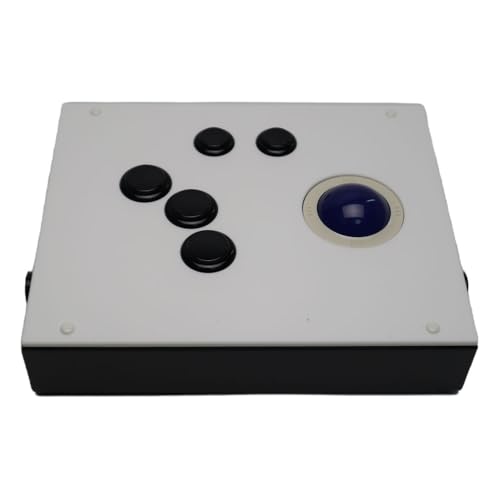
- Smooth-rolling trackball with blue LED lighting
- Sanwa buttons in a compact desktop layout
- Works with PC, Raspberry Pi, and emulators
Best For: PC and emulator players who want a compact arcade controller with trackball
Cabinet Upgrade Choice
ThunderStick LED Arcade Trackball TS-UTB01

- Drop-in replacement for Arcade1Up cabinets
- Compatible with Atari 12-in-1 and Centipede units
- Works with PC, Mac, and Raspberry Pi
Best For: Arcade1Up owners upgrading a stock trackball
Classic Jamma Pick
2-inch Trackball for Jamma 60-in-1
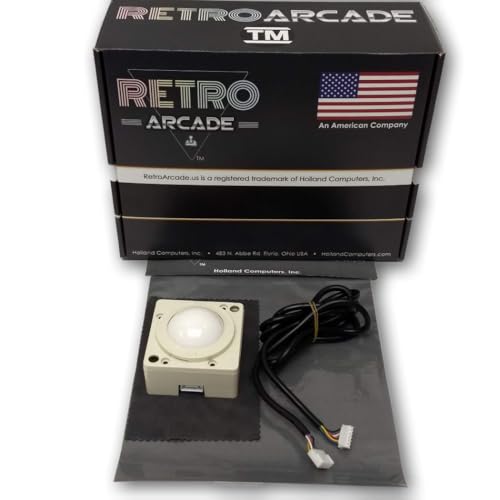
- 2-inch manual trackball
- Built for Jamma 60-in-1 and iCade PCB use
- Includes 90-day manufacturer warranty
Best For: Jamma and iCade arcade builds that need a compact trackball
All-in-One DIY Upgrade
GRS LED Trackball Spinner Combo

- Spinner and trackball combined in one unit
- USB-compatible with Mac, PC, Raspberry Pi, and arcade machines
- Customizable LED effects with optical tracking
Best For: DIY arcade panels that want a combined spinner and trackball
Big-Ball Retro Option
3-inch LED Color-Changing Trackball

- Larger 3-inch trackball design
- USB and PS2 interface support
- LED color-changing retro look
Best For: Arcade builds that want a larger illuminated trackball
Trackball Upgrade Kit
USB Arcade Trackball Mouse with LED Bracket
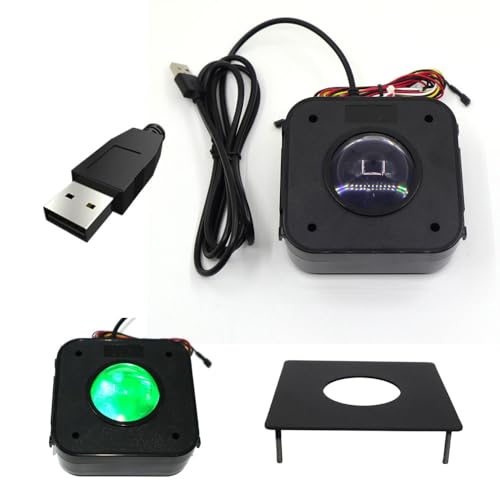
- USB trackball module with quick connects
- Metal plate for wood or metal panels
- LED illumination for arcade builds
Best For: DIY cabinet builders needing a trackball add-on
Multiplayer Cocktail Cabinet
3516-Game 3D Box with Trackball

- 3516 preloaded games with vertical and horizontal support
- USB trackball plus 8-way joysticks and LED buttons
- 4-player cocktail cabinet with 1280x720 display
Best For: Families and game rooms wanting an all-in-one arcade cabinet
Vertical-Horizontal Arcade Cabinet
Switchable 3516-Game Trackball Console

- Switches between 516 vertical and 3000 horizontal games
- Built-in USB trackball with LED controls
- Compact 4-player cocktail cabinet design
Best For: Buyers wanting a compact cabinet with flexible game orientation
Premium Full-Size Pick – FightBox R10 Arcade Fight Stick With Trackball
If you want an arcade controller with trackball that feels closer to a real cabinet than a casual gamepad, the FightBox R10 is built for that role. It pairs a Sanwa joystick with a 3-inch LED trackball, adds a 10-button layout, and uses a heavy metal body for a stable desktop or lap-friendly setup.
Best For: Players who want a premium, full-size fight stick with an integrated trackball for PC, PS3, or Switch play.
Pros:
- Sanwa joystick and premium arcade components
- 3-inch LED trackball for classic arcade-style control
- Robust metal construction for stable placement
- Wide compatibility with PC, PS3, and Nintendo Switch
Cons:
- Larger footprint than compact trackball controllers
- Primarily aimed at arcade-style games and setups
Overall, the R10 stands out if you want a more serious arcade control panel with trackball input and solid hardware. Its feature set is especially appealing for players who value premium parts and a sturdier build.
Cabinet Build Part – Multicade Full Size Control Panel 2 Inch Trackball Hole
This arcade controller with trackball option is less of a ready-to-play peripheral and more of a cabinet part for a larger build. The Multicade full-size control panel is designed for stand-up cabinets and includes a 2-inch trackball hole, making it useful when you are planning or replacing an arcade cabinet control surface.
Best For: Builders and cabinet owners who need a full-size control panel designed around a 2-inch trackball opening.
Pros:
- Full-size control panel for stand-up cabinets
- Pre-cut 2-inch trackball hole
- Useful for arcade cabinet replacement or custom builds
Cons:
- Not a complete plug-and-play controller
- Limited product details beyond cabinet-part use
If you are working on a cabinet project, this panel gives you the trackball opening and size you need in one part. It makes the most sense for DIY or replacement use rather than standalone gaming.
Compact Trackball Pick – FightBox R6 USB Arcade Game Trackball Controller
The FightBox R6 is a compact arcade controller with trackball for players who want a smaller desktop setup without giving up arcade-style controls. It includes a smooth-rolling trackball with blue LED backlighting, Sanwa buttons, and a stable low-profile design that suits PC and emulator use.
Best For: PC and emulator users who want a compact, stable trackball controller with arcade components.
Pros:
- Blue LED trackball with smooth rolling action
- Sanwa buttons and quality arcade components
- Compact size with non-slip bottom pads
- Supports PC, Raspberry Pi, media players, and emulators
Cons:
- Only 6 buttons, so layout is more limited than larger panels
- Designed mainly for desktop use rather than full cabinet setups
The R6 is a practical pick if you want trackball control in a smaller, tidy package. Its feature mix makes it well suited to retro gaming, especially when space and stability both matter.
Cabinet Upgrade Choice – ThunderStick LED Arcade Trackball TS-UTB01
The ThunderStick TS-UTB01 is an arcade controller with trackball for users upgrading an existing cabinet rather than buying a full new panel. It is described as a drop-in replacement for Arcade1Up cabinets and supports Arcade1Up Atari 12-in-1 and Centipede units, plus PC, Mac, and Raspberry Pi use through a USB interface board.
Best For: Arcade1Up owners who want to replace a stock trackball with an industrial-quality upgrade.
Pros:
- Drop-in replacement for Arcade1Up cabinets
- Compatible with Arcade1Up Atari 12-in-1 and Centipede units
- Supports PC, Mac, and Raspberry Pi via USB interface board
- Industrial-quality upgrade path for existing trackball setups
Cons:
- Not compatible with A1Up Centipede Legacy Unit
- More of an upgrade part than a standalone controller
This is the most targeted option in the group if your goal is cabinet replacement. It makes sense for owners who need a specific fit and want a sturdier trackball solution without changing the whole machine.
Classic Jamma Pick – 2-inch Trackball for Jamma 60-in-1
RetroArcade.us Track Ball - 2 inch Arcade Game Trackball for Jamma 60-in-1 Jamma iCade PCB Board
Check Price On AmazonIf you need an arcade controller with trackball for a Jamma or iCade setup, this 2-inch model is built for straightforward retro use. It’s a manual, indoor trackball made for adult players and comes as a single unit for compatible arcade boards.
Best For: Jamma 60-in-1 and iCade owners who want a compact 2-inch trackball replacement.
Pros:
- 2-inch size suits compact arcade control panels.
- Designed for Jamma 60-IN-1 and Jamma iCade PCB board use.
- Manual operation keeps the setup simple.
- Includes a 90-day manufacturer warranty.
Cons:
- Built for specific arcade board compatibility, not general USB use.
- No extra features like LED lighting or spinner controls.
- Requires an AC adapter-powered setup.
This is a practical choice if your priority is matching the right trackball size and board type rather than adding modern extras. For a classic arcade control build, it stays focused on the essentials.
All-in-One DIY Upgrade – GRS LED Trackball Spinner Combo
This arcade controller with trackball combines a spinner and trackball in one unit, which can simplify a DIY control panel build. It uses optical movement detection, USB connectivity, and supports Mac, PC, Raspberry Pi, and arcade machine setups.
Best For: DIY builders who want a combined spinner-trackball control with USB support.
Pros:
- Spinner and trackball are combined into one device.
- USB connectivity works with Mac, PC, Raspberry Pi, and arcade machines.
- Optical tracking is designed for strong trackball performance.
- Customizable LED effects add visual appeal.
Cons:
- Designed for 28mm hole setups, so panel compatibility matters.
- Wireless feature is listed, but the unit is also corded electric.
- More complex than a basic standalone trackball.
For builders who want fewer separate controls and more flexibility, this combo stands out. It’s a smart fit when you want modern connectivity plus arcade-style lighting in one package.
Big-Ball Retro Option – 3-inch LED Color-Changing Trackball
If you’re shopping for an arcade controller with trackball and want a larger 3-inch ball, this model is built for classic arcade-style use. It includes USB and PS2 interfaces, a color-changing LED design, and a corded electric power setup for indoor manual operation.
Best For: Arcade setups that want a larger 3-inch illuminated trackball with USB and PS2 support.
Pros:
- 3-inch size offers a larger trackball feel.
- USB and PS2 interfaces provide flexible connectivity.
- LED color-changing design adds a retro visual effect.
- Comes with a 90-day manufacturer warranty.
Cons:
- Made for manual indoor use only.
- Does not include spinner controls or combo functions.
- Requires a corded electric power setup.
This is a strong pick when ball size and simple retro presentation matter more than extra controls. It fits best in arcade builds that want a straightforward illuminated trackball with legacy interface support.
Trackball Upgrade Kit – USB Arcade Trackball Mouse with LED Bracket
TruBoost USB Arcade Game Trackball Mouse Illuminated LED Round 4.5cm USB Connector with Bracket Kit
Check Price On AmazonIf you need an arcade controller with trackball for a custom build or an upgrade, this USB trackball assembly is aimed at straightforward integration. It works like a standard 3-button computer mouse, includes quick connects for push buttons, and comes with a metal mounting plate for wood or metal control panels.
Best For: DIY arcade cabinet builders and tinkerers who want a USB trackball module with easy mounting.
Pros:
- USB plug-and-play style connection with quick connects for buttons
- Metal mounting plate helps adapt it to wood or metal control panels
- Illuminated LED design adds a visible arcade-style look
- Operates like a standard 3-button computer mouse
Cons:
- Trackball-only component, not a full arcade console
- Designed for arcade-style panels rather than general desktop use
- Single-unit kit may require additional parts for a complete build
This is a practical choice if your priority is adding a trackball to a cabinet rather than buying a full machine. The included bracket and wired button support make it more suited to hands-on arcade projects than plug-and-play entertainment systems.
Multiplayer Cocktail Cabinet – 3516-Game 3D Box with Trackball
For buyers comparing an arcade controller with trackball in a full stand-up style setup, this all-in-one console goes well beyond a simple control panel. It combines 3516 preloaded games, a 1280×720 display, 8-way joysticks, LED push buttons, USB trackball integration, and 4-player support in a cocktail cabinet design.
Best For: Households, game rooms, or group setups that want a complete multi-player arcade cabinet with built-in trackball controls.
Pros:
- Large preloaded library with 516 vertical and 3000 horizontal games
- USB trackball included alongside joysticks and LED push buttons
- Supports up to 4 players for multiplayer sessions
- 1280×720 display and cocktail cabinet layout add versatility
Cons:
- Larger footprint than a standalone control panel
- Not aimed at buyers who only need a simple replacement trackball
- Game count may matter more than control customization for some users
This is the most feature-heavy option in the group, especially if you want a ready-to-play arcade cabinet instead of building one. The trackball is part of a broader package, so it makes sense when you want both controls and entertainment in one unit.
Vertical-Horizontal Arcade Cabinet – Switchable 3516-Game Trackball Console
If you want an arcade controller with trackball built into a full cabinet, this switchable console is designed for both vertical and horizontal game libraries. It includes 3516 games, a 1280×720 screen, 8-way joysticks, LED push buttons, and a USB trackball in a compact cocktail-style layout.
Best For: Players who want a compact retro cabinet with trackball support and switchable screen orientation.
Pros:
- Supports 516 vertical-screen and 3000 horizontal-screen games
- USB trackball is built into the cocktail cabinet control setup
- 1280×720 display keeps visuals crisp and bright
- 4-player design works for group play and parties
Cons:
- Controller type is listed as joystick, so trackball is one part of the setup
- Compact dimensions may be less suitable for those wanting a larger cabinet
- Not a standalone trackball accessory
This model is a strong fit if you want the flexibility to play both vertical and horizontal classics without changing systems. It balances cabinet-style presentation with a built-in trackball, making it a practical pick for shared entertainment spaces.
How We Picked the Best Arcade Controller with Trackball
We focused on compatibility, control layout, build quality, input options, and overall value. For an Arcade Controller with Trackball, the most important factors are how well the trackball responds, whether the button layout suits your games, and if the unit works cleanly with your cabinet or PC setup.
Quick Comparison
In this group, some products are ready-made USB controllers for quick plug-and-play use, while others are larger control panels or cabinet components meant for deeper custom builds. A few also add features like LED lighting, spinner support, or bundled game systems, which may matter more if you want a complete entertainment solution rather than a single input device.
Key Buying Factors for an Arcade Controller with Trackball
Size and Mounting
Trackball size affects feel and compatibility. Smaller 2-inch units are common in compact panels and classic-style builds, while larger trackballs can offer a more substantial arcade feel. Check hole dimensions, bracket style, and cabinet depth before buying.
Platform Compatibility
Make sure the controller supports your intended system. USB models are usually simplest for PC and emulation setups, while other controllers may be better suited to JAMMA, multicade boards, or dedicated arcade cabinets.
Control Layout
Look at the spacing of buttons, joystick position, and whether you need extras like a spinner or additional function buttons. A good layout can matter as much as the trackball itself, especially for games that switch between analog-style and button-heavy play.
Build Quality and Responsiveness
Choose a controller with solid materials, smooth trackball movement, and reliable input registration. If you plan to play centipede-style shooters, golden-age arcade titles, or mouse-driven games, responsiveness should be a priority.
Lighting and Aesthetics
LED lighting is optional, but it can be a nice fit for showpiece cabinets or visible home arcade setups. Treat lighting as a bonus feature, not the main reason to buy.
Who Should Buy Which Arcade Controller with Trackball?
If you want a simple all-around solution, a USB Arcade Controller with Trackball is often the easiest path. If you are building or upgrading a full cabinet, a larger control panel or panel-ready trackball may be the better choice. For compact setups, prioritize smaller footprints and straightforward mounting. For feature-heavy builds, look for added spinner support, lighting, or bundled cabinet-friendly components.
In short, match the controller to your cabinet size, preferred games, and system compatibility first. Once those basics are right, the rest becomes a matter of layout preference and feature set.