Building a more immersive sim setup starts with the right hardware. A well-chosen flight simulator control panel for home cockpit use can make procedures faster, controls more tactile, and flying far more realistic.
Below, we focus on practical options across different aircraft styles, budgets, and desk spaces so you can pick the panel that fits your simulator goals.
Best 10 Flight Simulator Control Panel for Home Cockpit Picks for 2026
All-in-One Throttle Suite
Honeycomb Bravo Throttle Quadrant

- Configurable for GA aircraft through four-engine jets
- Includes autopilot, annunciator, gear, flap, trim, and reversers
- Works with MSFS, X-Plane 11/12, and Prepar3D
Best For: Home cockpit builders who want a versatile, realistic throttle and systems panel.
Dedicated Autopilot Panel
Logitech G USB Pro Flight Multi Panel

- Provides a full autopilot panel with controls and LED display
- Mounts to the Pro Flight Yoke System or a custom cockpit
- USB-powered for simple Windows-based setup
Best For: Simmers building a modular cockpit who need a compact autopilot control panel.
B737 Overhead Module

- Aluminum and acrylic overhead panel with backlighting
- Single USB connection powers logic and lighting
- Designed for MSFS 2020/2024 and X-Plane 12
Best For: Builders of a B737-style home cockpit who want an overhead module with a realistic layout.
Live Instrument Display
Logitech G Pro Flight Instrument Panel

- 3.5-inch LCD shows real-time cockpit data
- Automatically updates based on sim events
- Compact add-on for a home cockpit display area
Best For: Simmers who want a dedicated instrument screen to complement their cockpit setup.
Premium MCDU for Serious Home Cockpits
SYDYSOSO A320 Control Display Unit

- CNC aluminum body with authentic metal texture
- Real silicone keys and full-color display
- USB-C plug-and-play, no external power needed
Best For: Advanced simmers and cockpit builders who want an Airbus-style CDU
Classic Plug-In Radio Stack Panel
Logitech G USB Pro Flight Radio Panel

- Twin dials for fast frequency tuning
- Real-time LED displays in supported sims
- Includes mounting bracket and screws
Best For: PC simmers who want a dedicated radio communication panel
Immersive B737 Overhead Panel
ConsoleXpress B737 Light OVHD Panel
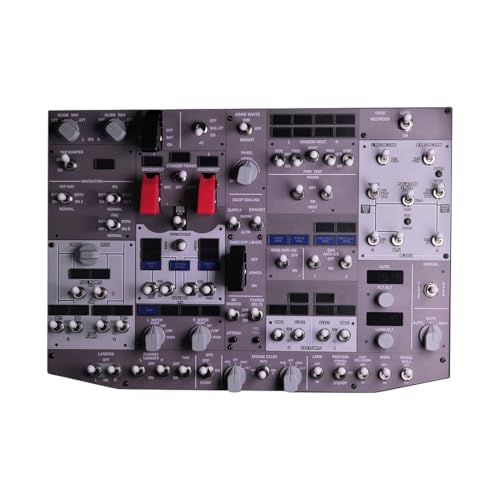
- Backlit B737 overhead layout for home cockpits
- Metal housing with 4 mm HD acrylic panel
- USB-powered with VESA mounting support
Best For: B737 cockpit builders who want an overhead panel with lighting
General Aviation Auto Pilot Pick
Full-Scale Digital Autopilot Panel for Home Cockpits

- Full-scale general aviation autopilot layout
- Automatic backlighting for low-light sessions
- Includes aluminum stand and rear mounting holes
Best For: General aviation sim pilots building a realistic autopilot station
737 MCP Training-Grade Pick
SYDYSOSO 737X Mode Control Panel

- True 1:1 scale 737-style MCP layout
- Custom displays with calibrated color output
- USB plug-and-play for desktop or cockpit builds
Best For: Advanced simmers and home cockpit builders focused on 737 operations
Realistic Boeing 737 Replica Pick
SYDYSOSO 737X Mode Control Panel Replica
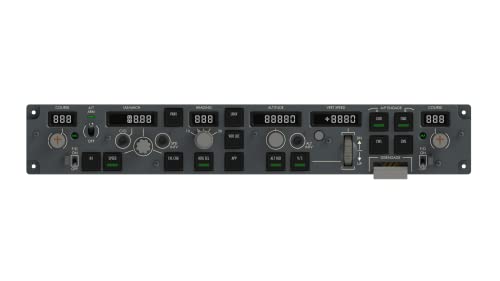
- 1:1 Boeing 737-style replica panel
- 14 custom switches and 5 adjusting knobs
- USB plug-and-play with broad sim support
Best For: Dedicated Boeing 737 home cockpit setups and add-on aircraft users
All-in-One Throttle Suite – Honeycomb Bravo Throttle Quadrant
If you want a flight simulator control panel for home cockpit use that covers a lot of real-world functions in one unit, the Honeycomb Bravo Throttle Quadrant is built for that job. It combines throttle control with an autopilot panel, annunciator panel, gear lever, flap lever, trim wheel, and thrust reversers, making it a strong centerpiece for both GA and airliner-style setups.
Best For: Sim pilots who want an all-in-one cockpit control unit with broad aircraft compatibility.
Pros:
- Configurable throttle setup supports anything from single-engine GA aircraft to four-engine jets.
- Includes autopilot, annunciator, gear, flap, trim wheel, and thrust reverser controls.
- Offers 7 programmable keys plus multiple switches and indicator lights for customization.
- Compatible with Microsoft Flight Simulator, X-Plane 11 & 12, and Prepar3D.
Cons:
- Designed as a desktop cockpit centerpiece, so it takes up meaningful space.
- Most useful when you want a broader throttle and systems panel rather than a single-purpose control.
Overall, this is one of the most versatile home cockpit additions if you want realistic multi-aircraft control in a single hardware package. Its strength is how many common cockpit functions it brings together without sacrificing compatibility.
Dedicated Autopilot Panel – Logitech G USB Pro Flight Multi Panel
The Logitech G USB Pro Flight Multi Panel is a practical flight simulator control panel for home cockpit setups when you want dedicated autopilot controls in a compact unit. It gives you a switch-based layout with an LED display and is made to integrate with the Pro Flight Yoke System or mount into your own cockpit arrangement.
Best For: Pilots who want a dedicated autopilot panel that fits neatly into a modular sim setup.
Pros:
- Full autopilot panel with associated setting controls.
- LED display adds quick at-a-glance feedback during flight.
- Can mount to the Pro Flight Yoke System or a custom home cockpit.
- USB connection keeps setup straightforward for Windows systems.
Cons:
- Works best as part of a larger setup rather than as a standalone cockpit centerpiece.
- Compatibility notes in the supplied details are older, which may matter for some sim environments.
This panel makes sense if you want to add autopilot functionality without committing to a large hardware footprint. It is a focused, cockpit-style accessory that helps a home setup feel more organized and realistic.
B737 Overhead Module – XMalNexity B107 B737 OVHD
If your goal is a more authentic flight simulator control panel for home cockpit use, the XMalNexity B107 B737 Overhead Panel is aimed squarely at Boeing-style setups. It uses an aluminum housing with a backlit acrylic panel, auto-return switches, and single-USB operation to create a convincing overhead section for MSFS and X-Plane.
Best For: Home cockpit users building a B737-style overhead panel with backlit controls.
Pros:
- Premium aluminum alloy frame with 4mm high-definition acrylic panel.
- Backlit controls and high-power LEDs support a realistic overhead feel.
- Single USB connection handles both power and logic without an external source.
- Compact design includes a VESA interface for easier cockpit mounting.
Cons:
- Focused on B737-style simulation rather than a general-purpose cockpit panel.
- Best suited to users comfortable with MobiFlight/Rowsfire-based setup and tutorials.
This is a strong fit if you are chasing a specific airliner cockpit look and want a panel that feels purpose-built for overhead systems. Its mountability and backlit layout make it especially appealing for dedicated home cockpit builders.
Live Instrument Display – Logitech G Pro Flight Instrument Panel
The Logitech G Pro Flight Instrument Panel is a useful flight simulator control panel for home cockpit setups when you want live instrument data in a dedicated display. Its 3.5-inch LCD screen automatically updates with software events, helping you keep key flight information visible without relying solely on the main monitor.
Best For: Sim pilots who want a compact display panel for real-time cockpit information.
Pros:
- Colorful 3.5-inch LCD screen shows real-time flight and aircraft data.
- Automatically updates and reacts to software events.
- Works with flight simulator software to display cockpit instrument information.
- Compact size makes it easier to fit into a home cockpit layout.
Cons:
- It is a display-focused module rather than a control-heavy panel.
- Best used as part of a larger cockpit rather than as a standalone input device.
For builders who want more visual immersion and less monitor clutter, this panel adds a practical instrument readout to the cockpit. It is a neat way to bring essential flight data into a dedicated hardware display.
Premium MCDU for Serious Home Cockpits – SYDYSOSO A320 Control Display Unit
If you’re building a flight simulator control panel for home cockpit use and want a realistic Airbus-style interface, this SYDYSOSO A320 MCDU is aimed at advanced setups. It pairs a CNC aluminum housing with real silicone keys, a full-color display, and USB-C plug-and-play connectivity for a cleaner desktop or cockpit install.
Best For: Advanced simmers, student pilots, and home cockpit builders who want a durable, training-inspired CDU layout.
Pros:
- Full CNC-milled aluminum housing for a rigid, authentic metal feel
- Real silicone keys designed for soft travel and tactile feedback
- Full-color display with high-contrast fonts and clear annunciator-style visuals
- USB-C plug-and-play setup with no HDMI, VGA, or external power supply required
Cons:
- Geared toward advanced simulation setups rather than casual use
- Platform support depends on proper configuration in compatible PC simulators
Overall, this is a strong pick if your home cockpit needs a realistic Airbus control display unit with premium materials and a straightforward single-cable connection. It looks and feels built for dedicated simulation environments.
Classic Plug-In Radio Stack Panel – Logitech G USB Pro Flight Radio Panel
For a flight simulator control panel for home cockpit communication functions, the Logitech G Pro Flight Radio Panel is a straightforward add-on with physical knobs, LED readouts, and real-time frequency control. It’s designed for PC flight sims and is especially useful if you want to keep radio tuning off-screen.
Best For: Sim pilots who want a dedicated radio stack panel for quick, tactile frequency adjustments.
Pros:
- Twin concentric dials make frequency changes faster and more precise
- Standby-to-active switch simplifies radio management
- LED displays update in real time in supported simulators
- Includes mounting bracket and hardware for cockpit-style installation
Cons:
- Compatibility is tied to specific PC sims and listed Windows versions
- Uses RCA connectivity rather than a modern USB-C-style single cable
- Warranty is limited to 90 days
This panel is best viewed as a practical cockpit upgrade: not flashy, but effective where radio access matters most. If you fly supported titles and want physical frequency control, it fills that role well.
Immersive B737 Overhead Panel – ConsoleXpress B737 Light OVHD Panel
If your goal is a more complete flight simulator control panel for home cockpit immersion, this ConsoleXpress B737 overhead panel is built for that role. It combines a backlit layout, metal housing, and simulation-oriented software support for MSFS 2020/2024 and X-Plane 12, making it a focused choice for Boeing-style cockpit builds.
Best For: Home cockpit builders creating a B737 overhead section with backlighting and mapped controls.
Pros:
- Designed specifically for B737 overhead simulation in home cockpit setups
- Backlit panel with LED lighting for a more realistic cockpit look
- Metal housing and 4 mm HD acrylic panel for a sturdy feel
- USB-powered with VESA mounting support and no external power supply required
Cons:
- Focused on B737-style workflows rather than a general-purpose control panel
- Compatibility depends on supported software and mapping tools
As a cockpit module, this is a strong fit if you’re assembling a Boeing-inspired overhead and want a mix of realism and practical USB operation. It’s most compelling when paired with a dedicated multi-panel home cockpit layout.
General Aviation Auto Pilot Pick – Full-Scale Digital Autopilot Panel for Home Cockpits
If you want a flight simulator control panel for home cockpit use that feels built around real-world IFR workflows, this digital autopilot panel is a strong general aviation option. It uses a full-scale layout, HID-style USB connection, and easy button mapping so it can fit into both desktop setups and more permanent sim rigs.
Best For: General aviation sim pilots who want a realistic autopilot panel with flexible mapping and desktop-friendly placement.
Pros:
- Full-scale layout with authentic cockpit-style controls and tactile feedback
- Automatic ambient backlighting helps visibility during night flights
- Standard HID device behavior supports broad in-game key binding
- Includes a custom aluminum alloy stand plus rear mounting holes for cockpit setups
Cons:
- Designed exclusively for general aviation flight simulation, not all aircraft types
- Some desktop users may need double-sided tape for extra stability
Overall, this panel is best for simmers who value authentic autopilot interaction and want a straightforward plug-and-play path into home-cockpit flying. The included stand and lighting make it especially practical for a desk-based setup that still aims for realism.
737 MCP Training-Grade Pick – SYDYSOSO 737X Mode Control Panel
For a flight simulator control panel for home cockpit builders focused on airliner workflows, this 737-style MCP is built to mirror the real aircraft’s mode control panel layout. It uses a true 1:1 scale design, USB plug-and-play connectivity, and realistic button/display behavior aimed at advanced simming and training-style use.
Best For: Home cockpit builders and advanced simmers who want a realistic 737 MCP with training-oriented details.
Pros:
- 1:1 scale 737-style MCP designed around real aircraft dimensions
- Customized digital displays with calibrated color output
- Realistic button feel and a support for automatic display brightness adjustment
- Single USB connection handles both power and data for easier integration
Cons:
- Best suited to 737-style workflows rather than general aviation panels
- Integration is strongest when paired with compatible cockpit hardware
This is a solid choice if your setup is centered on a 737 home cockpit and you want a panel with more of a training-grade feel. The scale, display tuning, and tactile controls all point toward immersion that goes beyond a basic desktop accessory.
Realistic Boeing 737 Replica Pick – SYDYSOSO 737X Mode Control Panel Replica
If you need a flight simulator control panel for home cockpit use that leans hard into Boeing 737 realism, this replica MCP is designed to sit close to the real aircraft experience. It combines a 1:1 size shell, USB plug-and-play operation, and aircraft-specific logic for simmers who want an authentic multi-panel feel.
Best For: Boeing 737 sim pilots who want a realistic replica MCP with simple one-cable setup.
Pros:
- 1:1 simulation of the real aircraft’s size with an engineering plastic shell
- 14 custom switches, 5 adjusting knobs, and real-aircraft-style A/T logic
- One USB cable handles both power and data with built-in plug-and-play support
- Compatible with major sim platforms and several PMDG/ZIBO/LevelUP aircraft add-ons
Cons:
- Compatibility is focused on specific simulator platforms and aircraft add-ons
- Primarily aimed at 737-style operations rather than a broader general aviation audience
This panel makes the most sense for builders who want an aircraft-specific 737 autopilot setup instead of a generic control box. Its detailed switch layout and real-aircraft logic help it stand out in a dedicated Boeing home cockpit.
How We Picked the Best Flight Simulator Control Panel for Home Cockpit
We focused on Flight Simulator Control Panel for Home Cockpit options that offer the best mix of realism, software compatibility, build quality, and day-to-day usability. Priority went to panels with responsive controls, clear labeling, reliable USB connectivity, and support for popular sims such as Microsoft Flight Simulator and X-Plane.
We also considered whether a panel is better suited to a general aviation setup, an airliner-style cockpit, or a modular desktop build. That matters because the best choice is not always the most complex one.
Quick Comparison
If you want broad utility, all-in-one throttle and autopilot units are the most flexible starting point. If your goal is airliner immersion, Boeing-style MCPs, overhead panels, and CDU units bring a much more authentic workflow. For pilots who want to monitor navigation and communications more efficiently, radio and instrument panels can add high value without taking much desk space.
Key Buying Factors for a Flight Simulator Control Panel for Home Cockpit
Aircraft Match
Choose hardware that matches the aircraft you fly most often. General aviation pilots usually benefit from autopilot, radio, and multi-panel controls, while airliner fans may want overhead, MCP, and CDU-style panels first.
Compatibility
Check plug-and-play support, driver requirements, and sim integration before buying. Some panels are easy to set up but rely on community profiles or third-party software for full functionality.
Build and Feel
Metal housings, firm switches, and realistic detents improve long-term satisfaction. For a Flight Simulator Control Panel for Home Cockpit use, the tactile feel often matters as much as the visual design.
Layout and Space
Measure your desk or cockpit frame carefully. Larger replica panels can be impressive, but compact units may be the smarter choice if you need room for yokes, throttles, or multiple displays.
Features You Will Actually Use
Extra realism is great, but prioritize controls you will touch every session. Autopilot modes, coms, flaps, gear, and key system switches usually deliver the biggest improvement in workflow.
Who Should Buy Which Flight Simulator Control Panel for Home Cockpit?
Beginners and mixed-aircraft simmers should start with versatile panels that cover common flight functions. General aviation flyers should look for compact autopilot and radio solutions, while airliner enthusiasts will get the most from Boeing-inspired MCP, overhead, and CDU hardware.
If you are building a dedicated home cockpit, modular expansion is the safest path: begin with one core panel, then add specialized units as your setup and flying style evolve.