A gaming monitor mount with laptop tray is a smart upgrade if you want better ergonomics, cleaner cable routing, and more room on your desk. It can also help place your main display at eye level while keeping your laptop accessible.
Below, we focus on mounts that balance stability, motion range, weight capacity, and VESA compatibility so you can choose a setup that fits your desk and your daily routine.
Best 10 Gaming Monitor Mount with Laptop Tray Picks for 2026
Single-Monitor Laptop Desk Mount
WALI Adjustable Laptop Desk Mount

- Supports either a 17-inch laptop or a 32-inch VESA monitor.
- Ventilated tray helps airflow and has a lip for stability.
- Offers clamp or grommet mounting plus broad arm adjustments.
Best For: A flexible single-arm setup for a laptop or monitor at one desk.
Dual-Setup Gaming Mount
Afaloona Dual Monitor and Laptop Stand
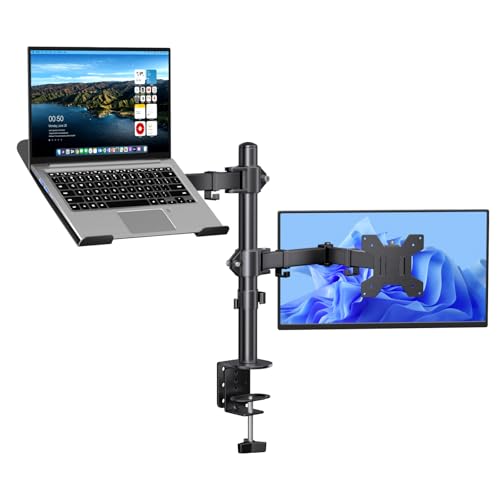
- Holds one 13-32 inch monitor plus one 11-17 inch laptop.
- Tray converts to dual-monitor mode when needed.
- Includes ventilated tray and cable-management clips.
Best For: Gamers and streamers who want one mount that can change with their setup.
Ergonomic Single Arm
HUANUO Monitor Arm with Laptop Tray

- Fits a 13-32 inch monitor and an 11-17 inch laptop.
- Offers wide motion with up to 17 inches of height adjustment.
- Ventilated tray and cable management support a cleaner desk.
Best For: A compact ergonomic setup with strong adjustability and laptop cooling.
Budget-Friendly Desk Stand
Suptek Monitor and Laptop Mount

- Supports a monitor plus a detachable tray for laptops up to 15.6 inches.
- Offers 180° swivel, 360° rotation, 90° tilt, and 400mm height adjustment.
- Comes with both clamp and grommet mounting plus cable management.
Best For: A value-focused desk mount with flexible laptop-tray use.
Ergonomic 2-in-1 Pick

- Works as a laptop tray mount or monitor arm
- Fits laptops up to 17" and monitors up to 34"
- Full-motion arm with ventilated, secure tray
Best For: People who want one mount for both a laptop and monitor
Heavy-Duty Tray Only

- Tray-only add-on for existing VESA monitor arms
- Steel build supports laptops up to 19.8 lbs
- Vented surface, EVA pads, and safety straps
Best For: Shoppers who already have a monitor arm and need a stronger laptop tray
High-Rise Combo Mount
MOUNTUP Laptop and Monitor Arm

- Supports a laptop tray and monitor arm in one mount
- Tall column gives up to 23.6" height
- Locking tray and open-frame airflow design
Best For: Gamers and multitaskers who want a tall 2-in-1 arm
Heavy-Duty VESA Tray
Ergounion 100x100 Tray for Heavy Gaming Laptops

- Supports laptops up to 17.3 inches and 28.6 lbs.
- Hollow design helps improve airflow.
- Bottom-edge clips keep side ports accessible.
Best For: Existing 100x100mm VESA arms with larger gaming laptops
Convertible 2-in-1 Mount
Mount Pro 2-in-1 Laptop and Monitor Desk Stand
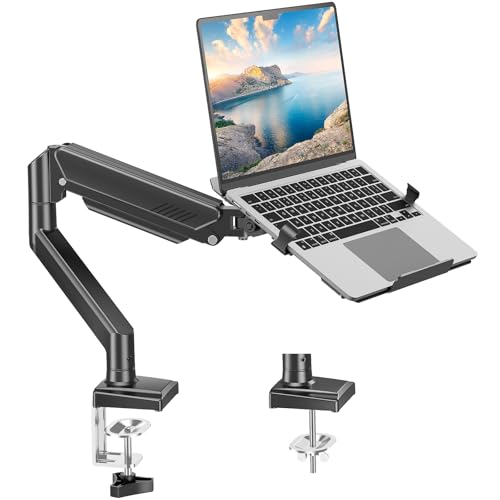
- Switches between laptop tray and monitor mount modes.
- Fits laptops up to 17 inches and monitors up to 32 inches.
- Includes tilt, swivel, rotation, and cable management.
Best For: Flexible setups that alternate between a laptop and monitor
Monitor Arm Add-On
Mount-It VESA Laptop Tray for Monitor Arms

- Attaches to 75x75 or 100x100 VESA arms.
- Fits laptops up to 16.5 inches wide.
- Ventilated steel tray with clips and traction pads.
Best For: Users adding a laptop tray to an existing monitor arm
Single-Monitor Laptop Desk Mount – WALI Adjustable Laptop Desk Mount
If you want a gaming monitor mount with laptop tray that keeps a single screen and notebook at eye level, this WALI model is a practical 2-in-1 pick. It supports either one 17-inch laptop or a 32-inch VESA monitor, and the ventilated tray helps improve airflow during long work or play sessions.
Best For: Gamers and desk users who want a flexible single-arm setup with room for a laptop or monitor.
Pros:
- Supports a laptop up to 17 inches or a monitor with 75x75mm / 100x100mm VESA mounting.
- 16-inch height adjustment with +/-15 tilt, +/-90 swivel, and 360-degree rotation.
- Ventilated 14 x 11-inch tray with a bottom lip to help keep a laptop stable and cooler.
- Includes both C-clamp and grommet mounting options for different desk setups.
Cons:
- Single-arm design is better for one screen plus laptop than a dual-monitor layout.
- Laptop support is limited to notebooks up to 17 inches.
Overall, this is a straightforward ergonomic upgrade if you need a compact desk mount that can handle either a laptop or a monitor. It focuses on adjustability, cooling, and desk-saving flexibility rather than advanced multi-display expansion.
Dual-Setup Gaming Mount – Afaloona Dual Monitor and Laptop Stand
This gaming monitor mount with laptop tray is built for people who want a true dual-device workstation without giving up desk space. It supports one 13-32 inch monitor and one 11-17 inch laptop, and the removable tray can convert the setup into a dual monitor arm when your needs change.
Best For: Gamers, streamers, and multitaskers who want a flexible monitor-plus-laptop desk mount.
Pros:
- Supports one monitor and one laptop, with a removable tray that converts to dual-monitor use.
- Full-motion adjustment includes 15-inch height on the center pole, 15° tilt, 90° swivel, and 360° rotation.
- Ventilated laptop tray helps improve airflow during gaming or office use.
- Built-in cable management clips help keep the desk tidy.
Cons:
- Each arm supports up to 18 lbs, so heavier displays are not a fit.
- C-clamp installation requires a desk up to 3.9 inches thick.
For users who want flexibility first, this Afaloona stand stands out because it can shift from laptop-and-monitor mode to dual-monitor mode. That makes it a strong choice for shared gaming, streaming, and work setups.
Ergonomic Single Arm – HUANUO Monitor Arm with Laptop Tray
If you’re shopping for a gaming monitor mount with laptop tray that prioritizes adjustability, this HUANUO model is easy to place on a compact desk. It supports a 13-32 inch monitor and an 11-17 inch laptop, while the ventilated tray and cable management help keep the setup practical for everyday use.
Best For: Users who want a single monitor arm with a ventilated laptop tray and broad adjustment.
Pros:
- Supports 13-32 inch monitors and laptops up to 17 inches.
- Offers up to 17 inches of height adjustment, plus +/-45° tilt, +/-90° swivel, and 360° rotation.
- 14 x 12-inch ventilated tray includes a 0.8-inch bottom lip to help hold the laptop in place.
- Includes both C-clamp and grommet mounting hardware for wooden desks.
Cons:
- C-clamp and grommet installation is limited to wooden material desks.
- The tray is sized for laptops up to 17 inches, so larger notebooks won’t fit.
This is a strong all-around desk mount if you want a simple ergonomic upgrade without extra bulk. The combination of motion range, tray ventilation, and dual mounting options makes it easy to adapt to different desk layouts.
Budget-Friendly Desk Stand – Suptek Monitor and Laptop Mount
For a gaming monitor mount with laptop tray that covers the basics well, this Suptek stand offers a practical dual-purpose layout. It works with 13-32 inch monitors and includes a detachable laptop tray that can also be removed to use the arm as a dual monitor desk mount.
Best For: Buyers who want an affordable, adjustable monitor-and-laptop solution with mounting flexibility.
Pros:
- Fits most 13-27 inch flat or curved monitors with 75x75mm or 100x100mm VESA support.
- Detachable laptop tray can be used for a notebook up to 15.6 inches.
- Independent arm adjustment includes 180° swivel, 360° rotation, 90° tilt, and 400mm height adjustment.
- Includes both C-clamp and grommet mounting options, with cable and slot management.
Cons:
- Laptop tray is smaller than some competitors and tops out at 15.6-inch notebooks.
- Monitor support is limited to 27 inches in the detailed specs despite broader title wording.
This Suptek mount is a solid value pick if you want a flexible desk stand without complicated setup. It gives you the core features most people need: movement, tidy cable routing, and a tray that can be removed when you want a cleaner monitor-only arrangement.
Ergonomic 2-in-1 Pick – HUANUO Laptop & Monitor Mount
If you want a gaming monitor mount with laptop tray that can switch between a monitor and notebook setup, this HUANUO model is built for that exact job. It supports 13-34″ monitors or laptops up to 17″, and the tray can be removed when you want a standard VESA monitor arm.
Best For: Users who want one arm that can handle both a monitor and a laptop on a single desk.
Pros:
- 2-in-1 design works as either a laptop tray mount or a monitor arm.
- Supports laptops up to 17″ and monitors up to 34″ with VESA 75x75mm/100x100mm.
- Full motion adjustment includes tilt, swivel, rotation, and height/extension changes.
- Ventilated tray with anti-slip pads, widened guard, and Velcro straps helps keep a notebook secure.
Cons:
- Desk compatibility is limited to the stated clamp and grommet thickness ranges.
- Like all combo mounts, the tray must be removed to use it with a monitor.
Overall, this is a practical pick if your workspace changes between laptop and monitor use and you want a cleaner desk with flexible positioning. The pre-assembled parts and dual mounting options make it especially straightforward for a quick setup.
Heavy-Duty Tray Only – monTEK Adjustable Laptop Tray
If you already own a monitor arm and just need a gaming monitor mount with laptop tray, this monTEK tray is designed as an add-on rather than a full arm. It supports 12″-18″ laptops up to 19.8 lbs and uses a steel build with vented surface, safety straps, and adjustable spring clamps.
Best For: Buyers who need a sturdy replacement or add-on laptop tray for an existing VESA monitor arm.
Pros:
- Heavy-duty steel construction supports laptops up to 19.8 lbs.
- Detachable, reversible base plate helps fit slim or thicker laptops.
- Metal spring clamps, EVA pads, and dual safety straps help secure the device.
- Vented surface improves airflow for longer work or gaming sessions.
Cons:
- Tray only; monitor arm must be purchased separately.
- Limited to laptops in the stated 12″-18″ size range.
This is a focused accessory for people who already have a compatible arm and want a more secure, heat-friendly laptop platform. It is especially sensible if your current setup needs a sturdier tray rather than a full replacement mount.
High-Rise Combo Mount – MOUNTUP Laptop and Monitor Arm
This MOUNTUP option is a gaming monitor mount with laptop tray that’s built for switching between a notebook and a larger monitor. It supports laptops up to 17″ and monitors up to 32″, with a tall column, wide height range, and clamp or grommet installation for different desks.
Best For: Gamers and multitaskers who want a tall, adjustable 2-in-1 desk mount.
Pros:
- 2-in-1 design supports both laptops and monitors on one mount.
- Up to 23.6″ of height and 20.9″ of extension for flexible positioning.
- Secure latch tray helps keep the laptop locked in place.
- Open-frame tray design improves airflow during long sessions.
Cons:
- Laptop tray is limited to notebooks up to 17″.
- Desk thickness and grommet dimensions must fit the stated limits.
For a desk that needs both vertical reach and dual-device flexibility, this mount covers the basics well. The taller column and locking tray make it a strong fit when you want a raised, tidy setup for work or gaming.
Heavy-Duty VESA Tray – Ergounion 100×100 Tray for Heavy Gaming Laptops
If you want a gaming monitor mount with laptop tray that can also work as a standalone desk tray, this ergounion option is built around flexibility and stability. It attaches to most 100x100mm VESA mounts and supports laptops up to 17.3 inches and 28.6 lbs, while the hollow steel design helps with airflow and the bottom-edge clips keep side ports open for easier cable access.
Best For: Users who already have a 100x100mm VESA arm and want a sturdy tray for large gaming laptops or a cleaner ergonomic desk setup.
Pros:
- Fits most 100x100mm VESA mounts and supports laptops up to 17.3 inches.
- Hollow U-shaped tray improves airflow to help reduce overheating.
- Bottom-edge clips leave side ports accessible for cleaner cable routing.
- Heavy-duty alloy steel build is designed for a stable, jitter-free setup.
Cons:
- Requires a compatible VESA arm; it is not a complete mount on its own.
- Best desk use is recommended with a desk mat for surface protection.
This is a strong pick if your priority is turning an existing monitor arm into a reliable laptop platform without blocking ports. The fixed 30° desk mode adds versatility, but the real value is its secure, minimalist design for heavier laptops.
Convertible 2-in-1 Mount – Mount Pro 2-in-1 Laptop and Monitor Desk Stand
This gaming monitor mount with laptop tray is a practical choice if you want one setup that can switch between a laptop and a monitor. The MOUNT PRO design supports notebooks up to 17 inches, or you can remove the tray to mount a 13-32 inch display. With tilt, swivel, and rotation adjustment, it helps you position your screen at a more comfortable viewing height while keeping the desk organized.
Best For: People who want a flexible 2-in-1 desk mount for alternating between a laptop tray and a monitor arm.
Pros:
- Converts between laptop tray mode and monitor mount mode.
- Supports laptops up to 17 inches and monitors from 13-32 inches.
- Offers tilt, swivel, and 360° rotation for viewing comfort.
- Ventilated tray, anti-slip pads, and latches help keep devices secure.
Cons:
- Rotation warning says not to turn the tray vertical when using laptop mode.
- May be more setup than needed if you only want a dedicated laptop tray.
For users who like to swap between work and play, this model stands out for versatility rather than specialization. The clamp or grommet mounting options and cable management also make it a good fit for a tidy desk setup.
Monitor Arm Add-On – Mount-It VESA Laptop Tray for Monitor Arms
If you already own a monitor arm and want a gaming monitor mount with laptop tray to build a cleaner dual-screen station, this Mount-It! tray is made for that exact job. It attaches to 75×75 or 100×100 VESA patterns, raises your laptop to eye level, and uses adjustable clips plus traction pads to help keep the device stable during long work or gaming sessions.
Best For: Buyers with an existing VESA monitor arm who want to add a secure laptop tray without replacing their current mount.
Pros:
- Works with 75×75 and 100×100 VESA monitor arms.
- Adjustable side clips fit laptops up to 16.5 inches wide.
- Ventilated steel tray helps warm air escape during extended use.
- Includes traction pads, bottom lips, and lifetime warranty support.
Cons:
- Requires an existing monitor arm; it is not a standalone mount.
- Fits smaller laptops than some larger-tray alternatives.
This is the most straightforward add-on choice for people who want to upgrade a current VESA arm into a laptop-and-monitor setup. It focuses on secure positioning, airflow, and ergonomics rather than extra mounting features.
How We Picked the Best Gaming Monitor Mount with Laptop Tray Options
We looked for mounts that offer a stable hold, broad monitor compatibility, and a tray design that keeps a laptop secure without overheating or wobble. Priority factors included VESA support, monitor and laptop size limits, arm adjustability, desk clamp quality, and total load capacity.
We also favored models that make sense for gaming and hybrid work setups, where quick screen repositioning and a clean footprint matter just as much as raw strength.
Quick Comparison: What Matters Most
Some products are true 2-in-1 arms with an integrated laptop tray, while others are tray-only accessories meant to convert an existing monitor arm. If you need an all-in-one solution, choose a complete arm-and-tray model. If you already own a compatible arm, a standalone tray can be the more affordable route.
Also compare whether the arm supports one monitor or dual displays, since that changes how much desk space you save and how easily you can manage a gaming-plus-work layout.
Key Buying Factors for a Gaming Monitor Mount with Laptop Tray
Weight Capacity and Device Fit
Check both the monitor weight range and the laptop tray’s maximum laptop size. A 17-inch laptop claim is common, but actual fit depends on width, thickness, and the presence of a cooling chassis or protective shell.
Motion and Ergonomics
Look for height adjustment, tilt, swivel, and rotation if you want a more comfortable viewing angle. For gaming, the ability to shift the monitor quickly can improve visibility and reduce neck strain during long sessions.
Desk and Clamp Compatibility
Make sure your desk thickness works with the clamp or grommet mount. A stable desk mount is essential, especially if you plan to use a heavier monitor or frequently reposition the tray.
Cooling and Cable Management
Laptops benefit from open or ventilated tray designs that promote airflow. Built-in cable routing is also helpful for keeping charging, display, and accessory cables organized around your setup.
Build Quality
Steel or aluminum construction usually provides better long-term support than lightweight alternatives. This matters more if you’ll extend the arm often or use a larger monitor with a full-size laptop.
Who Should Buy Which Gaming Monitor Mount with Laptop Tray?
If you want a simple, space-saving upgrade, a single-arm Gaming Monitor Mount with Laptop Tray is usually the best fit. If you work and play across multiple screens, a dual-monitor capable design may be worth the extra cost and desk space.
Choose a tray-only accessory if you already own a compatible monitor arm and just need laptop support. For heavier laptops or larger displays, prioritize higher load ratings and sturdier materials over extra features. The best choice is the one that matches your gear, your desk, and how you actually use your setup day to day.