The best micro-ATX computer cases balance a smaller footprint with enough room for modern graphics cards, capable cooling, and practical cable management. The right choice depends on whether you prioritize airflow, a compact layout, quiet operation, or showcase styling.
We compared 10 standout options across compatibility, ventilation, included fans, radiator support, materials, and overall build flexibility to help you choose a case that fits both your hardware and your desk.
Best 10 Micro Atx Computer Cases Picks for 2026
Best Value Airflow Pick

- 360mm GPU and 240mm radiator support
- Ventilated panels with magnetic dust filters
- Flexible modular I/O placement
Best For: Budget Micro-ATX and Mini-ITX builds
Best Compact High-Performance Design

- 26.3-liter footprint with 415mm GPU support
- Supports 360mm radiators and up to 10 fans
- Flexible ATX, SFX, and SFX-L PSU placement
Best For: Powerful compact builds with custom cooling
Best Overall Cooling Flexibility
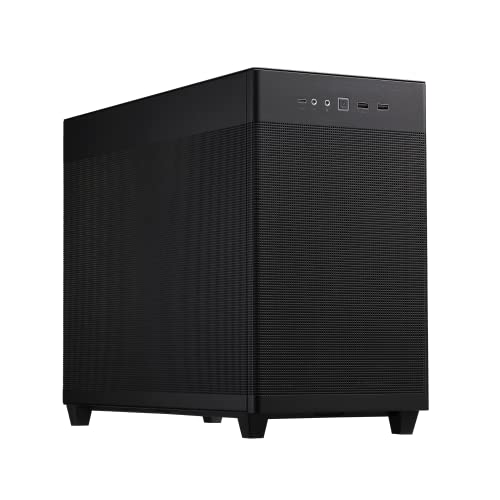
- Supports 360mm radiators and up to six fans
- Fits 338mm graphics cards and 180mm ATX PSUs
- Tool-free panels with 32mm cable gap
Best For: Cooling-focused Micro-ATX performance builds
Best Ready-to-Use RGB Case

- Three 120mm ARGB fans included
- Dual tempered-glass display panels
- Supports 280mm radiator and 340mm GPU
Best For: Showcase-oriented Micro-ATX gaming builds
Best Value Starter
Rosewill FBM-X5 Micro ATX Mini Tower

- Pre-installed 400W power supply
- Supports Micro ATX and Mini-ITX boards
- 240mm/280mm AIO support
Best For: Budget office and entry-level gaming builds
Best Design-Focused Compact Case

- Curved glass and walnut exterior panel
- Includes two front fans
- Compact 260mm GPU support
Best For: Décor-friendly compact desktop builds
Panoramic Gaming Pick

- 270-degree tempered-glass showcase design
- Supports Micro-ATX and Mini-ITX boards
- Three pre-installed fans included
Best For: Showcase gaming builds with immediate air cooling
Decor-Friendly Airflow Pick

- Walnut wood accents with tempered-glass side panel
- Four pre-installed 120mm fans
- Type-C 3.2 Gen 2 and three-sided mesh intake
Best For: Air-cooled builds for stylish home or office setups
ARGB Compact Pick

- Three pre-installed 120mm ARGB fans
- Quick-release panoramic glass panels
- Supports GPUs up to 309mm and Type-C 5Gbps
Best For: Compact, tidy air-cooled gaming builds with RGB lighting
Best Value Airflow Pick – Cooler Master Q300L V1
For shoppers comparing micro atx computer cases on a budget, the Cooler Master Q300L V1 offers a practical foundation with a ventilated design, flexible I/O placement, and support for capable gaming components.
Best For: Budget-conscious Micro-ATX or Mini-ITX builders who want flexible cooling and straightforward expandability.
Pros:
- Supports graphics cards up to 360mm and CPU coolers up to 159mm tall.
- Accommodates a 240mm liquid cooler and up to five fans.
- Perforated panels and magnetic dust filters support airflow and maintenance.
- Modular I/O panel can be positioned on the front, top, or bottom of either side.
Cons:
- Limited to four expansion slots.
- Supports Micro-ATX and Mini-ITX motherboards only.
- The listed power-supply maximum is 500 watts.
The Q300L V1 is a sensible choice when airflow, component clearance, and value matter more than premium materials or extensive storage capacity. Its transparent side panel also makes it suitable for showing off a carefully assembled build.
Best Compact High-Performance Design – Lian Li A3-mATX
The Lian Li A3-mATX is one of the more flexible micro atx computer cases for compact, high-performance systems. Its 26.3-liter layout supports long graphics cards, large radiators, and several power-supply formats.
Best For: Compact builders planning powerful hardware, extensive cooling, or a clean minimalist setup.
Pros:
- Supports GPUs up to 415mm while retaining a compact 26.3-liter design.
- Compatible with radiators up to 360mm and up to ten 120mm fans.
- Flexible front- or side-mounted PSU placement supports ATX, SFX, and SFX-L units.
- Wood front panel and modular construction create a distinctive minimalist appearance.
Cons:
- Fans are not included.
- Its compact layout may require more careful component and cable planning.
- The case is relatively heavy at 11 pounds.
Choose the A3-mATX when maximum hardware flexibility is more important than a simple plug-and-play build. The steel mesh panels and broad cooling support suit demanding components, while the wood front panel adds a refined visual touch.
Best Overall Cooling Flexibility – ASUS Prime AP201
The ASUS Prime AP201 balances a compact 33-liter footprint with strong cooling and hardware support, making it a versatile option among micro atx computer cases. Its fine mesh panels and generous cable-management space are especially useful for performance-focused builds.
Best For: Micro-ATX builders who want strong airflow, liquid-cooling support, and easy access during assembly.
Pros:
- Supports 280mm and 360mm radiators plus up to six fans.
- Accepts graphics cards up to 338mm and ATX power supplies up to 180mm long.
- Mesh panels use more than 57,000 precision-machined holes for airflow.
- Tool-free side panels and a 32mm cable-management gap simplify building.
Cons:
- Supports Micro-ATX and Mini-ITX motherboards only.
- Its front-mounted PSU layout can reduce front-area clearance for some builds.
- The 33-liter design is less compact than the smallest Micro-ATX cases.
The AP201 is a strong all-around choice for users who prioritize cooling and build convenience. It provides room for substantial hardware without moving up to a full-size ATX enclosure, while the removable panels make installation and maintenance easier.
Best Ready-to-Use RGB Case – Thermaltake View 170 TG ARGB
For builders who want lighting and display appeal without adding several fans separately, the Thermaltake View 170 TG ARGB is a compelling entry in micro atx computer cases. It includes three ARGB fans and uses front and side tempered-glass panels for a showcase-style build.
Best For: Gaming builders who want included RGB airflow and a clear view of their components.
Pros:
- Includes three 120mm ARGB fans.
- Supports a top radiator up to 280mm.
- Front and side pillarless tempered-glass panels provide a broad component view.
- Supports graphics cards up to 340mm.
Cons:
- Supports Micro-ATX motherboards only.
- Cooling support is limited to a 280mm radiator rather than a 360mm model.
- The glass-panel design may prioritize presentation over maximum open-mesh airflow.
The View 170 TG ARGB is a practical pick for a visually focused gaming system. Its included fans reduce the need for immediate accessories, while the dual-glass layout highlights the finished build and supports reasonably capable hardware.
Best Value Starter – Rosewill FBM-X5 Micro ATX Mini Tower
For shoppers comparing micro atx computer cases, the Rosewill FBM-X5 is a practical mini-tower option with a pre-installed 400W power supply. Its straightforward layout suits compact office builds and entry-level gaming systems while retaining useful storage and radiator support.
Best For: Budget-conscious office PCs and compact gaming builds that need an included power supply.
Pros:
- Includes a CE/FCC-certified non-modular 400W power supply.
- Supports Micro ATX and Mini-ITX motherboards with four expansion slots.
- Offers two 2.5-inch bays, one 3.5-inch bay, and support for a 240mm or 280mm AIO.
- Provides two USB 2.0 and two USB 3.0 ports.
Cons:
- The included 400W power supply may limit higher-power component choices.
- Only one 120mm PWM fan is pre-installed.
- The non-modular PSU can make cable management less flexible.
The FBM-X5 emphasizes value and convenience rather than premium materials or extensive expansion. It is a sensible pick when an included PSU and compact footprint matter most, provided your planned components fit its power and cooling limits.
Best for Showcase Builds – LIAN LI Vector V100 MINI
The LIAN LI Vector V100 MINI stands out among micro atx computer cases with panoramic tempered-glass panels, integrated ARGB lighting, and four included 120mm ARGB PWM fans. Despite its compact M-ATX focus, it accommodates long graphics cards and substantial radiator configurations.
Best For: Gaming builds where component visibility, lighting, airflow, and GPU clearance are priorities.
Pros:
- Includes four 120mm ARGB PWM fans and supports up to nine fans.
- Provides a 270-degree tempered-glass front and side view with an integrated ARGB strip.
- Supports GPUs up to 415mm and top-mounted 240mm or 360mm radiators.
- Works with standard M-ATX, back-connect M-ATX, and Mini-ITX motherboards.
Cons:
- Full-size ATX motherboards are not supported.
- Its roughly 17-inch dimensions may be larger than expected from the “MINI” name.
- The listed GPU, cooler, and PSU limits still require component-size checking.
With four pre-installed illuminated fans and generous GPU support, the V100 MINI is designed for a visually focused gaming system. Confirm your motherboard format and available desk space before buying, since it is compact for M-ATX but not an ultra-small SFF case.
Best Design-Focused Compact Case – JONSBO V12 Micro ATX Case
Among micro atx computer cases, the JONSBO V12 combines a compact separated-cabinet layout with curved glass and a solid walnut decorative panel. It supports Micro ATX and Mini-ITX systems, though its 260mm graphics-card and 140mm CPU-cooler limits make careful parts selection essential.
Best For: Stylish compact desktop builds intended to blend with home or office décor.
Pros:
- Features curved glass for multi-angle hardware viewing and an 8mm walnut panel.
- Includes two front fans and supports Micro ATX or Mini-ITX motherboards.
- Offers USB 3.2 Gen 2 Type-C connectivity on the front I/O.
- Supports multiple storage combinations using 3.5-inch HDDs and 2.5-inch SSDs.
Cons:
- GPU length is limited to 260mm.
- CPU cooler height is limited to 140mm.
- The rear 92mm and 80mm fan positions are optional rather than included.
The V12 is primarily a design-led chassis, pairing distinctive materials with a very compact footprint. It can make an attractive living-room or office PC, but buyers should verify graphics-card, cooler, and ATX power-supply dimensions before selecting components.
Panoramic Gaming Pick – Compact MATX Glass Case
For builders seeking micro atx computer cases with a strong visual focus, the MOROVOL MATX V3 combines Micro-ATX and Mini-ITX compatibility with a striking 270-degree tempered-glass view. Its three pre-installed fans also make it a practical starting point for an air-cooled gaming build.
Best For: Gaming PC builders who want a panoramic showcase design and included airflow hardware.
Pros:
- 270-degree panoramic tempered-glass panel provides an unobstructed view of the build.
- Supports Micro-ATX and Mini-ITX motherboards.
- Includes three pre-installed fans for out-of-box airflow.
- Offers a front USB 3.0 port and four expansion slots.
Cons:
- The listed cooling method is air cooling, with no radiator support specified.
- GPU and CPU-cooler clearance limits are not provided in the supplied details.
- Its glass-focused design may be less suitable for users prioritizing a mesh-front chassis.
The MOROVOL V3 is a visually oriented option among micro atx computer cases. Choose it when displaying components and getting three included fans matter more than detailed liquid-cooling flexibility.
Decor-Friendly Airflow Pick – Walnut MATX Case
The Okinos Cypress 3 Wood stands out among micro atx computer cases with walnut wood accents, a tempered-glass side panel, and four pre-installed 120mm fans. Its three-sided mesh intake design makes it a practical choice for an air-cooled build that should fit naturally into a home or office setup.
Best For: Air-cooled Micro-ATX systems where appearance, airflow, and front-panel connectivity are priorities.
Pros:
- Walnut wood front-panel decoration gives the case a distinctive home-friendly appearance.
- Four pre-installed 120mm 3-pin fans support airflow from the start.
- Three-sided mesh intake design helps maximize ventilation.
- Includes a Type-C 3.2 Gen 2 port, two USB 3.0 ports, and a tempered-glass side panel.
Cons:
- The included fans are non-PWM and non-ARGB, so their speed and lighting control are limited.
- GPU clearance is limited to 285mm or 320mm depending on front-fan placement.
- Supports CPU coolers up to 164mm and power supplies up to 150mm deep.
With its unusual wood detailing and generous included airflow, the Cypress 3 Wood is a strong aesthetic-and-function choice. Check your graphics-card, cooler, and PSU dimensions carefully before buying.
ARGB Compact Pick – Aqua UNO Micro ATX Case
The Okinos Aqua UNO is a compact option among micro atx computer cases, pairing quick-release panoramic glass panels with three pre-installed ARGB fans. It is designed strictly for air cooling, but provides useful cable-routing space, dust filters, and modern Type-C connectivity.
Best For: Compact air-cooled gaming builds that want ARGB lighting, easy panel access, and a clean interior.
Pros:
- Includes three pre-installed 120mm ARGB fans.
- Quick-release front and side glass panels simplify access.
- Supports graphics cards up to 309mm and air CPU coolers up to 165mm.
- Provides Type-C 5Gbps, USB 3.0, removable dust filters, and dedicated cable-routing paths.
Cons:
- Does not support radiator installation.
- The area above the PSU shroud cannot accept additional fans.
- Only two internal bays are listed.
The Aqua UNO is a focused choice for buyers who prefer straightforward air cooling over liquid-cooling expansion. Its compact footprint, ARGB fans, dust protection, and cable-management features make it well suited to tidy mainstream gaming builds.
How We Picked the Best Micro Atx Computer Cases
We focused on cases that support current micro-ATX and Mini-ITX components while offering meaningful differences in size, layout, cooling, and appearance. The selection includes affordable airflow-focused towers, compact dual-chamber designs, panoramic tempered-glass cases, and models with included fans or power supplies.
We also considered practical specifications such as maximum graphics-card length, CPU cooler clearance, radiator compatibility, front-panel connectivity, dust management, and ease of assembly. Because component fit can vary by configuration, always confirm the manufacturer’s current measurements before buying.
Quick Comparison
| Best For | What to Prioritize |
|---|---|
| Budget gaming builds | Included fans, mesh panels, and standard component support |
| Large graphics cards | GPU-length clearance and unobstructed front or bottom intake |
| Liquid cooling | Radiator size, mounting location, and RAM or GPU clearance |
| Showcase systems | Tempered glass, panoramic views, and clean cable routing |
| Small desks | Overall volume, power-supply placement, and external dimensions |
Key Buying Factors for Micro-ATX Computer Cases
Component Clearance
Check the case’s maximum GPU length with front fans or radiators installed, not just the empty-case measurement. Also verify CPU-cooler height, power-supply length, motherboard compatibility, and available storage mounts.
Airflow and Included Fans
Mesh intake panels generally provide better cooling than sealed glass fronts. Included fans can improve value, but check their size, connector type, speed control, and whether the layout supports balanced intake and exhaust. A case with several fans is not automatically well ventilated if intake openings are restricted.
Cooling Support
For air cooling, look for sufficient tower-cooler clearance and a direct front-to-back airflow path. For liquid cooling, confirm whether the case supports a 240mm, 280mm, or 360mm radiator and whether that position conflicts with the graphics card or memory.
Build Quality and Usability
Removable panels, accessible filters, hinged or quick-release glass, and sensible cable-routing space make installation easier. Tempered glass improves presentation but adds weight and can reduce airflow when used on the front or side without adequate ventilation.
Who Should Buy Which Micro Atx Computer Cases?
Choose a compact airflow-oriented model if you are building a straightforward gaming or productivity PC and want good value without excessive size. A larger micro-ATX tower is better for long graphics cards, multiple drives, or a high-end air cooler.
Pick a dual-chamber or compact-layout case if desk space and component presentation matter most, but plan the build carefully because tight cable paths can limit flexibility. Panoramic glass designs suit showcase systems, especially when paired with coordinated lighting, while wood-accented models work well for understated office or living-room setups.
Finally, prioritize a case with an included power supply only for modest, carefully matched builds. For a dedicated gaming system, buying a reputable power supply separately usually provides better wattage headroom, efficiency, warranty coverage, and upgrade flexibility.