If you want a more authentic way to play classics, an arcade controller can make retro gaming feel faster, sharper, and more tactile than a standard gamepad. The best options balance joystick precision, reliable buttons, and the right level of compatibility for your setup.
Below, we’ve rounded up 10 strong choices for different kinds of players, from plug-and-play sticks to DIY kits and multi-platform models.
Best 10 Arcade Controller for Retro Games Picks for 2026
Multi-Platform Pick
MAYFLASH F300 Arcade Fight Stick

- Works with many consoles, PC, macOS, Steam Deck, and Android
- Supports Sanwa Denshi parts for customization
- Includes turbo functions with multiple speed settings
Best For: Gamers who want a wired stick that spans retro and modern systems
Plug-and-Play Retro Bundle
My Arcade Atari Game Station Pro

- Includes 200+ built-in Atari games plus bonus titles
- Comes with two 2.4 GHz wireless joysticks and HDMI cable
- Supports game saves and paddle-style controls
Best For: Atari fans who want a simple TV-ready retro game setup
Wireless Customizable Stick
8Bitdo Arcade Stick for Switch & Windows

- Bluetooth, 2.4G, and wired USB-C connection options
- Ultimate Software supports remapping and macros
- Universal plate supports Sanwa arcade sticks
Best For: Switch and PC players who want a wireless, customizable stick
DIY Two-Player Kit

- Includes two joysticks, 20 LED buttons, and two zero-delay USB encoders
- Designed for MAME, JAMMA, and Raspberry Pi projects
- Supports Windows, Linux, Mac, Android, and PC
Best For: DIY builders creating a two-player retro arcade panel
Moddable Wireless Fight Stick

- Bluetooth, 2.4G, and wired USB-C support
- 2 macro buttons, Turbo, and custom profiles
- Moddable with replaceable buttons and joystick support
Best For: Switch and PC players who want a customizable arcade stick
DIY LED Arcade Kit
EG STARTS 1 Player Joystick Kit
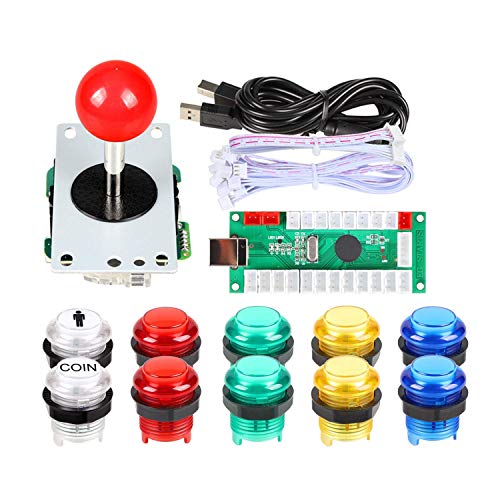
- USB encoder and joystick included
- Works with PC, MAME, and RetroPie
- LED buttons for cabinet-style builds
Best For: DIY retro gaming builds that need a complete wired control set
Switch Retro Cabinet

- Works with Switch, OLED, and Switch 2
- Joystick, 8 buttons, and Turbo support
- Includes C button and 12 card slots
Best For: Switch players who want a plug-and-play mini arcade cabinet for retro-style play
Screenshot Arcade Station
HONCAM Switch Retro Arcade Stick

- Screenshot button for easy capture
- Turbo, reset, and stick/D-pad modes
- Works with Switch, OLED, and Switch 2
Best For: Switch owners who want a compact arcade-style controller with capture features
Multi-Platform Pick – MAYFLASH F300 Arcade Fight Stick
If you want an arcade controller for retro games that can also move between modern systems, the MAYFLASH F300 is built around broad compatibility and easy customization. It works with Switch, PS4, PS3, Xbox consoles, Windows, macOS, Steam Deck, Android, and even retro-friendly devices like NeoGeo mini and SEGA Genesis/Mega Drive, making it a flexible starter stick.
Best For: Players who want one wired arcade stick that can cover many consoles and PC setups.
Pros:
- Compatible with a wide range of platforms, including Switch, PlayStation, Xbox, PC, macOS, Steam Deck, and Android
- Supports XINPUT and DINPUT on PC
- Compatible with Sanwa Denshi buttons and joystick for customization
- Includes turbo functions with different speed settings
Cons:
- PS5 support requires a separate MAYFLASH adapter or converter
- Wired USB design may not suit players looking for a wireless stick
- Customization parts are supported, but not included in the base unit
The F300 is a practical choice if you want one arcade controller to bridge retro and current gaming without limiting your platform options. Its main strength is flexibility, especially for players who like to tinker with their stick layout and parts over time.
Plug-and-Play Retro Bundle – My Arcade Atari Game Station Pro
For buyers who want a retro gaming setup more than a standalone arcade controller for retro games, the My Arcade Atari Game Station Pro is an easy TV-connected option. It comes with over 200 built-in Atari games, two wireless joysticks, HDMI output, and a simple plug-and-play design that keeps setup straightforward.
Best For: Anyone who wants an Atari-focused couch setup with included wireless controllers.
Pros:
- Over 200 built-in Atari games plus bonus titles
- Includes two 2.4 GHz wireless joysticks inspired by the original Atari design
- Connects directly to a TV via HDMI
- Supports game save options and includes paddle controls for compatible games
Cons:
- Pac-Man and Galaga are not included
- Joysticks require AA batteries, which are not included
- Best suited to Atari-style play rather than a broad multi-platform controller
This is a strong pick if your goal is quick access to classic Atari play on the TV without assembling a separate controller and emulator setup. It is less of a general-purpose stick, but it does deliver a very focused retro experience.
Wireless Customizable Stick – 8Bitdo Arcade Stick for Switch & Windows
If you’re shopping for an arcade controller for retro games on Switch or PC, the 8Bitdo Arcade Stick offers a modern feature set with wireless flexibility. It supports Bluetooth, 2.4G, and wired USB-C connections, and the companion software lets you remap buttons and create macros for a more personalized setup.
Best For: Players who want a customizable arcade stick with wireless and wired connection options.
Pros:
- Three connection modes: Bluetooth, 2.4G receiver, and wired USB-C
- Supports Ultimate Software for button mapping and macros
- Dynamic button layout changes with mode functionally and visually
- Universal mounting plate supports Sanwa arcade sticks
Cons:
- Official compatibility is listed for Switch and Windows only
- Battery-powered design may not appeal to players who prefer corded sticks
- Wireless features add complexity compared with a simple plug-in stick
The 8Bitdo is a good fit if you want a feature-rich stick that can adapt to different play styles and setups. It is especially appealing for retro fans who value wireless convenience and button customization.
DIY Two-Player Kit – Qenker LED Arcade DIY Kit
For builders looking for an arcade controller for retro games on a PC or Raspberry Pi, the Qenker LED Arcade DIY Kit is aimed at custom two-player projects. It includes two joysticks, 20 LED buttons, and two zero-delay USB encoders, so it is designed around assembling your own setup rather than buying a finished stick.
Best For: DIY enthusiasts building a two-player arcade panel for MAME or Raspberry Pi projects.
Pros:
- Includes two arcade joysticks, 20 LED buttons, and two zero-delay USB encoders
- Built for MAME, JAMMA, and Raspberry Pi-style DIY projects
- Supports Windows, Android, Linux, Mac, PC, and Raspberry Pi
- LED lighting adds a custom arcade look
Cons:
- Requires DIY assembly and installation
- Not a ready-to-play finished controller
- Battery-powered listing may be less straightforward than a simple USB stick setup
This kit makes sense if your priority is building a custom cabinet or panel instead of buying a preassembled controller. It offers a lot of parts for the price, but it is best for users who are comfortable with hands-on setup work.
Plug & Play Retro Game Console – 20,000+ Classic Games on TV
If you want an arcade controller for retro games without a complicated setup, this plug-and-play retro game console is built for quick TV gaming. It comes preloaded with 20,000+ classic games on 128GB of storage, supports 4K HDMI output, and includes two wireless controllers for easy couch play.
Best For: Families and casual players who want an easy way to play a huge library of classic games on a TV.
Pros:
- Preloaded with 20,000+ classic games across 23 emulators
- Includes two 2.4GHz wireless controllers with up to 40-foot range
- 4K HDMI output with 1080P display support for TV or projector use
- Save-progress feature lets you pause and resume games later
Cons:
- Designed for plug-and-play retro gaming, not a dedicated standalone arcade stick
- Game library and emulator compatibility are preloaded, so customization is limited compared with mod-friendly hardware
This is a strong pick if you mainly want simple, living-room retro gaming with minimal setup. It focuses on convenience, large game volume, and wireless multiplayer rather than competitive arcade controls.
Moddable Wireless Fight Stick – Switch and PC Arcade Control
If you’re shopping for an arcade controller for retro games on Switch or PC, this 8Bitdo fight stick is the most control-focused option in the group. It supports Bluetooth, 2.4G wireless, and wired USB-C, and it adds macro features plus a customizable button layout for players who want more than a basic stick.
Best For: Players who want a versatile arcade stick for Switch or Windows with customization and wireless options.
Pros:
- Supports Bluetooth, 2.4G wireless, and wired USB-C connection
- Includes 2 dedicated macro buttons plus Turbo and profile switching
- Works with Switch and Windows, with dynamic button layout changes by mode
- Ultra-moddable design supports 30mm/24mm buttons and universal joystick mounting
Cons:
- Compatibility is limited to Switch and Windows
- It is a premium arcade stick, so it is less of a plug-and-play game library solution
This model stands out for its flexibility and customization, especially if you care about button mapping or mod potential. It is the best fit here for players who want an actual arcade controller rather than a bundled retro game system.
Nostalgia Game Stick – 20,000 Games with Wireless Play
For buyers comparing an arcade controller for retro games with an easy TV-ready setup, this game stick focuses on breadth and convenience. It includes a 64GB TF card, 20,000 classic games, two 2.4GHz wireless controllers, and 4K HDMI output for simple big-screen play.
Best For: Budget-minded players who want a straightforward retro gaming setup with wireless multiplayer.
Pros:
- Comes with 20,000 classic games on a 64GB TF card
- Two 2.4GHz wireless controllers support two-player gaming
- 4K HDMI output works with TVs, monitors, laptops, PCs, and projectors
- Save-progress function adds convenience for longer sessions
Cons:
- Uses a preloaded game-stick format instead of a dedicated arcade stick controller
- No advanced customization or moddable hardware is listed in the supplied details
This is a practical pick for families or gift buyers who want a fast setup and a big classic library. It offers the core retro features most shoppers expect, with wireless play and HDMI output doing most of the heavy lifting.
DIY LED Arcade Kit – EG STARTS 1 Player Joystick Kit
If you want an arcade controller for retro games that you can build around your own setup, this EG STARTS DIY kit gives you the core parts for a classic 1-player stick. It’s aimed at PC, MAME, and Raspberry Pi RetroPie builds, with LED buttons and an 8-way joystick for a more authentic cabinet-style feel.
Best For: DIY retro gaming builds on PC, MAME, or Raspberry Pi that need a complete wired control set.
Pros:
- Includes a Zero Delay USB encoder, joystick, and 10 LED arcade buttons.
- Compatible with Windows, PC games, MAME, and Raspberry Pi/RetroPie setups.
- 8-way joystick and illuminated buttons add a classic arcade look and feel.
- Buttons and joystick are individually packaged, and a 1-year warranty is included.
Cons:
- Requires DIY installation and proper mounting-hole sizing.
- Build is limited to a 1-player control layout.
- LED features add wiring complexity compared with simpler kits.
This is a practical pick if you want to assemble a retro control panel rather than buy a finished stick. The included encoder and broad emulator support make it especially useful for hobbyists building a custom arcade controller for retro games.
Switch Retro Cabinet – HONCAM Mini Arcade Machine
This arcade controller for retro games is designed for Nintendo Switch owners who want a compact cabinet-style setup at home. It docks your Switch, adds a joystick and 8-button layout, and includes Turbo controls plus a dedicated C button for online chat.
Best For: Switch players who want a plug-and-play mini arcade cabinet for retro-style play, fighting games, and shooters.
Pros:
- Compatible with Nintendo Switch, Switch OLED, and Switch 2 consoles.
- Classic joystick + 8 responsive buttons with Turbo rapid-fire.
- Includes a dedicated C button for real-time voice chat in online play.
- Detachable, portable design with 12 game card/TF card slots.
Cons:
- Screen is not included.
- Requires a docked Switch console for use.
- More specialized for Switch than for general PC or emulator setups.
It’s a good choice if you want the feel of a mini arcade cabinet without building one from scratch. The plug-and-play design and storage slots make it a neat all-in-one option for casual retro sessions and party play.
Screenshot Arcade Station – HONCAM Switch Retro Arcade Stick
If you’re shopping for an arcade controller for retro games on Switch, this mini cabinet focuses on convenience and capture features. It supports Switch, Switch OLED, and Switch 2, adds a screenshot button, and keeps the familiar joystick-plus-buttons layout for arcade-style play.
Best For: Switch owners who want a compact arcade-style controller with easy screenshot capture and Turbo controls.
Pros:
- Compatible with Nintendo Switch, Switch OLED, and Switch 2.
- Dedicated screenshot icon button for capturing highlights.
- Turbo button, stick/D-pad mode switching, and reset button included.
- Blue and red LED indicators show connection and Turbo status.
Cons:
- Screen is not included.
- Designed around Switch use rather than broad cross-platform support.
- Detachable cabinet format may be bulkier than a standard arcade stick.
This model stands out if you value quick sharing and clear status indicators during play. It’s a strong fit for players who want a retro arcade feel with a few modern convenience features built in.
How We Picked the Best Arcade Controller for Retro Games
For this roundup of the best Arcade Controller for Retro Games options, we focused on control quality, platform support, connection types, and overall value. We also considered whether each pick suits authentic arcade-style play, emulation setups, or console use.
We favored models with durable parts, straightforward setup, and a clear purpose: casual play, competitive fighting games, retro emulation, or customization.
Quick Comparison
Start by matching the controller to your main use case. A compact fight stick is usually best for modern consoles and PC. A DIY kit is better if you want to build or upgrade your own cabinet or MAME setup. Plug-and-play retro consoles are ideal if you want a full gaming solution rather than just a controller.
Key Buying Factors for an Arcade Controller for Retro Games
Compatibility
Check support for your main device first: Switch, PC, PlayStation, Xbox, Steam Deck, Raspberry Pi, or emulator-based systems. Multi-platform support is convenient, but make sure the controller works in the mode you need without adapters or extra setup.
Connection Type
Wired models usually offer the lowest latency and simplest setup. Wireless options add flexibility for couch play, but battery life and input delay matter more if you play fast-paced fighters or rhythm-heavy retro titles.
Stick and Button Quality
The joystick gate, button travel, and overall responsiveness shape the experience more than cosmetics. For classic arcade feel, prioritize models with replaceable parts or known component compatibility.
Build Style and Use Case
Choose a full-size fight stick for desk use, a compact stick for portability, or a DIY kit if you want to customize the layout and parts. If you want all-in-one convenience, a retro game stick or console bundle may be the better fit.
Extras That Matter
Turbo, macro buttons, LED lighting, and dual-player support can be useful, but they should not outweigh core performance. For most buyers, sturdiness and compatibility matter more than flashy features.
Who Should Buy Which Arcade Controller for Retro Games?
If you want the simplest setup, choose a plug-and-play model. If you play across multiple systems, look for broad compatibility and both wired and wireless options. If you are building an emulator cabinet or customizing parts, a DIY kit is the smartest path. For players who mainly want authentic arcade control in retro games, a purpose-built fight stick is usually the best all-around choice.
In short, the right Arcade Controller for Retro Games depends on where you play, how much customization you want, and whether convenience or authenticity matters more to you.