If you want an arcade fight stick for PC, the right choice depends on play style, button layout, build quality, and how much you value portability versus tournament-grade feel.
In this roundup, we focus on dependable sticks that work well on Windows gaming setups, from affordable starter models to premium controllers built for serious fighting game play.
Best 10 Arcade Fight Stick for PC Picks for 2026
Pro Tournament Pick
HORI Fighting Stick Alpha for PS5, PS4, and PC
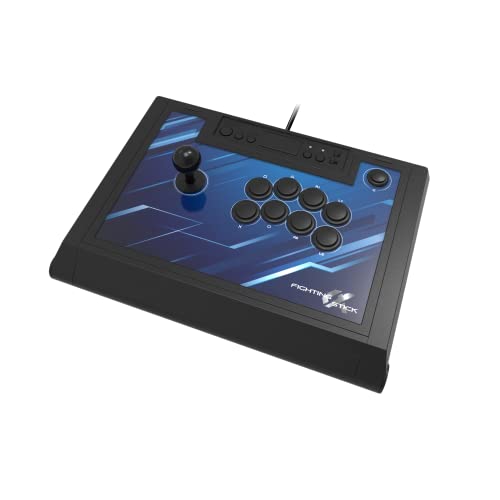
- Tournament-grade full-size design
- Hayabusa buttons and joystick
- Opens for easy customization
Best For: Serious players who want a premium PC and PlayStation fight stick
Wireless Custom Pick
8Bitdo Retro Wireless Arcade Fight Stick

- Bluetooth, 2.4G, and USB-C options
- Macro buttons and Turbo support
- Swappable parts and profile support
Best For: PC players who want wireless flexibility and deep customization
Compact Travel Pick
HORI Fighting Stick Mini for PS5, PS4, and PC

- Small, lightweight portable design
- Classic 8-button layout
- 8-foot cable and PC support
Best For: Casual players who want a compact stick for PC and travel
Feature-Rich Style Pick
8BitDo Arcade Stick for Switch 2, Switch, and Windows PC

- Bluetooth, 2.4G, and USB-C support
- Dynamic layout plus macro buttons
- Tempered glass faceplate
Best For: PC and Switch users who want a premium-looking customizable stick
Premium Tournament Pick
Victrix Pro FS Fight Stick for PS5, PS4, PC

- Aircraft-grade aluminum body
- Sanwa 30mm buttons and detachable joystick
- PS5, PS4, and PC support
Best For: Competitive players who want a durable, mod-friendly stick
Licensed Budget-Friendly Option
Qanba N3 Drone 2 Wired Joystick for PS5, PS4, PC

- Officially licensed Sony peripheral
- Authentic Qanba buttons and lever
- Wired PS5, PS4, and PC support
Best For: Players who want a simple licensed wired fight stick
Wireless Flexible Choice
8Bitdo Arcade Stick for Switch and Windows

- Bluetooth, 2.4G, and USB-C connections
- Supports button mapping and macros
- Universal mount for Sanwa sticks
Best For: PC and Switch players who want customization and wireless play
Pro-Grade Licensed Pick
Nacon Daija for PS5, PS4 and PC

- Sanwa joystick and buttons
- PC/Mac button mapping software
- Customizable plate and lock switch
Best For: Serious fighting game players who want a premium PC and PlayStation stick
Budget Multi-Platform Pick
MAYFLASH F300 for PC and Consoles

- Works with many platforms
- PC XINPUT and DINPUT support
- Mod-friendly Sanwa-compatible parts
Best For: Buyers who want an affordable all-rounder for PC and other systems
Wireless Premium Pick

- Bluetooth, 2.4G, and USB
- Headset audio support on PC/PS5
- Sanwa-compatible customization
Best For: Fighting game players who want wireless flexibility on PC and PlayStation
Pro Tournament Pick – HORI Fighting Stick Alpha for PS5, PS4, and PC
If you want an arcade fight stick for pc that feels built for serious play, the HORI Fighting Stick Alpha is aimed at that end of the market. It uses a full-size tournament-style design with USB connection, Hayabusa buttons and joystick, and an easy-open body for customization and maintenance.
Best For: Players who want a full-size, officially licensed stick for PC and PlayStation use with room to modify.
Pros:
- Full-size tournament-grade arcade stick design
- Hayabusa buttons and joystick
- Opens for easy customization and maintenance
- Replaceable top-panel artwork
Cons:
- Wired USB-only connection
- Large footprint compared with compact sticks
- Primarily aimed at PS5/PS4 players who also use PC
Overall, this is the most premium-feeling option in the group if you want a PC-ready stick that also supports console play. The official licensing and mod-friendly construction make it a strong pick for dedicated fighting game fans.
Wireless Custom Pick – 8Bitdo Retro Wireless Arcade Fight Stick
This arcade fight stick for pc focuses on flexibility, with Bluetooth, 2.4G wireless, and wired USB-C connection options. It also adds 8BitDo Ultimate Software support, macro buttons, turbo, and a dynamic layout that changes between Switch and PC modes.
Best For: Players who want a highly customizable PC fight stick with wireless convenience.
Pros:
- Three connection options: Bluetooth, 2.4G, and wired USB-C
- Supports button mapping, macros, and controller profiles
- Two dedicated macro buttons plus turbo function
- Mod-friendly with swappable buttons and universal joystick mounting
Cons:
- Designed for Switch and Windows, not broader console compatibility
- Wireless use depends on charging and battery life
- Dynamic layout is tied to mode switching rather than a fixed layout
If you value customization and connection flexibility, this model is one of the most feature-rich picks here. Its mod support and profile tools make it a practical choice for players who like to tune controls game by game.
Compact Travel Pick – HORI Fighting Stick Mini for PS5, PS4, and PC
If you need a smaller arcade fight stick for pc use, the HORI Fighting Stick Mini is built around portability. It uses a compact, lightweight body with a classic 8-button layout, an 8-foot cable, and HORI’s original joystick in a small form factor.
Best For: Players who want a portable, budget-friendly-style stick for casual arcade and fighting games on PC.
Pros:
- Compact and lightweight design
- Classic 8-button layout
- 8-foot cable for flexible desk setup
- Officially licensed for PS5, PS4, and PC
Cons:
- Smaller layout may feel cramped for some players
- Battery-powered spec may be less relevant for desk use
- Less feature-rich than full-size tournament sticks
This is the easiest stick to recommend if portability matters more than advanced features. It gives you the basic arcade feel in a tiny package, which makes it useful for travel or limited space.
Feature-Rich Style Pick – 8BitDo Arcade Stick for Switch 2, Switch, and Windows PC
This arcade fight stick for pc is aimed at players who want a mix of style and features. It supports Bluetooth, 2.4G, and wired USB-C, adds dynamic button labeling between Switch and PC modes, and includes macro buttons, turbo, and a tempered glass faceplate.
Best For: PC and Switch players who want a premium-looking stick with lots of control features.
Pros:
- Three connection modes: Bluetooth, 2.4G, and USB-C
- Dynamic button layout for Switch and PC modes
- Custom button mapping, macros, and profiles
- Tempered glass faceplate for a premium finish
Cons:
- Best suited to Switch and Windows, not wider console ecosystems
- Premium features may be more than casual users need
- Wireless play still depends on battery management
As a PC-friendly fight stick, this model stands out for convenience and presentation. The combination of wireless support, customization tools, and a polished finish makes it a strong modern pick for players who want more than the basics.
Premium Tournament Pick – Victrix Pro FS Fight Stick for PS5, PS4, PC
If you want an arcade fight stick for pc that feels built for serious play, the Victrix Pro FS leans hard into durability, comfort, and tournament-ready features. Its single-piece aircraft-grade aluminum body, Sanwa 30mm buttons, and detachable Link 2 joystick make it a premium option for players who want a true arcade-style setup.
Best For: Competitive players who want a durable, mod-friendly stick for PS5, PS4, and PC.
Pros:
- Single-piece aircraft-grade aluminum construction for strong travel durability
- Sanwa Denshi 30mm buttons and Link 2 detachable joystick
- Built-in mode switch supports PS5, PS4, and PC
- Quick-access back panel makes mods and updates easier
Cons:
- At 7.8 pounds, it is heavier than more portable sticks
- Premium build may be more than casual players need
The Victrix Pro FS is a strong pick if you value a high-end chassis, comfortable ergonomics, and easy maintenance. It is especially compelling for players who travel to events and want a stick that can handle frequent use.
Licensed Budget-Friendly Option – Qanba N3 Drone 2 Wired Joystick for PS5, PS4, PC
The Qanba N3 Drone 2 is a practical arcade fight stick for pc if you want an officially licensed wired stick with familiar fighting-game controls. It includes authentic Qanba buttons and lever, a full control panel with touch pad support, and a lightweight design that is easy to move around.
Best For: Players who want an officially licensed PS5, PS4, and PC fight stick with a simple wired setup.
Pros:
- Officially licensed Sony peripheral
- Authentic Qanba buttons, lever, and OV7 OMRON switch joystick
- Full control panel with touch pad support
- 3.5-mm microphone input with mute button control
Cons:
- Wired-only connectivity may limit setup flexibility
- Fewer extra features than more premium fight sticks
This model focuses on core fighting-game functionality rather than flashy extras. It is a straightforward choice for players who want a licensed stick with the essential controls already built in.
Wireless Flexible Choice – 8Bitdo Arcade Stick for Switch and Windows
The 8Bitdo Arcade Stick is a versatile arcade fight stick for pc users who want wireless and wired connection options in one unit. It supports Bluetooth, 2.4G, and USB-C wired play, while also offering button mapping, macros, and a universal mounting plate for modding with Sanwa parts.
Best For: PC and Switch players who want a customizable stick with multiple connection methods.
Pros:
- Three connection options: Bluetooth, 2.4G receiver, and wired USB-C
- Ultimate software support for button mapping and macros
- Universal mounting plate supports Sanwa arcade sticks
- Hidden compartment stores the 2.4G receiver
Cons:
- Compatible with Switch and Windows, not PS5 or PS4
- Battery-powered design may need charging during longer sessions
If flexibility matters more than console compatibility, this is a strong all-around pick. Its wireless options and mod-friendly design make it appealing for players who like to customize their setup.
Pro-Grade Licensed Pick – Nacon Daija for PS5, PS4 and PC
If you want an arcade fight stick for pc that feels built for serious fighting games, the Nacon Daija is a strong premium option. It pairs Sanwa joystick and action buttons with full button mapping software on PC and Mac, so you can tune the layout to your preferences and game profiles.
Best For: Players who want a premium, highly customizable stick for PC fighting games and PlayStation use.
Pros:
- Sanwa joystick and action buttons for a premium feel and durability
- Fully configurable button mapping with PC and Mac software
- Textured palm rest plus two joystick heads for comfort and precision
- Includes 3.5mm audio jack, button lock, and customizable front plates
Cons:
- Officially licensed for PlayStation, so PC-first buyers may be paying for console extras
- Heavier, larger design may be less convenient for travel
- Higher-end feature set may be more than casual players need
Overall, the Daija is aimed at players who care about responsiveness, customization, and tournament-style comfort. If your priority is a refined arcade fight stick for pc with pro-level parts, this is the most polished option in the group.
Budget Multi-Platform Pick – MAYFLASH F300 for PC and Consoles
The MAYFLASH F300 is a practical arcade fight stick for pc if you want broad compatibility without moving into a premium price tier. It supports XINPUT and DINPUT on PC, works with many systems, and is built to be customized with compatible Sanwa Denshi buttons and joystick parts.
Best For: Budget-minded players who want one stick for PC, retro systems, and multiple consoles.
Pros:
- Wide compatibility across PC, Switch, PlayStation, Xbox, macOS, Steam Deck, and Android
- Supports XINPUT and DINPUT on PC
- Compatible with Sanwa Denshi buttons and joystick for customization
- Turbo function with multiple speed settings
Cons:
- Not a native PS5 option without an adapter or converter
- Only 4 buttons listed in the supplied details
- Basic corded design with a shorter warranty than premium picks
For players who need flexibility more than flash, the F300 is an easy recommendation. It covers a lot of platforms and gives you a solid base if you plan to mod or upgrade parts later.
Wireless Premium Pick – MAYFLASH F700 for PS5 and PC
If you want an arcade fight stick for pc with wireless options, the MAYFLASH F700 stands out for its Bluetooth, 2.4G, and wired USB support. It is focused on fighting games, supports headset audio on PS5, PS4, and PC Xinput, and can be customized with Sanwa Denshi-compatible buttons and joystick parts.
Best For: Players who want flexible wireless connections and a fighting-game-focused stick for PC and PlayStation.
Pros:
- Three connection options: Bluetooth, 2.4G, and wired USB
- Supports headset audio and online chat on PS5, PS4, and PC Xinput
- Sanwa Denshi-compatible parts make it good for customization
- Works with PS5 fighting games, PC, Switch, Apple, Android, and more
Cons:
- Designed for fighting games only, not general game use
- Not compatible with Xbox Series S/X or Xbox One
- PS5 support is limited to fighting games
The F700 is the most versatile choice here if wireless play matters and you are staying within its fighting-game focus. It is especially appealing for players who want a cleaner setup on PC without giving up wired backup connectivity.
How We Picked the Best Arcade Fight Stick for PC
We focused on PC compatibility, control quality, connection options, and long-term value. For an Arcade Fight Stick for PC, the biggest differentiators are the joystick and buttons, firmware and platform support, and whether the case feels stable during fast inputs. We also looked for a mix of wired and wireless models so buyers can choose based on latency preferences and desk setup.
Quick Comparison: What Matters Most
Before choosing, compare three things: performance, convenience, and expandability. Tournament-oriented sticks typically prioritize low-latency wired play and premium parts. Midrange picks often balance solid components with cross-platform support. Budget models may be smaller or use more basic hardware, but they can still be a smart entry point if you are learning fighters or want a secondary controller.
Key Buying Factors for an Arcade Fight Stick for PC
Compatibility and Connection Type
Check whether the stick supports Windows natively and whether it connects through USB-C, USB-A, Bluetooth, or a 2.4G receiver. Wired USB is usually the safest choice for competitive play, while wireless can be convenient for casual use or living room setups.
Buttons, Joystick, and Layout
Sanwa-style parts and similar premium components usually deliver a lighter, more precise feel. Pay attention to button spacing, actuator feel, and whether the layout suits your game habits. Larger hands may prefer full-size cases, while compact sticks are easier to travel with.
Build Quality and Stability
A heavier base helps prevent sliding during rapid motion inputs. Metal top panels, reinforced shells, and grippy feet can make a noticeable difference, especially on smooth desks.
Features and Customization
Macro buttons, turbo modes, removable cables, and remappable layouts can improve versatility. These extras are especially useful if you play multiple genres beyond fighters or want to switch between platforms.
Who Should Buy Which Arcade Fight Stick for PC?
Choose a premium stick if you want tournament-level feel, durable parts, and the most refined input experience. Pick a midrange model if you want a strong balance of performance and price for regular PC play. Go with a compact or entry-level option if you are new to fighting games, need something portable, or want to test whether an arcade layout suits you before spending more.
If you mostly play at a desk, prioritize wired stability and a weighted case. If you travel or share setups, look for cross-platform support and easy switching between systems. For most buyers, the best Arcade Fight Stick for PC is the one that matches your hand feel, connection preferences, and the games you actually play.