Finding the right arcade fight stick for Xbox can make a big difference in comfort, consistency, and execution. The best options today range from classic levered sticks to low-profile and all-button controllers, giving every player a style that fits their game.
Whether you want an officially licensed model for Xbox Series X|S, a versatile multi-platform stick, or a competitive-grade build with premium parts, this roundup focuses on the features that matter most before you buy.
Best 10 Arcade Fight Stick for Xbox Picks for 2026
Wireless Xbox Pick
8BitDo Wireless Arcade Stick for Xbox Series X|S, Xbox One

- Wireless 2.4G or wired USB play
- Xbox and Windows compatibility
- 3.5mm audio jack with volume control
Best For: Players who want a licensed Xbox stick with wireless convenience and customization
Versatile Budget Option
SUBSONIC Arcade Stick for Xbox Series X/S and More

- Supports Xbox, PC, PS4, and PS3
- Steel joystick with microswitch buttons
- AUTO and COMBO functions
Best For: Multi-platform players who want a wired stick with programming features
Tournament-Style Pick
HORI Fighting Stick alpha Designed for Xbox Series X|S

- Officially licensed by Microsoft
- Opens for easy maintenance and customization
- Swappable artwork and assignable buttons
Best For: Players who want a customizable Xbox stick with easy access for maintenance
Multi-Platform Classic
MAYFLASH F300 Arcade Fight Stick for Xbox and More

- Works with Xbox, PC, macOS, and more
- Supports Sanwa-style customization
- Turbo function with speed settings
Best For: Players who want a multi-platform stick with customization potential
Leverless Precision Pick
8BitDo All-Button Arcade Controller for Xbox

- Officially licensed for Xbox Series X|S, Xbox One, and Windows
- 2.4G wireless with leverless all-button layout
- Hot-swappable low-profile switches and programmable controls
Best For: Competitive players who want fast, leverless inputs on Xbox
Multi-Platform Wireless Pick
MAYFLASH Wireless Arcade Fighting Stick F700X

- Works with Xbox Series X/S and many other platforms
- Bluetooth, 2.4G, and wired USB connections
- Supports Sanwa-compatible buttons and joystick
Best For: Gamers who want one wireless fight stick for Xbox and other platforms
Pro-Grade Licensed Pick
Nacon Daija Arcade Fight Stick for Xbox

- Official Xbox license with Sanwa joystick and buttons
- Fully configurable mapping with included software
- 3-meter cable plus textured palm rest and lock function
Best For: Serious fighting game players who want a premium wired Xbox stick
Universal Multi-Console Pick
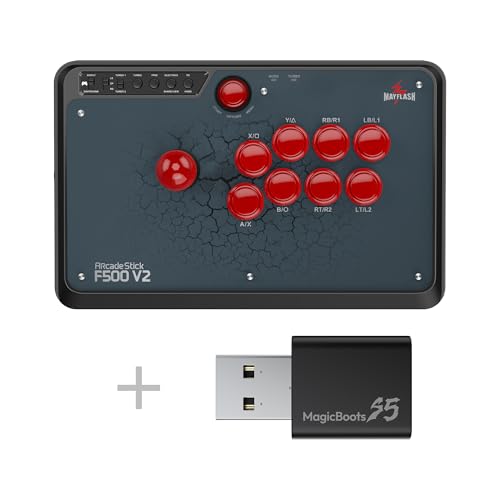
- Works with Xbox Series X/S, Xbox One, and Xbox 360
- Also supports PS5, PS4, Switch/Switch 2, PC, and more
- Requires wired Xbox controller for Xbox 360/One use
Best For: Gamers who want one stick for Xbox and many other platforms
Premium Leverless Choice
MAYFLASH F500 FLAT Elite for Xbox

- Leverless all-button layout with Sanwa OBSF buttons
- Works with Xbox Series X/S, Xbox One, and Xbox 360
- Requires wired Xbox controller for Xbox console use
Best For: Players who want a customizable leverless stick for Xbox
Mod-Friendly Flat Layout

- Supports Xbox Series X/S, Xbox One, and Xbox 360
- All-button layout with Sanwa-compatible customization
- Requires wired Xbox controller for console use
Best For: Buyers who want a flat, customizable Xbox arcade controller
Wireless Xbox Pick – 8BitDo Wireless Arcade Stick for Xbox Series X|S, Xbox One
If you want an arcade fight stick for xbox with true wireless convenience, this 8BitDo model is built around flexibility. It works with Xbox Series X|S, Xbox One, and Windows 10 and above, and gives you the choice of 2.4G wireless or wired USB play.
Best For: Players who want a licensed Xbox stick with wireless and wired options.
Pros:
- Officially licensed and positioned as the first Xbox-licensed wireless arcade stick worldwide
- 2.4G wireless plus wired USB connectivity for flexible setup
- 8BitDo Ultimate Software support with customizable button mapping and profile buttons
- Includes a 3.5mm audio jack and volume control
Cons:
- Battery-powered design means you’ll need to manage charging
- Best fit is limited to Xbox and Windows compatibility listed in the notes
Overall, this is the most modern choice in the group if you value convenience and software customization. The 30-hour battery rating and quick 4-hour charge add to its appeal for regular play sessions.
Versatile Budget Option – SUBSONIC Arcade Stick for Xbox Series X/S and More
For shoppers comparing an arcade fight stick for xbox across platforms, this SUBSONIC model stands out for broad compatibility and straightforward performance. It supports Xbox Series X/S, Xbox One, PC, PS4, and PS3, and uses a wired 3-meter USB cable for simple plug-and-play use.
Best For: Multi-platform players who want a wired stick with built-in macro-style functions.
Pros:
- Compatible with Xbox Series X/S, Xbox One, PC, PS4, and PS3
- Heavy-duty steel joystick and microswitch contact buttons for precise input
- AUTO and COMBO functions for rapid shots and programmed moves
- Soft-touch coating plus rubberized wrist rest for comfort
Cons:
- Wired-only design with a 3-meter cable
- Compatibility is broad, but the feature set is more basic than premium tournament sticks
This is a practical pick if you want one stick that can move between consoles without extra setup. Its programming features add value for fighting games that benefit from quick repeats and stored combos.
Tournament-Style Pick – HORI Fighting Stick alpha Designed for Xbox Series X|S
HORI Fighting Stick alpha Designed for Xbox Series X|S - Officially Licensed by Microsoft
Check Price On AmazonIf you want an arcade fight stick for xbox with a more premium, mod-friendly design, the HORI Fighting Stick alpha is a strong candidate. It is officially licensed by Microsoft, works with Xbox Series X|S, Xbox One, and Windows 10, and adds a chassis that opens for easier maintenance and customization.
Best For: Players who want a customizable Xbox stick with easy access for maintenance.
Pros:
- Officially licensed by Microsoft
- Chassis opens for easy maintenance and customization
- Swappable top housing artwork supports personalization
- Assignable buttons, Share Button, Profile Button, and Key Lock Mode
Cons:
- Wired USB connection only, based on the supplied notes
- Larger chassis may be less convenient than compact sticks
For players who care about long-term ownership and customization, this model is the most workshop-friendly option here. It combines official Xbox support with a layout that makes adjustments easier to manage.
Multi-Platform Classic – MAYFLASH F300 Arcade Fight Stick for Xbox and More
The MAYFLASH F300 is a good fit if you want an arcade fight stick for xbox that can also cover a lot of other systems. It supports Xbox Series S/X, Xbox One, Xbox 360, PC, macOS, Steam Deck, Android, and several Nintendo and PlayStation devices, making it one of the most flexible choices in this roundup.
Best For: Players who want a low-risk, multi-platform stick with customization potential.
Pros:
- Very broad compatibility across Xbox, PC, macOS, Steam Deck, Android, and more
- Supports Sanwa Denshi buttons and joystick for customization
- Includes XINPUT and DINPUT support on PC
- Turbo function with different speed settings
Cons:
- Wired USB design only
- PS5 support requires a separate MAYFLASH adapter or converter
This is the safest all-rounder if you want one stick that can travel between many platforms. The customizable parts and turbo support give it extra value for players who expect to tinker or expand later.
Leverless Precision Pick – 8BitDo All-Button Arcade Controller for Xbox
If you want an arcade fight stick for xbox that prioritizes speed and accuracy, this 8BitDo all-button controller takes a different approach from a traditional stick. It is officially licensed for Xbox Series X|S, Xbox One, and Windows PC, and its compact, low-profile design is built for quick inputs and easy transport.
Best For: Players who want a leverless Xbox fighting controller with fast inputs, wireless convenience, and a slim travel-friendly build.
Pros:
- 2.4G wireless support for Xbox and Windows PC
- Leverless all-button layout for ultra-fast, precise inputs
- Hot-swappable PCB with 16 Kailh Wizard low-profile mechanical switches
- Programmable buttons, 3.5mm audio jack, and volume control
Cons:
- All-button layout may not suit players who prefer a traditional joystick
- Very compact size may feel less familiar than full-size arcade sticks
This is a strong pick if your priority is competitive execution rather than classic arcade feel. The combination of wireless support, customization, and a slim footprint makes it a practical Xbox fighting option for players who value speed.
Multi-Platform Wireless Pick – MAYFLASH Wireless Arcade Fighting Stick F700X
For shoppers comparing an arcade fight stick for xbox across multiple platforms, the MAYFLASH F700X offers broad compatibility and flexible connection options. It works with Xbox Series X/S and also supports Bluetooth, 2.4G, and wired USB connections, making it a versatile choice if you play on more than one system.
Best For: Players who want a multi-platform fight stick with wireless flexibility and Xbox Series X/S support.
Pros:
- Compatible with Xbox Series X/S plus several other systems
- Three connection modes: Bluetooth, 2.4G receiver, and wired USB
- Includes a hidden compartment for storing the 2.4G receiver
- Supports Sanwa-compatible parts for customization
Cons:
- Not supported on PS5
- Firmware update is needed for Switch 2 Bluetooth support
The F700X is a practical all-rounder if you want one stick that can move between Xbox and other devices. Its wireless options and customization support give it a flexible profile, though buyers should note the PS5 limitation.
Pro-Grade Licensed Pick – Nacon Daija Arcade Fight Stick for Xbox
If you want an arcade fight stick for xbox with a more pro-focused design, the Nacon Daija is built around Sanwa components and deep customization. It is officially licensed for Xbox Series X|S, Xbox One, and Windows 10/11, and includes a 3-meter detachable cable plus software-based button mapping.
Best For: Fighting game players who want a premium, customizable Xbox stick with Sanwa controls and a comfortable grip.
Pros:
- Officially licensed for Xbox Series X|S, Xbox One, and Windows 10/11
- Sanwa joystick and action buttons for premium feel
- Fully configurable button mapping with included software
- Textured palm rest, two joystick heads, and button lock function
Cons:
- Uses a 3-meter cable, so it is not wireless
- Customization focus may be more than casual players need
The Daija stands out if you want a fight stick that feels built for serious play and personalization. Between its Sanwa parts, configurable profiles, and included accessories, it delivers a polished Xbox-ready package for dedicated fighters.
Universal Multi-Console Pick – MAYFLASH F500 Bundle for Xbox
If you want an arcade fight stick for Xbox that can also pull double duty across a lot of other systems, the MAYFLASH F500 with MAGICBOOTS-S5 is built for broad compatibility. It works with Xbox Series X/S, Xbox One, and Xbox 360, but also extends to PS5, PS4, Switch/Switch 2, PC, macOS, Steam Deck, Raspberry Pi, and Android. Just note that Xbox 360 and Xbox One use require a wired Microsoft Xbox controller, while PS5 and PS4 support comes through the Magic Boots setup.
Best For: Players who want one wired fight stick setup for Xbox plus a wide mix of other consoles and devices.
Pros:
- Compatible with Xbox Series X/S, Xbox One, and Xbox 360.
- Also supports PS5, PS4, Switch/Switch 2, PC, macOS, Steam Deck, Raspberry Pi, and Android.
- Includes turbo functions with multiple speed settings.
- Supports headset audio and online chat on PS4 and Xbox One/Xbox One S.
Cons:
- Xbox 360 and Xbox One use requires a wired Microsoft Xbox controller.
- PS5 and PS4 compatibility depends on the Magic Boots setup.
- Heavier build may be less convenient for frequent travel.
This is a strong choice if your priority is flexibility rather than a console-specific stick. It brings a lot of platform support into one package, but buyers should plan for the controller/adapter requirements on Xbox and PlayStation systems.
Premium Leverless Choice – MAYFLASH F500 FLAT Elite for Xbox
The MAYFLASH F500 FLAT Elite is an all-button, leverless arcade fight stick for Xbox players who prefer a flatter control layout and premium Sanwa OBSF buttons. It supports Xbox Series X/S, Xbox One, and Xbox 360, along with PS4, Switch/Switch 2, PC, macOS, Android, Raspberry Pi, Steam, Steam Deck, and several mini retro systems. For Xbox console use, a wired Xbox controller must be plugged into the stick’s USB slot.
Best For: Players who want a leverless Xbox fight stick with premium buttons and deep customization options.
Pros:
- All-button layout for a leverless arcade feel.
- Uses 15 Sanwa OBSF buttons for a premium setup.
- Supports button macro programming, button mapping, turbo, and five SOCD modes.
- Includes audio/chat support on PS4, Xbox Series X/S, Xbox One, and Xbox 360.
Cons:
- Xbox 360, Xbox One, and Xbox Series X/S use requires a wired controller connected to the USB slot.
- PS5 support requires an additional MAYFLASH adapter or MagicBoots converter.
- Heavier than some compact arcade controllers.
This is a feature-rich option if you want a leverless layout and plan to customize the feel and inputs. The tradeoff is that Xbox compatibility is not completely standalone, so it’s best for buyers who are comfortable with the required wired controller setup.
Mod-Friendly Flat Layout – MAYFLASH F500 FLAT for Xbox
If you’re shopping for an arcade fight stick for Xbox and want a flatter, mod-friendly design, the MAYFLASH F500 FLAT is built around an all-button arcade controller layout. It supports Xbox Series X/S, Xbox One, and Xbox 360, plus PS4, Switch/Switch 2, PC, macOS, Android, Raspberry Pi, Steam, Steam Deck, and retro mini systems. As with the other MAYFLASH models here, Xbox console use requires a wired Xbox controller plugged into the USB slot.
Best For: Players who want a flat all-button Xbox controller with broad system support and easy customization potential.
Pros:
- Supports Xbox Series X/S, Xbox One, and Xbox 360.
- All-button arcade controller design is ideal for leverless play.
- Supports turbo with different speed settings.
- Uses Sanwa Denshi-compatible buttons and a removable clear acrylic top plate for customization.
Cons:
- Xbox console use requires a wired Xbox controller connected through USB.
- PS5 compatibility needs a MAYFLASH adapter or MagicBoots converter.
- May not suit players who prefer a traditional joystick.
This model is a practical pick if you want the flat layout and mod-friendly design without stepping up to the Elite version. It offers the same broad Xbox support approach, but the required wired controller means it’s best for users who already have the necessary console controller on hand.
How We Picked the Best Arcade Fight Stick for Xbox
We focused on an Arcade Fight Stick for Xbox that offers a strong mix of compatibility, build quality, button and joystick feel, connection stability, and overall value. Priority went to models that support Xbox Series X|S and Xbox One, with extra credit for official licensing, premium components, and flexible play options like wireless or multi-platform support.
Quick Comparison
For most buyers, the main decision is whether you want a traditional lever stick, a wireless setup, or a leverless/all-button controller. Traditional sticks feel most familiar for arcade and fighting game fans. Wireless models reduce cable clutter. Leverless options can improve precision and are often favored by competitive players who want fast directional inputs.
Key Buying Factors for Arcade Fight Stick for Xbox
Compatibility
Always confirm support for your exact console, especially if you plan to use the stick on Xbox Series X|S, Xbox One, and PC. Some models are officially licensed for Xbox, while others need adapter support or specific platform modes.
Layout and Control Style
Look at whether you prefer a traditional joystick, an all-button layout, or a flat leverless design. The best layout depends on your muscle memory, the games you play, and how quickly you want to adapt.
Parts and Feel
Higher-quality switches, buttons, and joystick components usually improve durability and responsiveness. If you play fighting games seriously, premium parts such as Sanwa-style components can be a meaningful upgrade.
Connectivity
Wired sticks generally offer the most consistent latency. Wireless models are convenient for casual play, but make sure battery life and connection stability match your expectations.
Size and Travel
Some sticks are compact and easy to carry, while others are larger and better suited to home setups. If you attend locals or travel often, portability may matter as much as performance.
Who Should Buy Which Arcade Fight Stick for Xbox?
Casual players usually do best with a comfortable, easy-to-use traditional stick that works out of the box. Competitive players may prefer a premium build or leverless Arcade Fight Stick for Xbox if they value speed and precision. If you play on multiple systems, choose a multi-platform model to get more use from one controller.
For the best long-term value, pick the model that matches your main platform first, then narrow by layout, part quality, and whether you want wired or wireless play.