If you want a gaming docking station with 2.5GbE ethernet, you’re usually balancing three things at once: fast network performance, the right video outputs, and enough power delivery to keep your device charged while you play.
This roundup focuses on docks that make sense for gaming handhelds, USB-C laptops, and mixed desktop setups, with an emphasis on practical features rather than gimmicks.
Best 10 Gaming Docking Station with 2.5gbe Ethernet Picks for 2026
Console-First Gaming Dock
BenQ GR10 for Steam Deck and TV Gaming
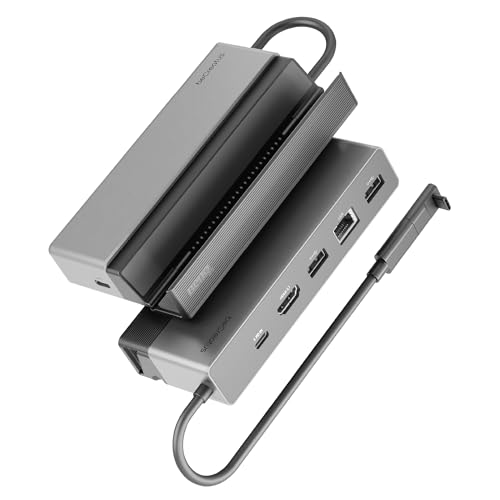
- HDMI 2.1 supports 4K@120Hz and other high-refresh modes.
- Includes 2.5GbE for steadier game streaming.
- 100W PD and flip-stand design suit TV-side use.
Best For: Steam Deck and handheld gamers who want a compact TV dock with wired networking.
Cross-Platform USB4 Dock
StarTech Driverless 2.5GbE Station

- Driverless USB4 setup works across macOS and Windows.
- 2.5GbE plus PXE Boot and Wake-on-LAN support IT use.
- Dual 4K 144Hz or single 8K 60Hz display support.
Best For: IT-managed teams and users who want a universal plug-and-play dock.
Enterprise Thunderbolt Dock

- Supports up to four 4K displays through multiple video outputs.
- 2.5GbE plus Wi-Fi management fits enterprise deployment.
- 130W Dell charging and security features suit business use.
Best For: Dell users who need a managed multi-display dock for the office.
Thunderbolt 4 All-in-One
UGREEN 13-in-1 Thunderbolt 4 Docking Station

- 2.5Gb Ethernet for faster wired networking
- Dual 4K@60Hz or single 8K@30Hz display support
- 13 ports plus up to 90W host charging
Best For: Power users and gamers needing a feature-rich Thunderbolt 4 dock
Dell-Friendly USB-C Dock
WD25 Dell Pro Dock USB-C Docking Station

- 2.5GbE Ethernet for fast, stable networking
- HDMI 2.1 and dual DisplayPort 1.4 outputs
- Up to 100W USB-C power delivery
Best For: Dell users who want a simple dock with fast Ethernet and modern video ports
High-End Thunderbolt 5 Dock
Plugable Thunderbolt 5 Dual HDMI Dock

- 2.5Gbps Ethernet plus 140W laptop charging
- Dual HDMI 2.1 with up to 8K 60Hz or 4K 144Hz
- Fanless, driverless design with 16-in-1 expansion
Best For: High-end laptop users who want the fastest display and docking features
Business-Grade Multi-Display Dock

- Supports up to four WQHD displays
- 2.5GbE Ethernet with 6 USB 3.2 Gen 2 ports
- 100W charging for Dell systems
Best For: Dell workstation users who need multi-display support and fast wired networking
High-Bandwidth Triple-Display Dock

- 4K@144Hz or 8K@30Hz on a single display
- 2.5GbE Ethernet with 10Gbps USB ports
- Includes SD/TF and audio/mic connections
Best For: Windows users who want high-refresh displays and fast wired networking
Console-First Gaming Dock – BenQ GR10 for Steam Deck and TV Gaming
If you want a gaming docking station with 2.5gbe ethernet for living-room play, the BenQ GR10 is built around the Steam Deck and TV gaming use case. Its HDMI 2.1 output, 100W Power Delivery, and compact flip-stand design make it a practical dock for stable big-screen sessions, while the 2.5GbE connection supports smoother streaming with Moonlight and GeForce NOW.
Best For: Steam Deck and handheld gamers who want a compact TV dock with fast wired networking.
Pros:
- HDMI 2.1 supports up to 4K@120Hz, 1080p@360Hz, or 8K@60Hz.
- 2.5Gb Ethernet is included for stable streaming and lower-lag networking.
- 100W Power Delivery helps keep the Steam Deck charged during play.
- Flip-up/flip-down stand design keeps the dock compact near a TV.
Cons:
- Notes state there is no HDMI CEC support.
- It is focused on handheld/TV use rather than a full desktop workstation setup.
Overall, the GR10 is a strong pick if your priority is a clean couch-gaming setup with wired internet and high-refresh HDMI output. It trades broad office-style expansion for a more focused gaming-first layout.
High-Throughput Creator Dock – TobenONE 16-in-1 Triple-Monitor Hub
The TobenONE 16-in-1 is a gaming docking station with 2.5gbe ethernet in the sense that it offers fast wired networking alongside a lot of high-speed I/O, but its real strength is workstation expansion. With triple HDMI outputs, 10Gbps USB-C ports, SD/microSD 4.0, and 2.5Gbps Ethernet, it is designed for users who need both display flexibility and dependable connectivity.
Best For: Windows and ChromeOS laptop users who want a feature-rich dock for multiple monitors and fast peripherals.
Pros:
- Three HDMI ports support triple 4K display setups on compatible Windows laptops.
- 2.5Gbps Ethernet is built in for faster wired networking.
- Includes multiple 10Gbps USB-C ports plus several USB-A ports for peripherals.
- 150W power supply and 100W laptop charging help support demanding setups.
Cons:
- Triple-display support is aimed at Windows laptops, not universal across all systems.
- It is a large all-in-one dock, so it is less minimal than handheld-specific options.
If you want one dock to handle monitors, storage, cards, and Ethernet at once, this TobenONE model is very capable. It is better suited to productivity-heavy desks than a simple gaming handheld dock.
Cross-Platform USB4 Dock – StarTech Driverless 2.5GbE Station
If you need a gaming docking station with 2.5gbe ethernet that is also easy to roll out across Macs and Windows laptops, the StarTech USB4 dock is built around driverless simplicity. It supports dual 4K 144Hz or single 8K 60Hz displays, includes 2.5GbE, and delivers 100W charging over a single USB4 or Thunderbolt connection.
Best For: IT-managed environments and users who want a universal, plug-and-play USB4 dock.
Pros:
- Driverless plug-and-play design works across macOS and Windows.
- 2.5GbE and PXE Boot/Wake-on-LAN suit managed network setups.
- Supports dual 4K 144Hz or single 8K 60Hz via DisplayPort.
- 100W charging helps reduce cable clutter on the desk.
Cons:
- The display outputs are centered on DisplayPort rather than a broader mix of video ports.
- It is positioned more as an IT/workstation dock than a gaming-specific accessory.
This StarTech model stands out for compatibility and deployment simplicity more than flashy gaming extras. If you want one dock that behaves predictably across different laptops, it is a strong option.
Enterprise Thunderbolt Dock – Dell Pro SD25TB4 with 2.5GbE
The Dell Pro Thunderbolt 4 Smart Dock SD25TB4 fits the gaming docking station with 2.5gbe ethernet keyword from a networking perspective, but it is really aimed at business-class multi-display setups. It supports up to four 4K displays, includes 2.5GbE and Wi-Fi management, and offers 130W charging for Dell systems or up to 96W for others.
Best For: Dell-centered desks that need strong display expansion, charging, and managed networking.
Pros:
- Up to four 4K displays are supported through HDMI 2.1, DP 1.4, USB-C, and Thunderbolt 4.
- 2.5GbE plus Wi-Fi remote management support business deployment needs.
- 130W charging for Dell devices helps simplify power delivery.
- Security and manageability features include PXE boot, MAC filtering, and DMA protection.
Cons:
- It is clearly optimized for business and fleet management rather than gaming.
- Some of the strongest power and ecosystem benefits are most relevant to Dell devices.
For users already in the Dell ecosystem, this dock offers a strong mix of ports, charging, and remote management. It is less of a gamer’s dock and more of an enterprise workstation anchor.
Thunderbolt 4 All-in-One – UGREEN 13-in-1 Thunderbolt 4 Docking Station
If you want a gaming docking station with 2.5gbe ethernet that also doubles as a full desktop hub, the UGREEN Revodok Max 213 is built for heavy multitasking. It combines Thunderbolt 4 bandwidth, dual 4K monitor support, and a wired network port with enough expansion to handle peripherals, storage, and charging from one dock.
Best For: Gamers and power users who want Thunderbolt 4 performance, dual-monitor support, and a fast wired Ethernet connection.
Pros:
- 2.5Gb Ethernet for faster, more stable wired networking than standard Gigabit.
- Dual 4K@60Hz support on Windows and select Macs, plus single 8K@30Hz on Windows.
- 13-in-1 layout with Thunderbolt 4, DisplayPort, USB-A, USB-C, SD/TF, and audio.
- Up to 90W host charging with the included 180W GaN power adapter.
Cons:
- DP port does not support DP++, so HDMI output needs an active adapter or cable.
- Full display support depends on host type and port compatibility.
- Dock must be connected to power to function.
This is a strong pick if you want one dock to cover network, displays, storage, and charging without giving up high-speed Thunderbolt connectivity. The feature set is broad, but buyers should check display compatibility carefully before committing.
Dell-Friendly USB-C Dock – WD25 Dell Pro Dock USB-C Docking Station
For a gaming docking station with 2.5gbe ethernet focused on dependable everyday use, the WD25 Dell Pro Dock keeps the formula straightforward. It pairs 2.5GbE networking with HDMI 2.1, DisplayPort 1.4, and multiple USB ports, making it a practical USB-C dock for a desktop-style setup.
Best For: Dell and USB-C laptop users who want fast wired networking, simple display hookups, and solid power delivery.
Pros:
- Built-in 2.5GbE Ethernet for faster and more stable wired internet.
- HDMI 2.1 plus two DisplayPort 1.4 outputs for flexible monitor connections.
- Up to 100W power delivery for Dell laptops and 96W for other USB-C devices.
- Four USB-A 3.2 Gen 2 ports and one USB-C 3.2 Gen 2 port for peripherals.
Cons:
- More focused on USB-C expansion than high-end Thunderbolt features.
- Display setup details are less advanced than premium multi-monitor docks.
- Best fit is centered around Dell and compatible USB-C systems.
This dock makes sense if you want a clean, stable wired setup with fast Ethernet and modern display outputs. It is less flashy than top-tier Thunderbolt options, but the practical port mix is easy to use.
High-End Thunderbolt 5 Dock – Plugable Thunderbolt 5 Dual HDMI Dock
If you need a gaming docking station with 2.5gbe ethernet and cutting-edge display support, the Plugable TBT-UDH2 is the most performance-focused option here. It combines Thunderbolt 5, dual HDMI 2.1, 2.5Gbps Ethernet, and 140W charging in a fanless, driverless dock designed for high-end laptops.
Best For: Thunderbolt 5 and Thunderbolt 4 users who want maximum display bandwidth, fast Ethernet, and high charging output.
Pros:
- Dual HDMI 2.1 outputs support up to 8K 60Hz or 4K 144Hz with Thunderbolt 5 hosts.
- 2.5Gbps Ethernet adds fast wired networking for gaming and work.
- 140W laptop charging and two front-facing 30W USB-C charging ports.
- Fanless, driverless design with six USB-C ports and UHS-II card readers.
Cons:
- Requires Thunderbolt 5, Thunderbolt 4, or USB4 systems with specific OS support.
- Some display limits vary by host generation and Mac chip class.
- Premium feature set may be more than casual users need.
This is the most advanced dock in the group, especially if you care about high-refresh displays and a clean single-cable setup. It is a strong fit for users who want top-end connectivity and do not mind checking host compatibility first.
Portable 6-in-1 USB-C Hub for Everyday Work – ORICO 6-in-1 Dock with 2.5G Ethernet
If you want a compact gaming docking station with 2.5gbe ethernet for a laptop setup that also handles everyday work, the ORICO 6-in-1 keeps things simple. It adds 4K@60Hz HDMI, 2.5GbE networking, 100W PD, and three USB data ports in a travel-friendly aluminum body, so it fits well when you need a fast wired connection without a bulky dock.
Best For: Laptop users who want a portable dock for gaming-adjacent setups, streaming, and fast wired networking on the go.
Pros:
- 2.5G Ethernet supports adaptive speeds up to 2.5 Gbps for faster downloads and smoother 4K streaming.
- 4K@60Hz HDMI output is useful for external monitors, presentations, and multitasking.
- 100W PD helps power the laptop while using connected accessories.
- Compact 70 g design makes it easy to carry in a bag.
Cons:
- Only one HDMI display output, so it is not built for multi-monitor gaming rigs.
- Requires a USB-C port with DisplayPort Alt Mode for video output.
- Best Ethernet performance depends on using a Cat 5e or better cable.
This is a practical pick if your priority is a lightweight dock with solid wired networking and a single high-refresh external display path. It is less of a full desktop replacement and more of a clean, portable expand-everything solution.
Business-Grade Multi-Display Dock – Dell Pro Dock WD25
The Dell Pro Dock WD25 is a strong gaming docking station with 2.5gbe ethernet if your setup also needs serious office-style expandability. It supports up to four WQHD displays, includes HDMI 2.1 and dual DP 1.4, and adds 2.5GbE plus six USB ports, making it a feature-heavy dock for users who want one hub to manage a busy desk.
Best For: Dell users who want a compact dock with multi-display support, wired networking, and plenty of USB ports.
Pros:
- Supports up to four WQHD displays for demanding multitasking setups.
- 2.5GbE Ethernet and six USB 3.2 Gen 2 ports give you broad connectivity.
- 100W charging for Dell systems helps reduce cable clutter.
- Ambidextrous USB-C cable and compact footprint make desktop placement easier.
Cons:
- Designed for Dell systems, so compatibility is more limited than universal docks.
- Larger and heavier than simpler portable hubs.
- Extra management features may be unnecessary for basic plug-and-play use.
If you need a dock that leans more toward a full workstation hub than a travel accessory, this one stands out. Its combination of 2.5GbE, multi-display support, and strong USB expansion makes it a practical choice for a permanent desk setup.
High-Bandwidth Triple-Display Dock – WAVLINK 12-in-1 10Gbps Dock
If you are shopping for a gaming docking station with 2.5gbe ethernet and high-refresh external display support, the WAVLINK 12-in-1 is the most performance-focused option here. It offers dual DP, HDMI, 10Gbps USB-A and USB-C, SD/TF, audio, and 2.5GbE, with single-display output reaching 4K@144Hz or 8K@30Hz when the host supports DP 1.4 with DSC.
Best For: Windows laptop users who want high-refresh display support, fast USB transfers, and wired networking in one dock.
Pros:
- Single-display support reaches 4K@144Hz or 8K@30Hz with compatible hardware.
- 2.5GbE Ethernet provides fast wired networking for downloads and streaming.
- 10Gbps USB-A and USB-C ports are better for fast transfers than standard 5Gbps ports.
- Includes SD/TF slots and audio/mic ports for a fuller desktop setup.
Cons:
- Windows only and not compatible with macOS computers.
- High resolutions require host support for DP 1.4 plus DSC 1.2.
- Maximum laptop charging is limited to 85W, and the charger is not included.
This dock is the best fit for users who care about display bandwidth as much as networking speed. If your laptop supports the required video standards, it can anchor a fast and flexible desktop setup.
How We Picked the Best Gaming Docking Station with 2.5gbe Ethernet
We prioritized docks that combine 2.5GbE networking with gaming-friendly display support, stable charging, and broad device compatibility. For a Gaming Docking Station with 2.5gbe Ethernet, that means looking beyond port count and checking the real-world mix of bandwidth, monitor support, and host power delivery.
We also favored docks with clear specs for HDMI 2.1, DisplayPort 1.4, Thunderbolt or USB4 support, and enough USB ports for controllers, storage, and peripherals.
Quick Comparison
Use a high-bandwidth Thunderbolt 4 or Thunderbolt 5 dock if you want the strongest all-around performance, especially for multi-monitor setups and fast external storage. USB-C docks are often the better value if you mainly need 2.5GbE, charging, and one or two displays. For handheld gaming systems, compact USB4 and USB-C models can be easier to carry and often provide the simplest plug-and-play experience.
Key Buying Factors for Gaming Docking Station with 2.5gbe Ethernet
Network Speed and Stability
2.5GbE is the main reason to buy one of these docks, but the controller quality and driver support matter as much as the headline speed. If you move large game files, stream over a wired connection, or run game libraries from network storage, a dependable Ethernet implementation is worth prioritizing.
Display Output and Refresh Rate
Match the dock to your monitor setup. HDMI 2.1 is useful for higher refresh rates and 4K gaming, while DisplayPort 1.4 is often the better choice for PC monitors. If you plan to use multiple screens, confirm both the number of outputs and the maximum refresh rate at your target resolution.
Charging and Power Headroom
Look for enough host charging to keep your laptop or handheld running under load. Higher-wattage docks help reduce battery drain during gaming, especially when you’re also powering accessories and external drives.
Compatibility and Ease of Use
Not every dock works equally well across Windows laptops, Macs, and gaming handhelds. If you want the least friction, look for driverless operation, clear USB4 or Thunderbolt support, and compatibility notes for your specific device.
Who Should Buy Which Gaming Docking Station with 2.5gbe Ethernet?
Choose a compact USB-C or USB4 dock if you want a simple gaming desk setup with wired internet, one external display, and easy portability. Pick a full-featured Thunderbolt 4 or Thunderbolt 5 model if you need stronger multi-monitor support, faster data throughput, and more future-proof connectivity. If your priority is a handheld gaming system, focus on compact docks with the right video output and enough power delivery rather than oversized workstation features.
For most buyers, the best choice is the dock that matches your display count, charging needs, and device connection standard before you chase extra ports.