If you want sharper positional cues, cleaner voice chat, and enough power to drive demanding headphones, a dedicated audio upgrade can make a noticeable difference.
These picks focus on gaming sound card with headphone amp models that balance sound quality, feature sets, and platform compatibility for PC and console setups.
Best 10 Gaming Sound Card with Headphone Amp Picks for 2026
External USB Upgrade
Sound Blaster X4 with 7.1 Surround
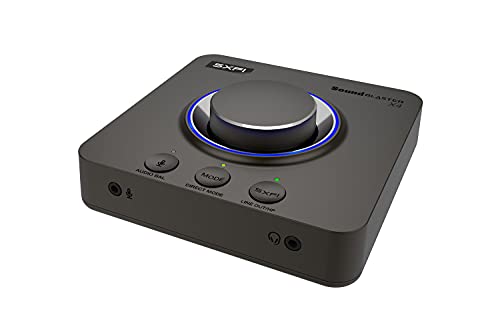
- USB-C external DAC and headphone amp
- Drives headphones up to 600Ω
- 7.1 surround, optical-in, and console support
Best For: Gamers who want a flexible external audio hub
PCIe Classic

- Internal PCIe x1 sound card
- Headphone amp supports up to 600Ω
- Dolby Digital Live and THX TruStudio Pro
Best For: Desktop PC users wanting an internal amp-based upgrade
Portable Console Pick

- Portable USB DAC and headphone amp
- Discrete Xamp amp drives up to 600Ω
- Works with PS4, Xbox One, Switch, and PC
Best For: Console and PC gamers who want a portable audio boost
Low-Profile Internal Upgrade
Audigy Fx Pro Hi-Res PCIe Card

- 32-bit / 384 kHz playback, up to 120 dB SNR
- Discrete 7.1-channel analog output
- Half-height design for smaller PC cases
Best For: Compact PC builds that need hi-res internal audio
Elite PCIe Upgrade
Creative AE-5 Plus Pure Edition

- Xamp discrete headphone amp for up to 600Ω headphones
- SABRE32 PCIe DAC with 32-bit / 384 kHz playback
- Dolby Digital Live, DTS, and RGB lighting extras
Best For: PC gamers wanting an internal sound card with strong headphone amp support
Dual-Source Desktop Hub
Sound Blaster G8 USB DAC/Headphone Amp

- Dual USB-C inputs for two-source mixing
- Xamp discrete bi-amplifier for left/right channels
- Up to 32-bit / 384 kHz playback and 130 dB dynamic range
Best For: Multi-device users who want a USB DAC/amp for gaming and desktop audio
Console-Friendly External Pick
Sound BlasterX G5 External Sound Card

- Works with PC, Mac, PS4, and Xbox-listed devices
- 7.1 headphone surround with Blaster Acoustic Engine Pro
- Up to 192 kHz playback and 120 dB SNR
Best For: Console and PC players needing an external sound card with headphone amp
Value Pick
Asus Xonar AE 7.1 PCIe Gaming Sound Card
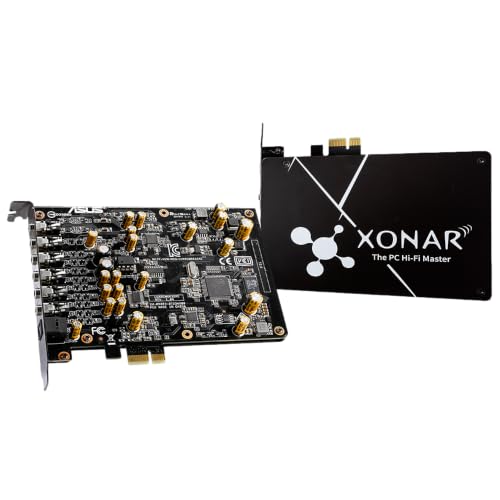
- 150 ohm built-in headphone amp
- 192 kHz/24-bit hi-res playback
- 110 dB SNR with PCIe x4 design
Best For: Desktop gamers wanting an affordable internal sound card with headphone amp support.
Feature-Rich Pick
Creative Sound BlasterX AE-5 Plus PCIe Sound Card

- Xamp bi-amp drives headphones up to 600 ohms
- 32-bit/384 kHz playback with 122 dB SNR
- Dolby Digital Live, DTS, and RGB lighting
Best For: Gamers who want strong headphone drive and lots of surround and lighting features.
Premium Choice
Creative Sound Blaster AE-7 with ACM

- Xamp bi-amp supports headphones up to 600 ohms
- Audio Control Module adds volume and headset I/O
- 127 dB DNR with ESS SABRE-class 9018 DAC
Best For: Enthusiasts wanting premium headphone amplification and easier desk-side control.
External USB Upgrade – Sound Blaster X4 with 7.1 Surround
If you want a gaming sound card with headphone amp that can also handle speakers and consoles, the Sound Blaster X4 is built for flexible setups. It combines USB-C connectivity, optical input, and 7.1 surround support with headphone amplification that can drive studio-grade cans up to 600Ω.
Best For: Gamers and multi-device users who want one external hub for headphones, speakers, and console audio.
Pros:
- 7.1 discrete surround and Super X-Fi / Dolby Digital Live support
- Headphone amp can drive up to 600Ω headphones
- Optical-in, USB-C, and support for PC, Mac, and gaming consoles
- Handy on-device controls, EQ modes, and audio balance adjustment
Cons:
- Requires USB-C power and setup to get the most from its features
- Best for users who will actually use the surround and software controls
The X4 is a strong pick if you want desktop-level audio flexibility in an external unit rather than an internal card. Its mix of high-resolution playback, communication tools, and console-friendly inputs makes it especially practical for gaming-focused setups.
PCIe Classic – Recon3D THX PCIE Sound Card
The Recon3D is a straightforward gaming sound card with headphone amp for a PC that still focuses on surround sound and voice/game tuning. Its PCIe design, THX TruStudio Pro processing, and dedicated amplifier make it a solid internal upgrade for older desktop builds.
Best For: PC builders who want an internal sound card with a built-in headphone amp and 5.1 surround output.
Pros:
- Dedicated headphone amp supports headsets up to 600Ω
- Dolby Digital Live for 5.1 surround from any source
- THX TruStudio Pro and Sound Core3D processing
- PCIe x1 card for desktop installation
Cons:
- Listed for Windows 7, so compatibility is more limited than newer options
- Older 96 kHz / 105 dB specs trail newer high-res cards
This card makes sense if you specifically want an internal PC solution with a real headphone amp and surround features. It is more of a legacy-style upgrade than a modern all-platform pick, but the audio feature set is still useful for gaming-focused desktops.
Portable Console Pick – Sound BlasterX G6 Hi-Res DAC
The Sound BlasterX G6 is a portable gaming sound card with headphone amp designed for PC and console players who want a noticeable audio upgrade. It pairs a hi-res DAC with a discrete Xamp headphone amplifier, 7.1 virtualization, and Dolby Digital support in a compact USB unit.
Best For: Players on PS4, Xbox One, Switch, or PC who want a portable DAC and strong headphone amplification.
Pros:
- Discrete Xamp headphone amplifier with 1Ω output impedance
- Drives sensitive 8Ω IEMs through 600Ω headphones
- 7.1 virtual surround, Dolby Digital, and Scout Mode
- USB connectivity and support for multiple gaming platforms
Cons:
- Outputs are listed as stereo, so surround is virtual rather than discrete for headphones
- External unit adds another device to your desk or console setup
For most buyers searching for a gaming sound card with headphone amp, this is the most versatile all-rounder in the group. It offers stronger platform support and a more modern amplifier design than older internal cards, while staying small enough to move between systems.
Low-Profile Internal Upgrade – Audigy Fx Pro Hi-Res PCIe Card
If you want a gaming sound card with headphone amp features in a compact internal form, the Audigy Fx Pro focuses on clean hi-res playback and desktop compatibility. It is aimed at PC users who want 7.1 analog output, headphone and mic connections, and a low-profile card that fits smaller cases.
Best For: PC owners looking for a compact internal sound card with hi-res audio and headset-friendly connectivity.
Pros:
- 32-bit / 384 kHz playback with up to 120 dB SNR
- Discrete 7.1-channel analog output for PC speakers
- Headset outputs, mic-in, line-in, and SPDIF support
- Half-height bracket included for smaller cases
Cons:
- No explicit dedicated headphone amp spec is listed in the supplied details
- PC-only design limits flexibility versus external USB options
This is a practical choice if your priority is a tidy internal upgrade rather than a feature-heavy external DAC. It leans more toward clean audio, speaker support, and case compatibility than headline gaming extras, so it suits simpler desktop builds well.
Elite PCIe Upgrade – Creative AE-5 Plus Pure Edition
If you want a gaming sound card with headphone amp that can also handle hi-res playback, the Creative Sound BlasterX AE-5 Plus Pure Edition is built for that job. It combines a SABRE32 PCIe DAC, Dolby Digital Live and DTS Encoding, and Xamp discrete headphone amplification for a more capable desktop audio setup.
Best For: PC gamers and audio fans who want a PCIe card with strong headphone drive and surround support.
Pros:
- Xamp discrete headphone amp drives studio-grade headphones up to 600Ω.
- SABRE32 DAC supports up to 32-bit / 384 kHz playback with 122 dB DNR.
- Supports Dolby Digital Live, DTS Encoding, 5.1 discrete, and 7.1 virtual surround.
- Includes customizable RGB LEDs plus four RGB LED strips.
Cons:
- Requires PCIe x1 installation in a Windows PC.
- Best suited to users who want software-tuned audio features and lighting.
Overall, this is the most feature-packed option here if you want an internal card with serious headphone amp power and flexible gaming audio processing. It leans hard into desktop PC use, but it rewards that setup with strong specs and broad surround options.
Dual-Source Desktop Hub – Sound Blaster G8 USB DAC/Headphone Amp
The Sound Blaster G8 is a gaming sound card with headphone amp designed for users who want flexible USB connectivity and high-resolution audio in one desktop unit. Its dual USB-C inputs, Xamp discrete bi-amplifier, and up to 32-bit / 384 kHz playback make it a practical pick for multi-device setups.
Best For: Gamers and desk users who want a USB DAC/amp that can mix two sources and drive headphones cleanly.
Pros:
- Dual USB-C inputs let you stream audio from two USB devices at once.
- Xamp discrete bi-amplifier drives left and right channels individually.
- Supports up to 32-bit / 384 kHz playback and 130 dB dynamic range.
- Works with headphones, laptops, PCs, smartphones, and tablets.
Cons:
- USB-connected desktop design may not suit users who want an internal card.
- Output is listed as stereo or surround rather than a dedicated multichannel PCIe card.
For buyers who want a flexible external audio hub, the G8 stands out for mixing two USB sources and delivering strong headphone amplification. It is especially appealing if you value desktop convenience and multi-platform use over an installed card.
Console-Friendly External Pick – Sound BlasterX G5 External Sound Card
If you need a gaming sound card with headphone amp that works beyond a PC tower, the Sound BlasterX G5 is built as an external audio option for Windows PC, Mac, PS4, and other consoles. It brings 7.1 headphone surround, up to 192 kHz playback, and Blaster Acoustic Engine Pro into a compact external setup.
Best For: Console and PC players who want a portable external sound card with headphone amplification and surround processing.
Pros:
- Supports Windows PC, Mac, PS4, and Xbox compatibility listed in the details.
- Offers 7.1 headphone surround and Blaster Acoustic Engine Pro.
- External design makes it easier to use across different devices.
- Supports up to 192 kHz playback and 120 dB SNR.
Cons:
- Older model with lower sample-rate support than the newer options here.
- Not aimed at users who want internal PCIe installation.
The G5 makes sense if your priority is cross-platform use and a straightforward external connection rather than the newest specs. It remains a solid pick for players who want headphone amp features and surround audio on consoles or multiple systems.
Value Pick – Asus Xonar AE 7.1 PCIe Gaming Sound Card
If you want a gaming sound card with headphone amp support that keeps the setup simple, the Asus Xonar AE is a straightforward PCIe option for desktop Windows 10 systems. It offers 192 kHz/24-bit hi-res audio, a 110 dB SNR, and a built-in 150 ohm headphone amp, making it a practical upgrade for gamers who want better headphone drive without moving to a larger external DAC.
Best For: Desktop gamers who want an internal PCIe card with hi-res audio and a basic headphone amp.
Pros:
- Built-in 150 ohm headphone amp for better headphone support.
- 192 kHz/24-bit playback with 110 dB signal-to-noise ratio.
- PCI Express x4 internal card design for desktop builds.
- Supports surround output for gaming setups.
Cons:
- Headphone amp is rated lower than the higher-end Creative options here.
- Listed for Windows 10 desktop use, so compatibility is narrower than some alternatives.
Overall, the Xonar AE is the most budget-minded pick in this group if your priority is a gaming sound card with headphone amp support and solid hi-res playback. It is less ambitious than the AE-5 Plus or AE-7, but its features are well matched to a simple internal upgrade.
Feature-Rich Pick – Creative Sound BlasterX AE-5 Plus PCIe Sound Card
The Creative Sound BlasterX AE-5 Plus is a strong gaming sound card with headphone amp features for users who want more power and flexibility. It combines a SABRE32-class DAC with up to 32-bit/384 kHz playback, a 122 dB SNR, and Xamp discrete headphone bi-amp support that can drive headphones up to 600 ohms, including planar-magnetic models.
Best For: Gamers who want a powerful internal card with high headphone drive, surround support, and RGB lighting.
Pros:
- Xamp discrete headphone bi-amp supports headphones up to 600 ohms.
- Up to 32-bit/384 kHz playback with 122 dB SNR.
- Dolby Digital Live, DTS Encoding, and 7.1 virtual surround support.
- Customizable RGB lighting plus included RGB LED strip.
Cons:
- Features are PC-focused and tied to Sound Blaster Command software.
- Internal PCIe card design may be less convenient than external audio gear.
For buyers who want a gaming sound card with headphone amp power and extra tuning options, the AE-5 Plus stands out as the most feature-heavy option in this roundup. Its stronger headphone output and broader audio features make it a good fit for demanding headset and headphone users.
Premium Choice – Creative Sound Blaster AE-7 with ACM
If you are shopping for a gaming sound card with headphone amp performance at a higher tier, the Creative Sound Blaster AE-7 adds an Audio Control Module for easier access to volume and headset connections. It uses an ESS SABRE-class 9018 DAC, supports up to 32-bit/384 kHz playback, and delivers a 127 dB DNR for very clean output.
Best For: Enthusiasts who want a premium internal sound card with a powerful headphone amp and a desk-friendly control module.
Pros:
- Xamp discrete headphone bi-amp drives headphones up to 600 ohms.
- Audio Control Module adds a volume knob and front-facing mic/headphone I/O.
- ESS SABRE-class 9018 DAC with 127 dB DNR and 32-bit/384 kHz playback.
- Supports Dolby Digital Live, DTS Connect, and up to 7.1 virtual surround.
Cons:
- More premium hardware than the other options, so it is likely overkill for simple setups.
- Like the other cards here, it is a desktop PCIe solution rather than a portable device.
The AE-7 is the most refined pick here if you want better onboard control along with serious headphone amplification. For buyers focused on audio quality and convenience at the desk, it offers the strongest overall package among these internal gaming cards.
How We Picked the Best Gaming Sound Card with Headphone Amp
We focused on products that combine a capable DAC or sound card stage with a built-in headphone amp, since that pairing matters most for gaming performance. Priority went to models with strong output power, low noise, surround virtualization, useful software controls, and broad compatibility with modern PCs and, where relevant, consoles.
Quick Comparison
External USB options are usually the easiest choice if you want simple setup, front-panel controls, and flexible use across multiple devices. PCIe cards can be better for a permanent desktop install and may offer a cleaner internal layout, while higher-end models tend to provide more headroom for harder-to-drive headsets and more tuning options.
Key Buying Factors for a Gaming Sound Card with Headphone Amp
Headphone Power and Impedance Support
Check whether the amp can comfortably drive your headphones’ impedance and sensitivity. If you use high-impedance or planar headphones, stronger output and better voltage swing matter more than headline surround features.
Connectivity and Platform Fit
Make sure the device matches your setup. USB units are ideal for fast installation and portability, while PCIe cards suit fixed desktop builds. Also confirm support for Windows, Mac, PlayStation, or other devices if you plan to switch systems.
Audio Features That Actually Help in Games
Surround processing, virtualized positional audio, mic monitoring, and onboard EQ can improve clarity and awareness, but they should complement good tuning rather than replace it. Look for features you will actually use rather than the longest spec sheet.
Noise Floor and Sound Cleanliness
A good Gaming Sound Card with Headphone Amp should reduce hiss, interference, and muddy output compared with many motherboard audio solutions. This is especially important if you use sensitive headphones or in-game voice communication.
Who Should Buy Which Gaming Sound Card with Headphone Amp?
Choose an external USB model if you want the simplest upgrade path, easy access to controls, and the flexibility to move between systems. Choose a PCIe card if you want a more permanent desktop solution and may prefer a cleaner internal audio chain. If your main priority is competitive gaming, prioritize amp strength, clarity, and reliable positional cues. If you also listen to music or watch movies, lean toward models with higher-resolution playback, better DAC specifications, and richer tuning tools.