The best smart home hubs without cloud access keep essential automations running locally, reducing latency, improving privacy, and limiting dependence on internet services.
These 10 hubs vary widely in protocol support, device compatibility, and setup complexity. Use the guide below to find the right fit for your existing devices and automation goals.
Best 10 Smart Home Hubs Without Cloud Access Picks for 2026
Best Local-First Hub

- Home Assistant OS comes preinstalled
- Stores home data locally
- Expandable through USB adapters
Best For: Easy local Home Assistant setups
Best Budget Tuya Gateway

- Supports Zigbee and Bluetooth
- Uses Smart Life or Tuya apps
- Works only with Tuya devices
Best For: Small Tuya-based device setups
Best Edge Automation Hub

- Prioritizes local automations
- Bridges Aqara devices to Matter
- Includes Thread, IR, and PoE support
Best For: Aqara-centered Matter ecosystems
Best Local AI Gateway

- Runs Home Assistant locally
- Adds Matter bridging and local AI
- Offers Linux, Docker, and SSH access
Best For: Power users building an expandable local hub
Compact Sensor Hub

- Connects up to 64 Tapo devices
- Low-power protocol helps extend battery life
- Built-in chime and up to 90 dB siren support
Best For: Tapo sensor and switch setups
Local Automation Powerhouse

- Runs automations locally during internet outages
- Supports Matter, Z-Wave, Zigbee, and Bluetooth
- No subscription required for full platform functionality
Best For: DIY multi-brand smart homes
Long-Range Local Gateway

- Runs synced automations locally during internet outages
- Supports a Local API for Home Assistant
- LoRa range reaches up to 2,034 feet
Best For: Long-range YoLink and local API setups
Dedicated Lighting Control
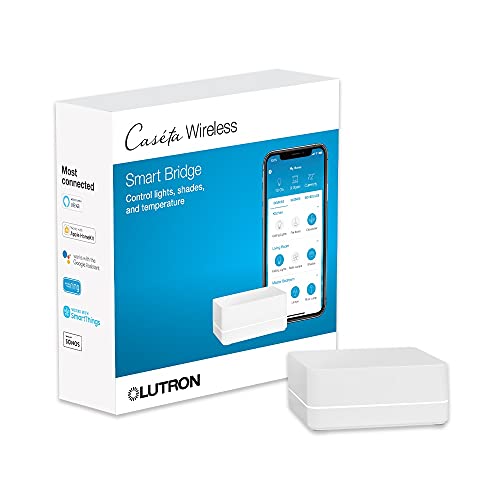
- Supports up to 75 Caseta devices
- Works with major voice and smart-home platforms
- Clear Connect technology reduces Wi-Fi congestion
Best For: Lutron-centered lighting systems
Local Matter Bridging
SONOFF Bridge Max Smart Home Hub
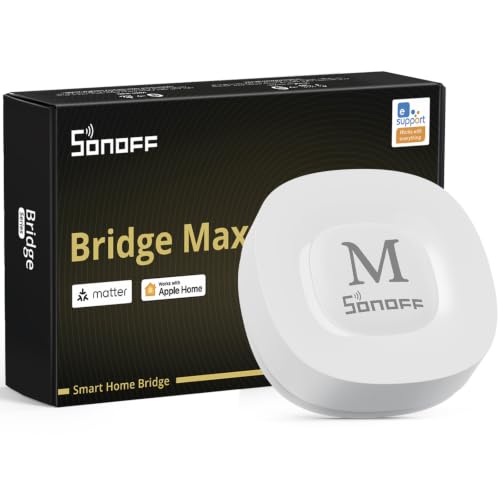
- Local web console with no cloud required
- Bridges Zigbee and other devices to Matter
- Supports Home Assistant via MQTT or bridging
Best For: Local, privacy-focused multi-ecosystem setups
SmartThings Local Automation
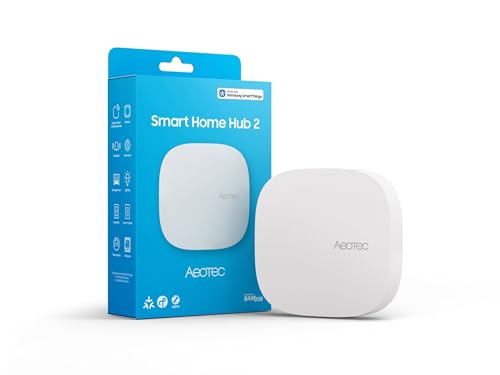
- Supports SmartThings, Matter, and Zigbee
- Many routines continue during internet outages
- Works over Wi-Fi or Ethernet
Best For: SmartThings homes needing local automation
Best Local-First Hub – Home Assistant Green
Home Assistant Green | Smart Home hub with Advanced Automation | Official Home Assistant Hardware
Check Price On AmazonFor shoppers comparing smart home hubs without cloud access, Home Assistant Green is an approachable local-first option. Home Assistant comes preinstalled, and the fanless hub stores your home data locally while providing a central platform for automation and device control.
Best For: Homeowners who want an easy Home Assistant setup with local data storage and room to add Zigbee, Z-Wave, or Thread connectivity.
Pros:
- Home Assistant OS is already installed for quick setup.
- Local data storage lets you view, share, and export your information.
- Compact, silent design uses only a couple of watts.
- USB ports support optional Zigbee, Z-Wave, and Thread adapters.
Cons:
- Ethernet connectivity is required for the included setup.
- Zigbee, Z-Wave, and Thread connectivity requires separate USB devices.
Green is a straightforward foundation for a locally managed smart home, especially if you value Home Assistant’s broad automation platform. Its main limitation is that some wireless protocols are expansions rather than built-in features.
Best Budget Tuya Gateway – Tuya Zigbee 3.0 Hub
This compact gateway is worth considering only if your setup is built around Tuya Smart or Smart Life devices. It supports Zigbee 3.0 and Bluetooth 5.0, but shoppers seeking smart home hubs without cloud access should note that remote control is tied to the Tuya and Smart Life apps.
Best For: Tuya-compatible Zigbee and Bluetooth devices in a small, app-based gateway setup.
Pros:
- Supports both Zigbee 3.0 and Bluetooth 5.0 devices.
- Compact design connects over 2.4GHz Wi-Fi without an Ethernet cable.
- USB-C power connection and simple Smart Life setup.
Cons:
- Compatible only with devices using Tuya protocols.
- Remote control uses the Smart Life or Tuya Smart app, so it is not a cloud-independent choice.
- Not compatible with specified products including blinds, Sengled bulbs, and door locks.
This gateway can be convenient for a narrowly defined Tuya ecosystem, but it is a poor match for a privacy-focused local-control roundup. Confirm protocol compatibility before buying, particularly if you plan to mix brands.
Best Edge Automation Hub – Aqara Smart Home Hub M3
The Aqara M3 is a strong option for shoppers evaluating smart home hubs without cloud access because it prioritizes edge control and local automations. It combines Aqara Zigbee and Thread support with Matter bridging, encrypted local storage, and flexible wired or wireless networking.
Best For: Aqara users who want local automation, Matter integration, Thread support, and an integrated IR controller.
Pros:
- Edge Hub design shifts supported automations to local operation.
- Supports Aqara Zigbee, Thread, Matter bridging, Wi-Fi, and PoE.
- Includes 8GB of end-to-end encrypted local storage.
- Built-in 360-degree IR blaster can control compatible traditional devices and report status.
Cons:
- Some cloud-based notifications still require an internet connection.
- Zigbee support is for Aqara devices rather than third-party Zigbee products.
- A 2A USB power adapter is not included.
M3 offers a privacy-conscious balance between local automation and broader Matter ecosystem compatibility. It is most compelling for Aqara households, while mixed-brand Zigbee users should verify device support before switching.
Best Local AI Gateway – HomeClaw Smart Home Gateway
HomeClaw targets users who want smart home hubs without cloud access plus a local automation and AI server. It runs on Linux, installs Home Assistant Container with one click, processes device data and automation logic locally, and continues operating without an internet connection while retaining optional secure remote access.
Best For: Advanced users who want local Home Assistant, Matter bridging, Docker and SSH access, and an integrated AI assistant.
Pros:
- Home Assistant Container can be deployed without coding.
- Local-first processing allows operation during internet outages.
- Supports Matter bridging across Zigbee, Wi-Fi, Apple Home, Alexa, and Google Home.
- Includes Linux, Docker, SSH, backups, OTA tools, and auto-restore features.
Cons:
- Z-Wave and Zigbee connectivity through USB requires a separate dongle.
- Its broad AI and server feature set may be more than basic smart-home users need.
- Remote access is available through a built-in tunnel, so users should review their preferred access settings.
HomeClaw is the most feature-rich local option here, combining Home Assistant flexibility with an AI server and Matter bridge. It makes the most sense for technically inclined buyers who will use its expandability rather than seeking a simple plug-and-play hub.
Compact Sensor Hub – Tapo H100
If you want smart home hubs without cloud access for a focused Tapo setup, the Tapo Smart Hub H100 is a compact option for connecting sensors, switches, and buttons. It requires a 2.4GHz Wi-Fi connection and uses a low-power wireless protocol for paired devices.
Best For: Tapo users building sensor-based routines with long battery life and an integrated alarm.
Pros:
- Supports up to 64 Tapo devices with a stated range of up to 30 meters.
- Low-power connections can extend compatible device battery life by up to 10 times compared with Wi-Fi-powered devices.
- Can trigger shortcuts, control compatible Tapo devices, and activate a siren of up to 90 dB with suitable sensors.
Cons:
- Requires 2.4GHz Wi-Fi for setup and operation.
- It cannot directly connect to Tapo smart plugs or smart lighting.
- Its device compatibility is centered on Tapo sensors, switches, and buttons.
The H100 makes sense for a Tapo-centered home where low-power sensor connectivity and a built-in chime or alarm matter more than broad multi-brand support. Note that the supplied information does not establish fully cloud-independent operation.
Local Automation Powerhouse – Hubitat Elevation C-8 Pro
For shoppers specifically comparing smart home hubs without cloud access, the Hubitat Elevation C-8 Pro is the strongest local-first choice in this group. It runs automations directly on the hub, helping lights, locks, thermostats, and routines continue working during an internet outage.
Best For: DIY users who want broad device compatibility, local processing, and advanced automation without a subscription.
Pros:
- Processes automations locally rather than relying on remote servers.
- Supports Matter, Z-Wave 800 Series Long Range, Zigbee 3.0, and Bluetooth.
- Works with more than 1,000 devices across over 100 brands, according to the supplied notes.
- Includes Rule Machine for multi-condition routines and supports Alexa, Google Home, and Apple HomeKit.
Cons:
- Advanced Rule Machine automations may require more setup than simpler hubs.
- Voice assistants and integrations can introduce services beyond the hub’s local processing.
- The supplied details emphasize an active community and documentation, suggesting a more DIY-oriented experience.
The C-8 Pro is the clearest fit when local execution, privacy, and multi-protocol flexibility are priorities. It also avoids a recurring subscription, while retaining compatibility with major voice assistant ecosystems.
Long-Range Local Gateway – YoLink Local Hub YS1606
The YoLink Local Hub YS1606 is a practical option among smart home hubs without cloud access when you want long-range device communication and local automation. After provisioning, synced rules can run locally, while the Local API supports integrations such as Home Assistant.
Best For: YoLink users needing long-range sensors, local rules, and Home Assistant integration.
Pros:
- Local schedules, timers, and automations can continue operating when external internet access fails.
- Offers a Local API for third-party local control centers such as Home Assistant.
- LoRa connectivity provides a stated range of up to 2,034 feet.
- Can connect to the router through Ethernet or Wi-Fi and includes battery backup.
Cons:
- Internet is required for initial provisioning and for creating or modifying local automation rules.
- App access and local API operation during a blackout require powered, active network equipment.
- Local operation is centered on preconfigured YoLink rules and compatible devices.
The YS1606 offers a useful middle ground: local execution after setup, unusually long LoRa range, and an open local API. It is not a completely cloud-independent setup because provisioning and rule changes still require internet access.
Dedicated Lighting Control – Lutron Caseta Smart Hub
For shoppers comparing smart home hubs without cloud access, the Lutron Caseta Smart Hub is primarily a focused lighting bridge. It connects Caseta devices to a router and supports Alexa, Apple HomeKit, Google Assistant, Ring, Serena shades, and Sonos, while its Clear Connect technology avoids competing with Wi-Fi-connected devices.
Best For: Homes centered on Lutron Caseta lighting that want broad voice-assistant and platform compatibility.
Pros:
- Supports up to 75 Caseta devices.
- Works with Alexa, Apple HomeKit, Google Assistant, Ring, Serena shades, and Sonos.
- Uses Clear Connect technology alongside Wi-Fi devices.
- Plugs into an outlet and connects to a Wi-Fi router.
Cons:
- Designed around Lutron Caseta devices rather than a general-purpose device ecosystem.
- The supplied notes do not specify offline or local control without cloud access.
- Caseta dimmers and switches are sold separately.
The Caseta Smart Hub makes the most sense when reliable Lutron lighting control is the priority. It is less clearly suited to buyers seeking a fully local, cloud-independent hub across many device protocols.
Local Matter Bridging – SONOFF Bridge Max Smart Home Hub
The SONOFF Bridge Max is a strong candidate for shoppers seeking smart home hubs without cloud access. Its local web console is accessible directly from the LAN, so configuration and device bridging do not require an app or cloud service. It bridges Zigbee, BTHome, and eWeLink devices to Matter platforms and also supports local integrations with Home Assistant.
Best For: Privacy-conscious users who want local device bridging, Zigbee support, and Home Assistant flexibility.
Pros:
- Provides a local web console with no cloud required for management.
- Bridges Zigbee, BTHome, and eWeLink devices to Matter platforms.
- Supports Home Assistant through MQTT or Matter-compatible bridging.
- Offers Wi-Fi and Ethernet connectivity plus a built-in 90 dB alarm.
Cons:
- It is a Matter Bridge, not a Matter Controller, so it cannot add Matter devices directly.
- Compatibility and features may vary across third-party Zigbee devices.
- Mobile notifications are included in the security feature description, so some alert functions may involve connected services.
Among these options, Bridge Max makes the clearest case for local operation. Its main limitation is the distinction between bridging existing devices and directly managing Matter devices, so buyers should match it to their intended ecosystem.
SmartThings Local Automation – Aeotec Smart Home Hub2
The Aeotec Smart Home Hub2 combines SmartThings, Matter, and Zigbee support for shoppers comparing smart home hubs without cloud access. It can execute many local automations, allowing routines to continue when the internet goes offline, while setup is available over Wi-Fi or Ethernet.
Best For: SmartThings users who want Matter and Zigbee compatibility with local automation support.
Pros:
- Supports Matter and Zigbee devices, including lights, sensors, plugs, switches, and thermostats.
- Many local automations can continue during temporary internet outages.
- Works with Alexa, Google Assistant, and the SmartThings ecosystem.
- Supports both Wi-Fi and wired Ethernet setup.
Cons:
- Z-Wave is explicitly not supported.
- It is powered by the SmartThings app, so the supplied notes do not establish that every function works without cloud access.
- Compatibility depends on supported Matter, Zigbee, and SmartThings devices.
The Aeotec hub is a versatile choice for a SmartThings-based home, especially where local routines and Matter support matter. However, buyers specifically seeking completely cloud-independent control should distinguish its local automation capability from full offline operation.
How We Picked the Best Smart Home Hubs Without Cloud Access
We focused on hubs that offer meaningful local control, local automation, or a documented local API rather than relying entirely on remote servers. We also considered protocol support, including Zigbee, Z-Wave, Matter, Wi-Fi, infrared, and proprietary wireless systems. Compatibility, automation depth, setup requirements, privacy features, and suitability for different experience levels were also important.
“Local” does not always mean completely offline. Some hubs require cloud access for account setup, remote control, firmware updates, voice assistants, or selected integrations. Check each product’s documentation before assuming every feature works without an internet connection.
Quick Comparison
| Best For | Look For |
|---|---|
| Advanced local automation | Home Assistant Green or Hubitat Elevation C-8 Pro |
| Broad modern protocol support | Aqara Hub M3 or Hubitat Elevation C-8 Pro |
| Simple brand-specific setups | Tuya, Tapo, Lutron, or YoLink hubs |
| SmartThings-style compatibility | Aeotec Smart Home Hub2 |
| Existing Sonoff devices | SONOFF Bridge Max |
Key Buying Factors for Smart Home Hubs Without Cloud Access
Local Processing and Offline Behavior
Confirm which automations continue when the internet is disconnected. A hub may support local schedules and device control while still requiring the cloud for remote access or third-party integrations.
Wireless Protocols
Match the hub to your devices. Zigbee and Z-Wave can reduce Wi-Fi congestion, while Matter improves cross-platform compatibility. Proprietary systems may work well but can limit future expansion.
Device Compatibility
Check support for the exact sensors, switches, locks, thermostats, and brands you own. Broad compatibility is valuable, but a focused hub can be easier to configure and more dependable within one ecosystem.
Automation and Maintenance
Consider whether you want visual rules, advanced scripting, dashboards, or simple routines. Also check update policies, backup options, storage, and the amount of ongoing configuration required.
Who Should Buy Which Smart Home Hubs Without Cloud Access?
Choose Home Assistant Green if you want powerful, customizable local automation and are comfortable learning a flexible platform. Hubitat Elevation C-8 Pro is a strong alternative for deep local rules with built-in Zigbee, Z-Wave, and Matter support.
For newer Matter-focused systems, consider the Aqara Hub M3. Buyers committed to a particular ecosystem may prefer the simplicity of Tapo, Lutron Caseta, YoLink, Tuya, or SONOFF hardware. The Aeotec Smart Home Hub2 suits shoppers seeking SmartThings-style compatibility, while HomeClaw may appeal to users interested in Home Assistant and AI-assisted control.
Before buying, list your current devices, identify the protocols they use, and decide which functions must work during an internet outage. That short checklist will usually narrow the options more effectively than feature count alone.